Best Of
Re: August Question of the Month - Join the conversation and receive a badge
I also absolutely love the community and support as well, digging into formulas and the collaboration!
That being said, two solutions I have found for a couple of my problems that needed solving were these. So simple and (I thought) elegant!
Simple way to round to nearest 0.5 posted by @CanadaJim
And getting a Month Name is a column by @John C Murray
 jjg279
Re: August Question of the Month - Join the conversation and receive a badge
The best thing for me about the community is how Smartsheet links the forum posts to the help center so we can check the provided resources, or we can quickly see if any other user has the same issue and if anyone shared how to fix it.
Being able to have that function embedded into the questions support has really allowed me to review the community forums even when I have a busy day and I have a problem I need to figure out immediately.
Thank you Smartsheet for bridging the gap between what you provide as resources and the communities support.
 Amanda Winter
Re: August Question of the Month - Join the conversation and receive a badge
One of the best things I've seen, the games. It's cool to see the different types of games you can build in Smartsheet to further engage users.
 Isis Taylor
Re: August Question of the Month - Join the conversation and receive a badge
I get my dopamin kick when I get notified that my answer was chosen as the best answer…
 kowal
kowal
Re: Capabilities of "Viewers" in new Model
@SteCoxy pretty much. We're putting a lot of accountability with paid Members to understand the changes around sharing and permission levels that auto upgrade users.
My opinion is it's the System Admins where the headache of managing these users comes into play.
Like you we do not convert to USM until the end of September so are trying our best to hammer in all these changes in responsibility. It's a lot to retain and be careful of including permissions at a group level vs individual account level. All we can do is our best to educate, provide resources they can refer to at any time and track who acknowledges they've read and understand these changes.

Re: Importing Excel spreadsheet to an existing Smartsheet
Hi!
I’m Maria from the Product team at Smartsheet. I’m looking to speak to a few users with data import use cases, and came across your post here. Would you be willing to meet with me, to talk through your import needs, and your experiences of importing data with Smartsheet to date? We are working on improving the import experience for users, and your input would be valuable.
My email is maria.franklin@smartsheet.com if you’d like to get in touch to schedule some time.
Best regards,
Maria
Maria Franklin
Re: Using #IFERROR to display #NO MATCH as a usable automation
Hi @Ty Werven
Great question!
When using the IFERROR function, think of it like this:
IFERROR(successful_formula, fallback_if_error)
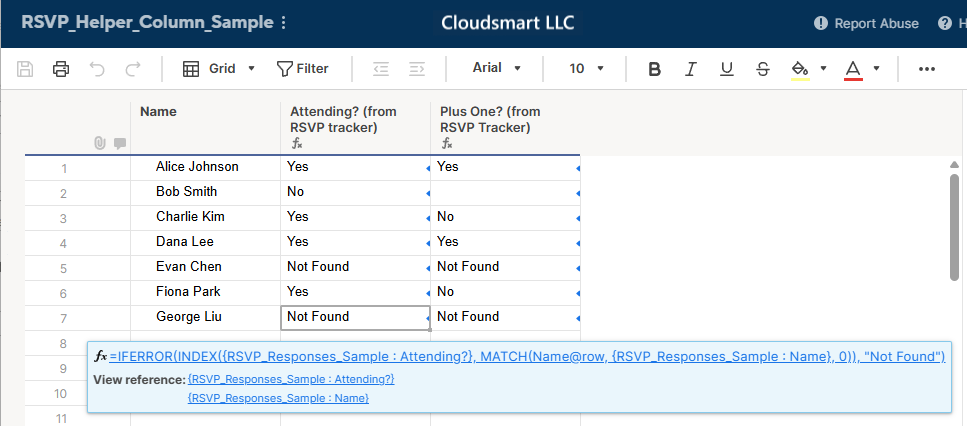
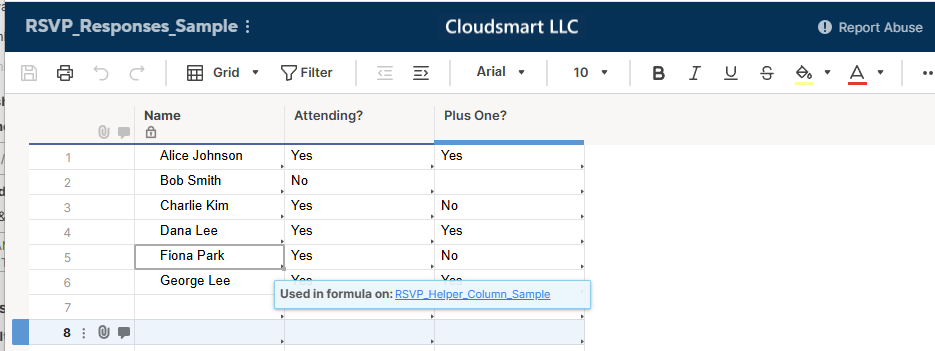
In your case, you're trying to match names from another sheet and return their "Attending?" status. If there's no match (e.g., #NO MATCH), you want to display "Not Found" instead — which is perfect for driving automation.
Here’s a sample formula that does just that:
=IFERROR(INDEX({RSVP_Responses_Sample : Attending?}, MATCH(Name@row , {RSVP_Responses_Sample : Name}, 0)), "Not Found")
What it does:
- MATCH(Name@row , {RSVP_Responses_Sample : Name}, 0) looks for the current row’s name in your RSVP sheet.
INDEX(..., ...)retrieves the corresponding "Attending?" value.- If no match is found (which would normally return
#NO MATCH),IFERRORreplaces it with"Not Found".

Re: Is there anyway to automate the process of moving an attached image to a cell?
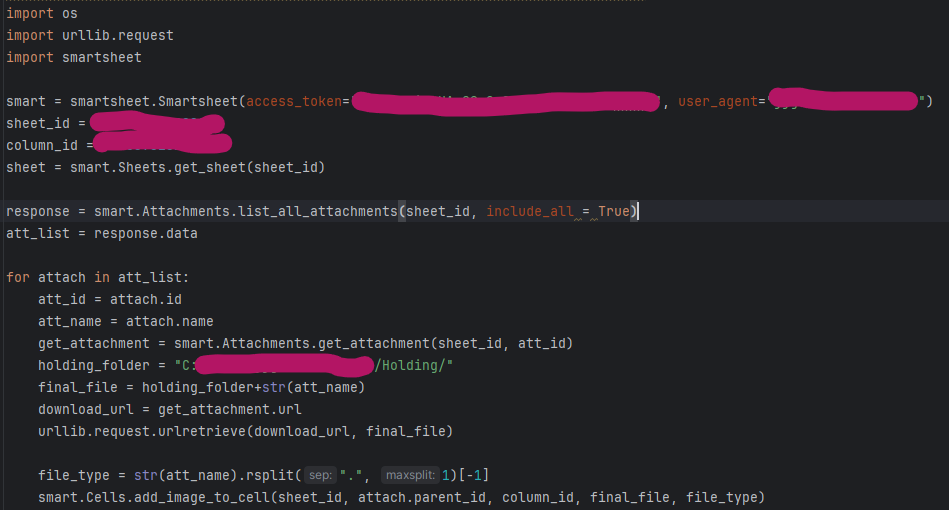
Just in case others stumble on this section, I had a similar problem and used the API to solve this problem using python. The following code gets a list of attachments and moves them to designated column on the same row as the original by downloading them and the re-uploading them.
 jjg279
Re: Allow linked cells to trigger workflows
Scenario: I have one "master" and 7 "slave" sheets, each sheet equal in design. The sheets are 600+ rows long and about 20 columns wide.
Task: On the master sheet if a user clicks the "System Task" check box, the 7 slave sheets with a linked System Task check box also get checked. This part of the process is working.
Need: Setup automation to change Status drop-down column to "Not Applicable" on the 7 slave sheets. After it did not work, contacted Support and was told due to cross-sheet formula present in System Task checkbox on the slave sheets, the automation does not work.
Attempted Work-A-Round: Created a new column in the slave sheet with this formula: =IF([System Task]@row = 1, 1, 0). When the System Task check box in the slave sheet gets checked, the new column has a 1, otherwise it defaults to 0. Setup automation to use the new column, where when column changes to a 1 it would update the status. This also did not work, and was confirmed by the support team.
Feature Request: Would like the ability to change a drop-down selection in a cell based on the status of a cell on that sheet, regardless of whether or not cross-sheet linking is involved.
Jerry in SC
Re: Introduce yourself & get to know your peers!
Hi! I'm Meagan. I live in Metro Detroit and work at Ford Motor Company as a Project Manager Associate. I've been utilizing Smartsheet since 2023 and primarily use Smartsheet to track projects in our EV division. I just realized I've never formally introduced myself in Community!!
A few fun facts about me:
- I have four cats
- I've recently gotten into quilting and am almost finished with my first quilt top, pieced by hand!
- I've attended Smartsheet ENGAGE twice (so far!) - once in Seattle and once in London 😎

 meagans