Best Of
Re: Count & Sum Distinct Values based on Criteria | COUNT(DISTINCT(COLLECT(...) | Returning 1 ???
The problem is the mix of data types in the serial number column. You will need to add a helper column (can be hidden after setting up) that converts every row within that column into text and then reference this in your formula.
=[Serial #]@row + ""
=[Column Name]@row plus quote quote
 Paul Newcome
Re: Repeated reminders for no response to update request
Yes! You could set up an automation that's triggered by a date (ex. every day)...

Then use Condition Blocks in your workflow to filter what to send.
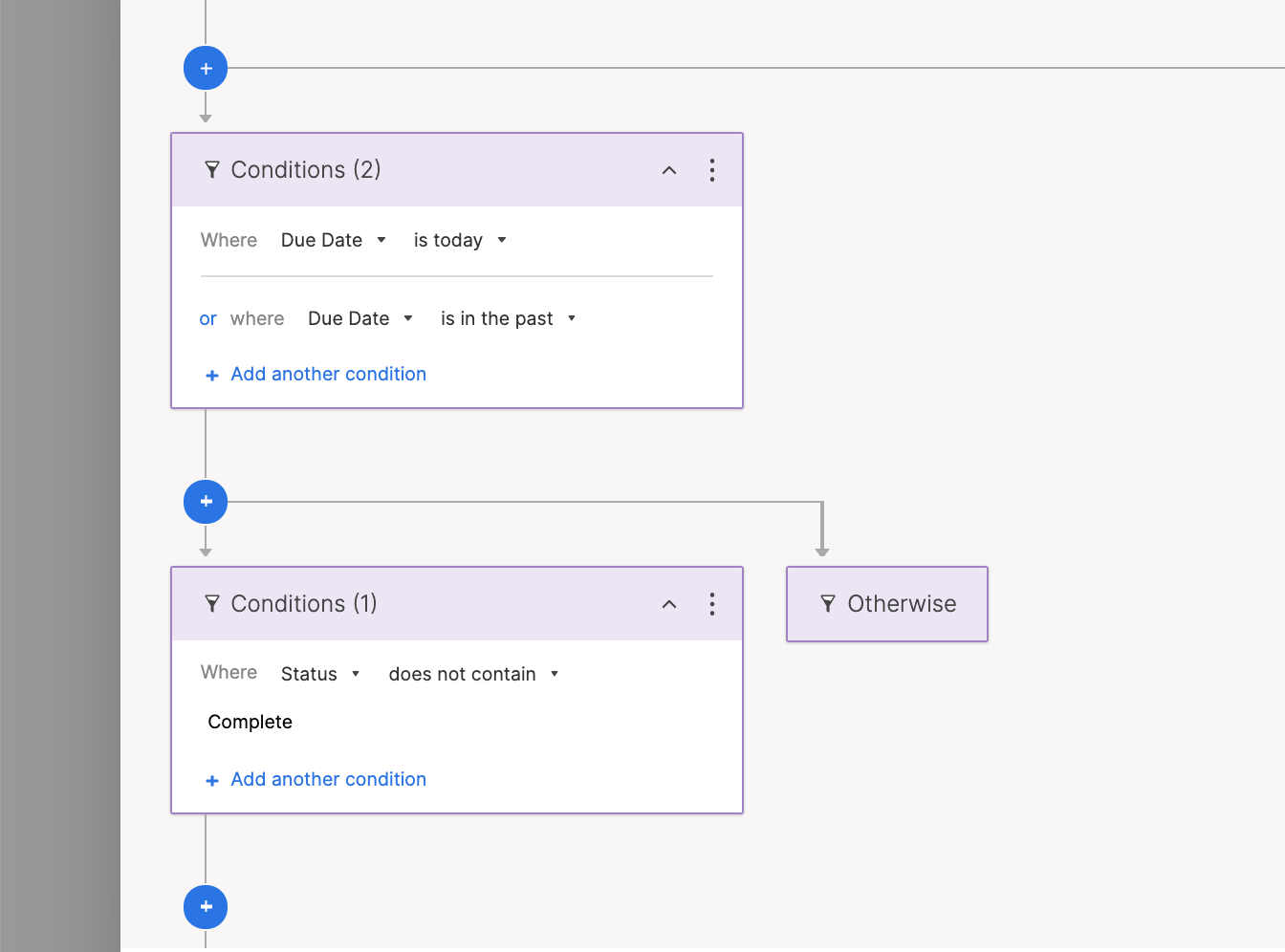
Then every day the workflow will check to see if the Due Date column either has a Due Date that's Today or in the Past, but the Status is not Complete. This way your users will either need to push the date forward or change the Status to Complete.
Let me know if this makes sense and will work for you!
Cheers,
Genevieve
 Genevieve P.
Re: Is there a way that we can get kids signed in?
Hey @fennerb
What I would do in this situation is actually use a completely separate sheet.
- Have one column with all the names listed (copy/pasted from your original sheet with all the data).
- Have another column that houses the checkbox
Then you can use a formula from your source sheet to look into this checkbox sheet and return either a value (e.g. "Checked in") or another checked box in this sheet, too.
=IF(COUNTIFS({Name Column}, Name@row, {Checkbox Column}, 1) >0, "Checked In")
Cheers,
Genevieve
Genevieve P.
Re: Date within Next 5 Business Days
@KRH_SFO You need to incorporate a WORKDAY function.
=IF(AND([Due date]@row <= WORKDAY(TODAY(), 5), [Due date]@row >=TODAY()), 1)
Paul Newcome
Re: How to combine two rows of non-numerical Data?
Have you tried adding in a space when adding the two names together?
=First@row + " " + Last@row
Paul Newcome
Re: how to sort filtered data?
Creating a report for each time you want to filter a sheet is pretty inefficient. Filtering and then sorting is available in Excel (even the online version) and MS Project (also the less robust online version) so seems like something most users are accustomed to doing. Hopefully this is coming soon!

Re: COUNTA alternative in Smartsheet
You are dead on with the concept... you only missed it with parentheses.
=IF(SUM([AR]@row:[AT]@row) > 0, IF(OR(ISBLANK([AU]@row), ISBLANK([AV]@row)), "Please enter review reason and detailed explanation", IF( COUNTIFS([AR]@row:[AT]@row, NOT(ISBLANK(@cell))) > 1, "Please enter one type of increase recommendation only", IF(NOT(ISBLANK([AW]@row)), [AW]@row / [V]@row))), 0)
 Carson Penticuff
Re: COUNTA alternative in Smartsheet
You are correct in that COUNTA is not present in Smartsheet. You can use COUNTIF, as you mentioned, though I prefer to use COUNTIFS instead. There is also no IFS, so to cover multiple cases, we must nest several IF statements. Will you be setting these up as column formulas? If so, here is the equivalent of the first formula. Since Smartsheet references column names instead of alphabetic references, you will have to replace the column references with your actual column names.
=IF(SUM([AR]@row:[AT]@row) > 0, IF(OR(ISBLANK([AU]@row), ISBLANK([AV]@row)), "Please enter review reason and detailed explanation", IF(COUNTIFS([AR]@row:[AT]@row, NOT(ISBLANK(@cell))) > 1, "Please enter one type of increase recommendation only", IF(NOT(ISBLANK([AR]@row)), ROUND([AR]@row * [V]@row, 0), IF(NOT(ISBLANK([AS]@row)), ROUND([AS]@row * [U]@row, 0), IF(NOT(ISBLANK([AT]@row)), ROUND(([AT]@row - [AL]@row) * [U]@row, 0)))))), 0)
Carson Penticuff
Re: Rich Text formatting in cells
Adding my voice to this ask.
We would like to use Smartsheet to track written copy content for our projects, but the inability to have different formats of text within cells is a huge limiting factor.
We would like to put all text for a topic in a single cell. This includes titles, paragraphs, quotes, key words, etc. and requires at minimum the support of selective bold, italics, bold italics, bullet points and numbered lists. Support for multiple font sizes and selective font colour would also be an asset. We would be able to copy the text directly out of the cell and paste into another program (typically Adobe Illustrator or Indesign) to create our graphic panels.
In our use case, each text piece is assigned a tracking number in a different cell of the same row to that all our content pieces can be sorted or filtered as needed. We are typically working with a hundred or so pieces of text that are each 1-2 paragraphs in length, so a database/spreadsheet system gives us the best overview and control vs. one large word processing document (cannot sort content) or multiple small word processing documents (cannot see full picture of the project). Bonus points if another cell on the same row could house all the related images/graphics that go with the content, but that is a different ask.
 LinetteOrigin
Re: Rich Text formatting in cells
I am not sure if there is another request or mention of this elsewhere but this suggestion is not only extremely relevant to text in cells but also in the comments!! Rich text formatting would be extremely helpful both in cells and in comments as there are no other real tools for note-taking in Smartsheet.
I know this request is on the roadmap, glad to hear it and looking forward to what comes of it!
 jmillercvlav