Best Of
Re: Capturing Cost Savings by the month
Ok. So to get the chart based on "Current Year" and showing a single column for every month Jan - Dec and adding up the appropriate amounts based on start and end dates, here is what we need…
In a separate sheet, put the month labels in the Primary Column.
January
February
March
so on and so forth
The next column will be a text/number column called "Month Number", and you will manually enter the month numbers.
1
2
3
so on and so forth
Then you will have a text/number column formatted to show currency and using this column formula with cross sheet references:
=SUMIFS({Monthly Savings}, {End Date}, @cell >= DATE(YEAR(TODAY(), [Month Number]@row, 1), {Start Date}, @cell <= IFERROR(DATE(YEAR(TODAY()), [Month Number]@row + 1, 1), DATE(YEAR(TODAY()) + 1, 1, 1)) - 1)
You are also going to need to use one of the various solutions for keeping the TODAY() function up to date. My personal preference is to insert a dedicated date type column and have a record a date automation running daily and recording the date in this dedicated column.
 Paul Newcome
Re: Automation to send Reminder @ 60d, 30d, etc
The helper column may not be needed depending on exactly when you want to trigger though. If you set your trigger to be date based, you can set it to "Run Once" and change the "on" to one of a handful of more common selections including 60 and 30 days before a certain date field. The helper column comes into play if you need something a little less "standard" such as 10 days or specifying working days.
 Paul Newcome
Re: Automation to send Reminder @ 60d, 30d, etc
Thank you @Paul Newcome and @Nitish K! I was hoping the automation wouldn't need a helper column but looks like that's all I can do. Appreciate you both!

Re: How To Share Dynamic View With Assigned Users
@RanaM The banner you showed on the share settings screen tells you what you need to know. Your Smartsheet account isn't part of the organization that owns the Dynamic View.
 Darren Mullen
Re: How do I sync a Dataverse table with my Smartsheet data?
Hi @Ryan Rubens!
I haven't personally worked with Dataverse tables before, so I can't speak to the specific mapping requirements for that tool. However, I found some resources regarding the Smartsheet integration with Power Automate that might be helpful for you:
- Microsoft Power Automate | Smartsheet Marketplace
- Smartsheet Connector Documentation | Microsoft Learn
Since your question involves specific logic configuration within the Power Automate environment, you might also find more specific answers in the Microsoft Power Automate Community.
Hopefully, other Smartsheet Community members who have experience with Dataverse can chime in with their advice as well!
Cheers,
Isaac.
 Isaac A.
Re: Name changing
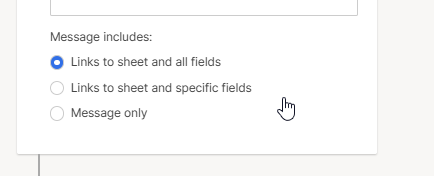
On your beautification note- I get the same thing with my notifications. I have to pare down the columns from "all fields" to "specific fields" and then things are easier to read:
 Eric B.
Re: [UPDATED 2025] Start Your Community Customer Journey Here!
I'm loving the updates! I know I asked the question on another discussion about the champion being a pre-requisite to becoming an Overachiever. This image makes it seem like that's the case 😊
 Akblevins
Re: Search/Find Column Titles
@FTesseneer That's a good suggestion, I'm sure more users will come upvote this too!
If you are ok searching for columns in Grid View, we do have a solution for that using the handy SSFeatures extension :) https://smartworkflowguru.com/smartsheet-go-to-column/
Darren Mullen
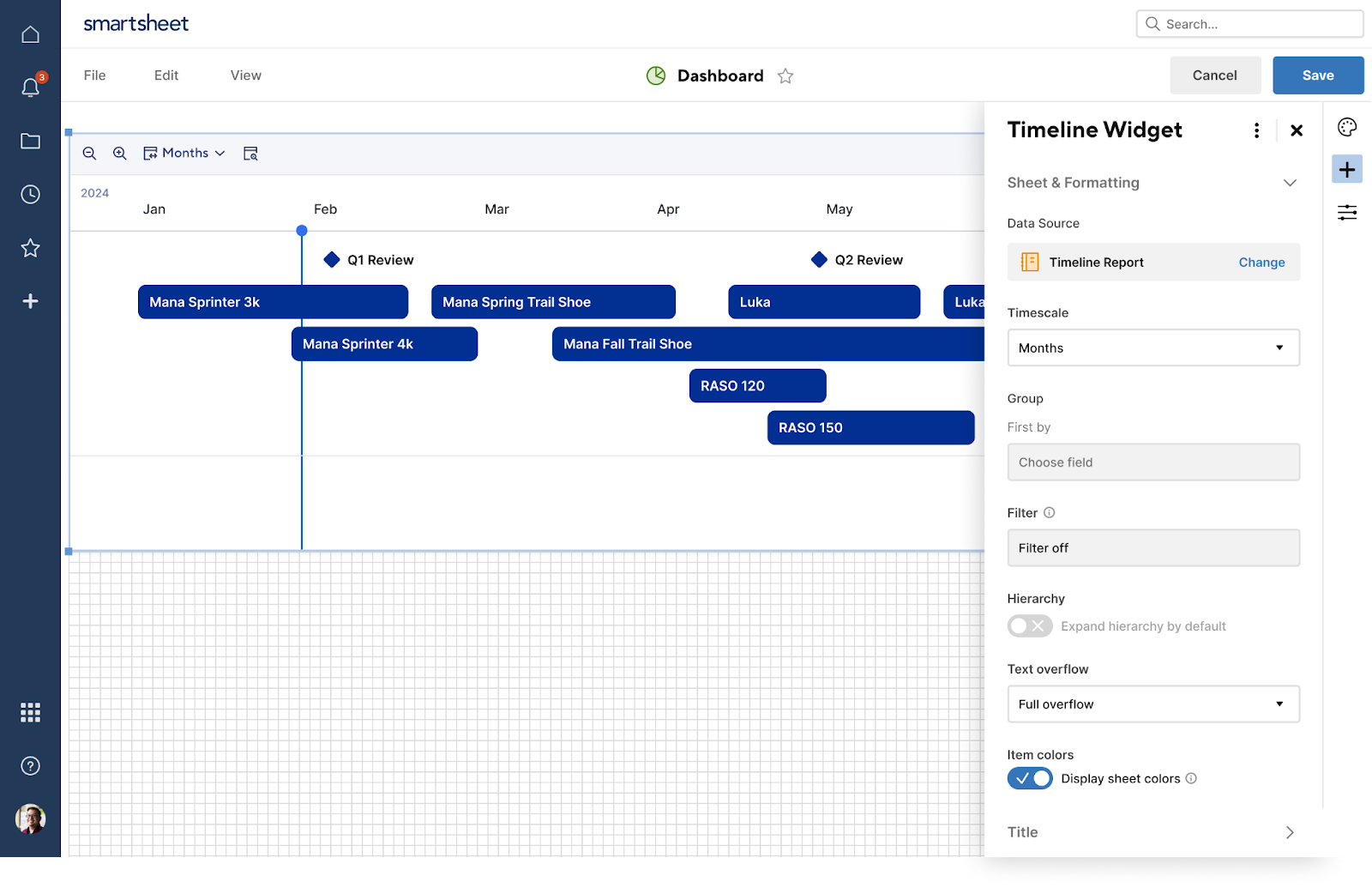
The timeline dashboard widget now supports using a report as a data source
December 22, 2025
Earlier this year, customers gained the ability to add a timeline view widget to dashboards, but it could only draw from a single sheet. Now, the timeline widget also supports using timeline reports as a data source, allowing teams to surface timelines built from multiple sheets or projects. Learn More
Environments availability: Commercial US, Commercial EU, Commercial AU
Plan availability: Business, Enterprise, Advanced Work Management
Subscription Model Availability: Legacy model, user model
Stay informed by subscribing to receive product release updates for curated news of recently released product capabilities and enhancements for the platform of your choosing, delivered to your inbox. As new releases occur, you will receive a weekly email with news of what's released every Tuesday.
 Lekshmi Unnithan
Re: SUMIFS keeps returning 0
If it works without the [Value Score] range/criteria set, and that column is being output as a number (indicated by rounding and averaging), you will need to remove the quotes from around the 5. Putting quotes around a number turns it into a text string that simply looks like a number. Since a text value does not equal a number value (different data types), you won't have any rows that are matching there.
Paul Newcome