Best Of
Re: Change Formatting in Reports
This has likely been requested before, but it would be super useful to have better report formatting available, beyond the layout options (card, etc.) and different than the column and row formatting from the source sheet. Exporting to format means the data is frozen at that time (and why should we have to export a report just to reformat it?).
 SModesitt
Re: Change Formatting in Reports
Oh look….yet another obvious capability that Smartsheet tone-deaf developers have ignored.
bkw1962
Click and drag to select multiple assets for organization and management.
Need to organize, move, or edit a group of assets all at once? Instead of clicking each one individually, you should be able to click and drag your cursor over any group of assets to select them all in one go. This saves time, especially when working with large sets of images or files.
Simply click anywhere on the canvas, hold down your mouse, and drag - everything inside the selection box would be highlighted and ready for your next action. It’s a faster, more intuitive way to manage your work - similar to how Google Drive does it.
 dnvrcrew
Re: Is it possible to have a drop down list based upon criteria from another column?
My query above was solved with a really nice solution that worked for me. Not exactly a dynamic drop down list but something close enough for my needs and a solution that requires minimal maintenance.
It involved making a separate {Database Sheet} with a list of options for each row in my {Working Sheet}. In my case, I was focusing on countries/regions on each row and so for each [Country Region] in my {Database Sheet}, I had up to 3 options detailed in [Option 1], [Option 2], [Option 3].
(Image below is an example of {Database Sheet})

Then in my {Working Sheet}, I had a column matching the [Country Region] column in the Database sheet. (See 1 in the image below)
In my {Working Sheet}, I have an [Options] column with a formula to pull in each of the options for that country from the {Database Sheet} and make them available to read in the sheet. (See 2 in image below)
Formula =INDEX(COLLECT({Database Sheet_Option 1}, {Database Sheet_Country}, [Country]@row), 1) + CHAR(10) + INDEX(COLLECT({Database Sheet_Option 2}, {Database Sheet_Country}, [Country]@row), 1) + CHAR(10) + INDEX(COLLECT({Database Sheet_Option 3}, {Database Sheet_Country}, [Country]@row), 1))
Again, in the {Working Sheet}, I have a dropdown [Choose Option] column with 1, 2, 3 as options to select from. (See 3 in the image below)
Finally, there would be a [Decided Option] column that would check this and pull in the relevant selected option for that country (See 4 in the image below)
Formula =IF([Choose Option]@row = 1, INDEX(COLLECT({Database Sheet_Option 1}, {Database Sheet_Country}, [Country]@row), 1), IF([Choose Option]@row = 2, INDEX(COLLECT({Database Sheet_Option 2}, {Database Sheet_Country}, [Country]@row), 1), IF([Choose Option]@row = 3, INDEX(COLLECT({Database Sheet_Option 3}, {Database Sheet_Country}, [Country]@row), 1))))
(Image below is an example of {Working Sheet})

This solution was perfect for my use case. It came with the benefit that any updates made to the {Database Sheet} would automatically be reflected in my numerous {Working Sheet}.
In respect of credit where credit is due - I did not come up with the solution, the idea and concept came from an employee at Irlca Limited (enquiries@irlca.com)
 Protonsponge
Re: NEW! Modern forms submission experience with accessibility enhancements
I have many forms that run from a dropdown, now you can not select anyone else on from the dropdown and when you do it just goes back the first one on the list, I have reloaded and checked my data shuttles with no resolve.
rfairchild
Slicer In Smartsheet
Hi Community,
I’d like to propose an idea that I believe would greatly improve usability and data interaction across Smartsheet: adding slicer-style filtering, similar to what we see in tools like Microsoft Excel or Power BI.
It can be done by creating a sheet and building up cross reference with the Main sheet . And than linking it with the report this will help to build up slicer and you can make dynamic view of it and use it in the dashboard. So as the options in the dynamic view are changed the dashboard built on the report changes and in this way the slicer can be used in smartsheets dashboard
Dhiraj Patil
Re: NEW! Modern forms submission experience with accessibility enhancements
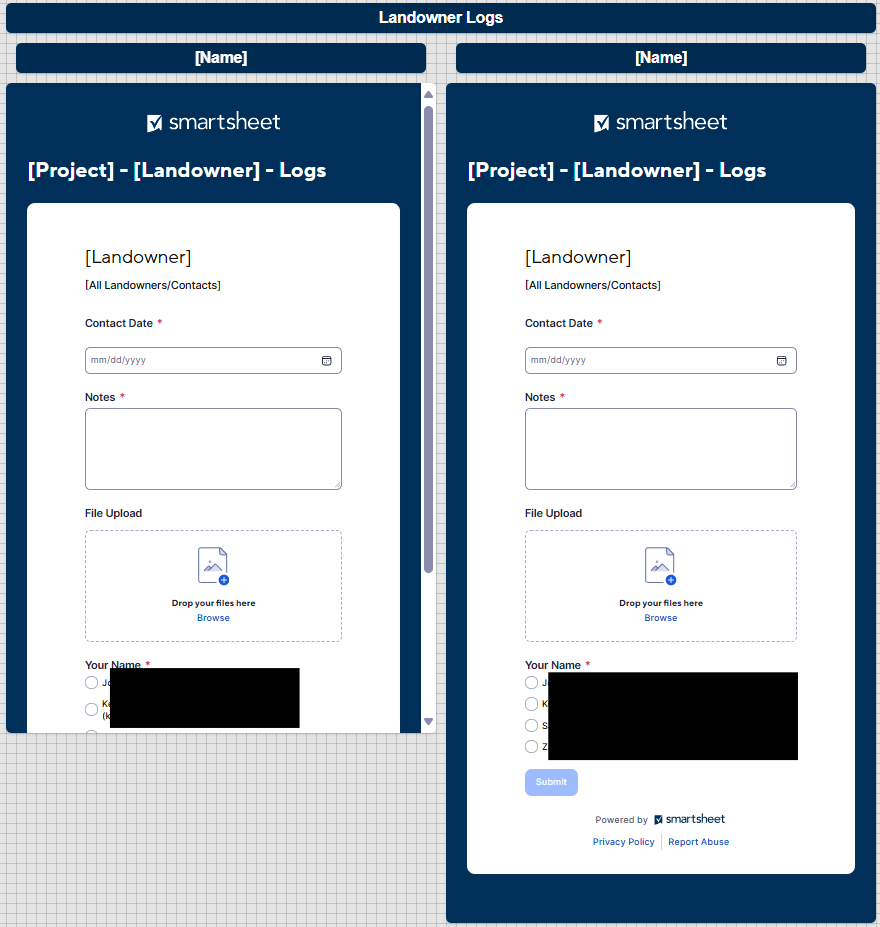
I would also like to request more formatting options so our forms can fit on our dashboards again. We are creating hundreds of forms, and they were all set to fit perfectly. But with the new design, we have to manually adjust everything so our teams can fill them out without having to scroll through every form.
Ideally, I'd like to be able to set the size of each field like we can with notes. The file upload is especially large now, and even that large date section is taking up space. As of now, even if I remove the title in the blue area, it leaves a gap of the same size, so I can't even save space that way.
I appreciate the accessibility, but without the ability to customize these views, we've got hours of work on our hands to reformat all of our dashboards to work smoothly again.
 S.Stone
Re: Gantt Bar with milestone
Does anyone know if this feature is still outstanding? If not, can someone please point me to directions for how to do this?
Smctaggart
Re: Welcome to the Education Community!
Hello from Idaho State University. I work in the Academic Affairs umbrella and have used Smartsheet for many years. I have built systems with sheets, automation, and dashboards to track tutoring usage, peer mentoring contacts, and created a system to track adjunct pay for dual-enrollment instructors and send a letter to them using the document creation feature. I nerd out over designing solutions to labor-intensive tasks by implementing automation, writing complex formulas, and building dashboards to deliver the info in a clean, usable manner.
 broctawn
Dynamic Views Listed Out in Mobile Application
It is not possible find dynamic views that have been shared with you via the mobile app. The only way I can find to access them is by finding the original link that was shared and selecting that.
We need a section within the mobile app that allows us to open any dynamic view that has been shared with the user similar to how we access sheets. For guests and users alike.
DougT