Best Of
Idea: Expand BulkImportTemplate & User.csv to Support Full Profile Metadata
I am submitting a request to modernise the Bulk User Import/Export functionality. Currently, the BulkImportTemplate and the User.csv export provide only a fraction of the data required for effective enterprise user management, leading to significant manual overhead for System Administrators.
1. The "BulkImportTemplate" Limitation
The current template is restricted to: First Name, Last Name, Email, Seat Type, Group Admin, Resource Viewer, and Sys Admin.
To manage an organisation at scale, we need this template to support additional fields. My recommendation is to update the template to include optional fields for:
- Department
- Job Title/Role
- Company
- Group Membership (e.g., adding users to existing Contact Groups during the import process)
Proposed Mandatory vs. Optional Standards:
- Always Mandatory: First Name, Last Name, Email.
- Optional but Supported: All other profile metadata and permission toggles.
2. The "User.csv" Reporting Gap
The corresponding reporting function is equally limited. The current User.csv output includes basic status and roles but excludes the very metadata we need for auditing and resource planning.
Current Fields: Name, Email, Status, Sys Admin, Group Admin, Licensed User, Resource Viewer, Sheets (Owned), Last Login, Time Added, Trial Status.
Requested Update:
The User.csv export should be updated to include Department, Title, and Group Affiliations. Without these, Admins are forced to manually click through individual user profiles to verify if users are correctly categorised or assigned to the right functional teams.
The Business Impact:
For any organisation with more than 100 users, "Bulk" management should mean more than just adding an email address. It should allow for the complete setup of a user’s professional profile. Enhancing these templates would turn a multi-hour manual audit into a 5-minute CSV task.
 Elon007
Ability to expand the size of the entry field for update requests
I've got an automation to request updates for a sheet, with one of the fields being a narrative entry. It would be helpful if I could expand the size of the box in the form for the update request, so they can better see what they are entering. As a bonus, it would also be helpful if they had some rich text attributes they could use.
 KLaLa
KLaLa
Data Shuttle- Filter Logic For Dates include "Is in the next (days)" and "is in the last (days)"
Update the Data Shuttle Filter Logic For Dates to include "Is in the next (days)" and "is in the last (days)". The workarounds are adding too many columns to my file.
 Synclaire
Table View - Show column links AND formula in row header
Currently, if there is a formula in a column and the data is part of a column link where that formula data is being sent elsewhere, the column only shows the Column Link icon… and doesnt show the formula icon. It gave me a minor heart attack today!!
Rdelliott
Folder Level Security
It would be great if we had the ability to share folders with users in the same way that we can with Workspaces. It would greatly enhance organization and workspace management.
There are many situations in which a workspace needs to be shared with a core team while subfolders within that workspace need to be shared with a larger/different audience. I'm sure most, if not all, of your customers would appreciate this functionality.
cpalamar
Search in Dynamic View
Please add the ability to search the full page in Dynamic View similar to "Ctrl+F" in a traditional Smartsheet Sheet. Right now, it is only the browser search that only searches what is visible on the page, but we want to be able to search all the information in Dynamic View.
Thank you!
MatisseConnors
Re: Show Sheet Owners whether the people they are sharing to are members, provisional members, or viewer
I don't see that this solves the issue as you need to see the member's status BEFORE you share the asset with them, not after, and it needs to be readily aparent like when you're commenting @ someone that isn't shared to a sheet.
Is the expectation that we share the item unknowingly with a non-paid user, making sure to uncheck the Notify people box, then once shared to them, hover over their name to see their member status, and then if they are a non-member, revoke the sharing…?
I'm attempting to write best practices for sharing in our organization and this should be as transparent as possible, given users can only be a Provisional Member one time.
Amy G
Re: RACI Matrix
Smartsheet currently shows no RACI Templates you can use. I typed "RACI," and nothing came up. This is awkward, as a RACI is a fundamental tool for Project Management.
 Proximian
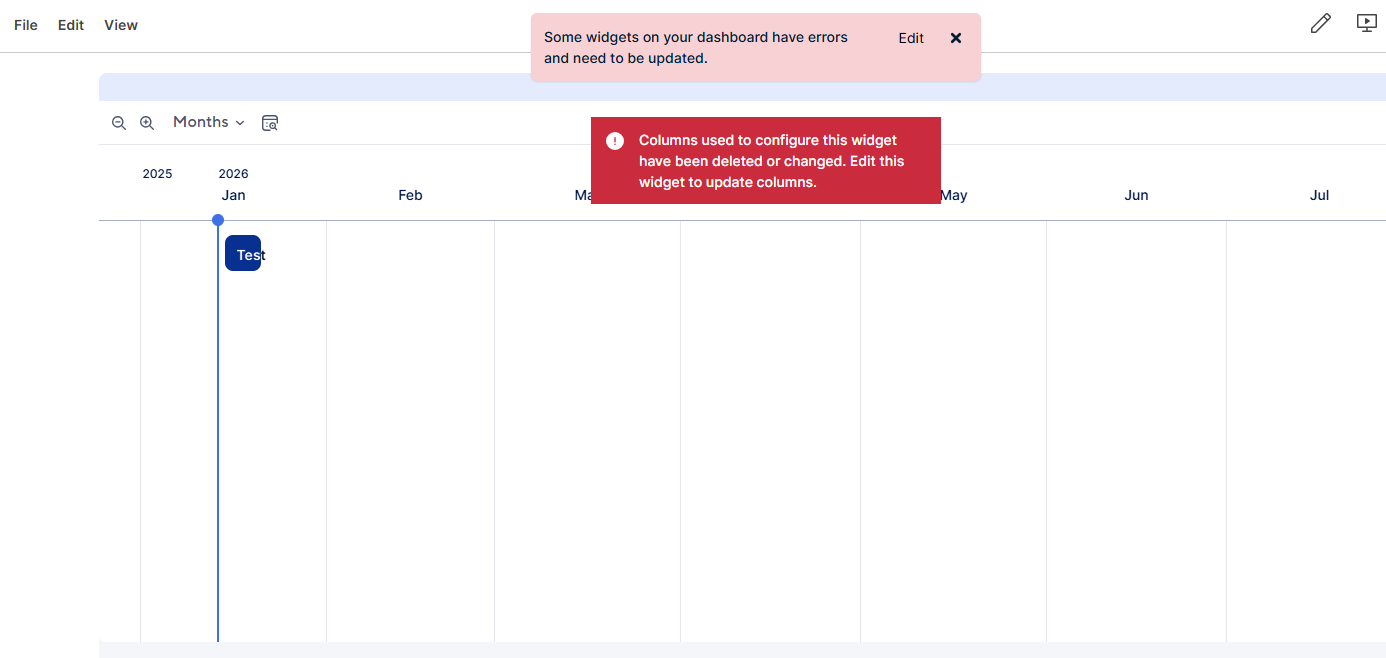
Every Timeline widget tied to a report has stopped working
I have a couple timeline widgets tied to reports on my dashboard, just for tracking rentals of different types and having the length of the rental visible on the timeline.
As of this morning, every single one shows the error "Columns used to configure this widget have been deleted or changed. Edit this widget to update columns." Which I tried to troubleshoot for a while seeing if I changed any columns or depedancies or duration columns but nope, they all work. The source sheets Gantt view works perfectly fine and when I try to make a timeline on the dashboard tied to a sheet it works fine as well.
I even made a new workspace and make a new sheet, report, dashboard, and timeline widget to see if it was just a problem with the workspace. Same error here, even for a simple sheet and report of 4 columns, Primary, Start Date, Duration, End Date (which isn't even used here).
I just want to know if anyone else is encountering this problem and it is a sitewide issue or there is some glaring flaw I'm missing.
To restate the issue, Timeline widgets that use reports as their source have started to completely fail.
 Aaron Kennedy
Dashboard Pulling Week# and Year
Hello,
We created a dashboard last year that pulled data from the week number but now that it's a new year, the data isn't pulling correctly. We added a year column, but haven't quite figured out how to do it correctly.
Any help? Does this look correct?
=COUNTIFS(WEEKNUMBER({PrintProductIntake-Week#}, [Primary Column]@row ), AND ({2026 Print Opportunity-Year}, [Value 5]@row ))
davemetran