Best Of
Re: How to integrate Smartsheet with custom software for better workflow automation?
You can use the Smartsheet API to create integrations and workflows between Smartsheet and other systems. Take a look here for more information about integrations, particularly the FAQ section towards the bottom of the page.
Here are 5 steps for getting started with the Smartsheet API, and you can find the Smartsheet API documentation here.
Hope that helps!
Georgie
 Georgie
Re: Dynamic Filter on Dashboards
Caroline, I couldn’t agree more with your suggestion. A top-level, single dynamic filter that controls all widgets and reports within a dashboard would be a game-changer.
The ability to switch views—like selecting a specific university or department—and have all charts, metrics, and visuals instantly update would dramatically streamline workflows. As it stands, maintaining multiple dashboards or manually updating filters for each chart/report is both time-consuming and error-prone.
This kind of centralized filtering is standard in many BI tools and would make Smartsheet dashboards far more powerful and user-friendly. Huge +1 from me!
 bs786
bs786
Desktop App to use system default browser for Authentication
The Smartsheet desktop app currently uses an embedded browser (WebView/WebView2) for authentication and does not support using the system browser for OIDC sign-in.
This is why it fails Conditional Access policies that require device compliance or trusted client conditions.
Please add support for launching authentication in the system browser instead of an embedded WebView, so that Conditional Access policies requiring compliant or hybrid-joined devices can succeed.
"Does Not Contain" Conditional Formatting
It just came to my attention that the custom criteria dropdown for Conditional Formatting has a "contains" option, but not a "does not contain" option. Also, the "Apply to format when condition is NOT met" button [which would solve this problem] only exists on the "select from a list" menu and not from the "define custom criteria" one.
In my specific case, we have a certain syntactic element [a double colon "::"] that we use to denote a list of certain values in a certain cell. I want to highlight that cell if it does not contain that "::". Cells that do not have that "::" may not be blank and aren't any specific string, so "is not blank", "is not equal to", and selecting options from the list do not work. "Does not contain" is the correct function. We can work around this with a helper column that does that check, but we're trying to keep clutter to a minimum, so I'd ideally like to avoid adding another helper column to every sheet we want to do this kind of formatting.
This feels like a really basic component that's missing. Either adding a "does not contain" logic option to the existing list OR adding the "Apply to format when condition is NOT met" button to the custom criteria menu would solve this issue.
In the meantime, does anybody have any idea why this functionality is missing? This seems like a really basic add that should have been there from the beginning.
 Nik Fuentes
Connecting HEX to Smartsheet
Extend the support to other tools like HEX to provide embed codes to be used in Sheets and dashboards.
 loris.peserico
Table View and Board View in WorkApps
We are using WorkApps to maintain our preventive maintenance program. It would be useful to have the new Table View and Board View available in the WorkApps to take advantage of the enhanced features. The Card View is available, but it has some limitations.
Matt Coyle
Re: Dynamic Filter on Dashboards
Hi,
I'd like to suggest a product improvement. My users at my new company are mostly used to excel/powerbi/standard queries, and they keep asking me to duplicate dynamic dashboard functionality inside of smartsheet. This is mildly achievable with the legend, but real breakdowns I generally have to build many subsets of dashboards to achieve.
My request/recommendation is to add a report filter link as a dashboard widget for dropdown fields. This would allow for far more dynamic sorting and reviewing of data, and much less development work to build breakdowns that may only ever be used a couple of times, and make smartsheet more competitive on building dynamic dashboards.
L_123
Re: Dynamic Filter on Dashboards
The formulas pull from the raw data sheet a, however each row is slightly different as they are pulling from different columns in the raw data sheet....
so the achieved column
Row with task CR =SUMIFS({CRCcomplete}, {Month yy}, Task$1, {BDM range}, BDM$2)
They are all =SUMIFS ({REF SHEET A/ " choose relevant" COLUMN}, {REF SHEET A MMM YY COLUMN}, this sheet cell were your mmm yy is, {REF SHEET A NAME COLUMN}, this sheet cell were your name is.
I have basically done same on the target column however if the target is a set target then you could just put the set target in there rather than a formula which I have on some :)
I used an if statement if symbol boxes then i can get my conditional formatting running from these :)
Also the task weight % is if they are in everyday, where as the target % considers the amount of days they were actually working that month.
Stacy Meadows
Re: NEW! Modern chart styling and readability enhancements
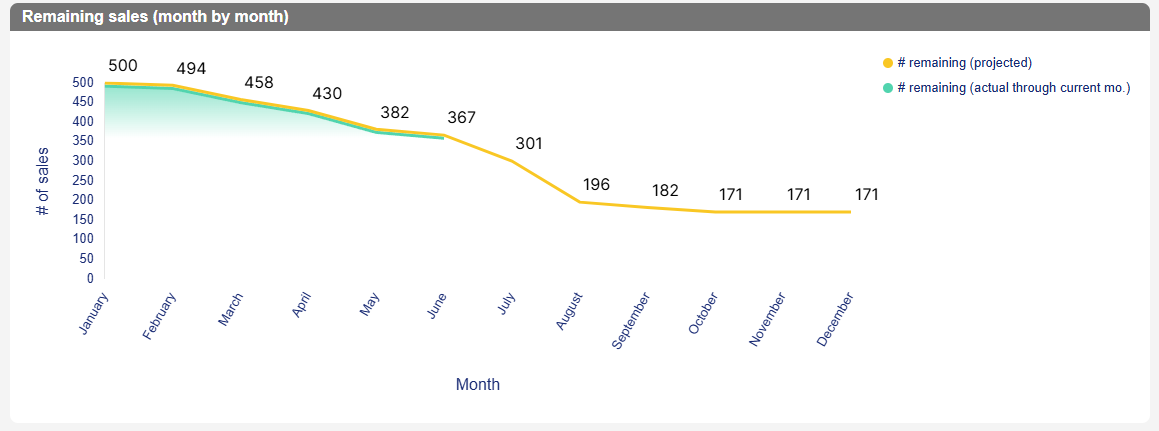
Hi all - I have a question about the series fill updates for line charts: is there any way to go back to the solid color fill version when using a line chart?
I understand that it is cleaner for some users to have this ombre aesthetic to layer multiple lines and fills. However, my chart only needs the green line to be filled and the ombre gets cut off because we don't include data for months that haven't occurred yet.
Thanks!
 Marie Zaragoza
Re: Referencing an imported sheet
Happy to help!
I forgot about another solution.
I'd recommend the fantastic add-on, which makes this possible (+ many other features).
SSFeatures from the brilliant Nathan. @SSFeatures
Would that work/help?
✅ Remember! Did I help answer your question/solve the problem? Please support with💡 ⬆️ ❤️, and/or ✅ Answer. This will make it easier for others to find a solution or help answer. I appreciate it, thank you! 🙏
 Andrée Starå