Best Of
Re: Restore Asset Creation Controls in Smartsheet USM
We fully support this position.
With this change, Smartsheet is behaving more like a B2C platform, while it claims to serve enterprise customers. Administrators must regain control over the system to ensure proper governance and compliance.
Ultimately, the lack of centralized and simple user management is pushing us to reconsider our use of Smartsheet. Without the ability to restrict asset creation, the platform introduces unnecessary risks and overhead for enterprise environments.
Restoring the previous functionality — or introducing a robust alternative — is not just a feature request, it’s a necessity for enterprise-grade administration.
 PhilippK
Re: Dynamic Filter on Dashboards
Hi @Naeem Ejaz and @Julie Becker
Thank you for making me notice the Dynamic Dashboard template! It’s a great reference, and I appreciate your insights.
After reviewing the template, I found that its logic is essentially identical to the approach I shared earlier (see my post dated January 17, 2024). Even the “Max Row Helper” column name and structure are the same, which leads me to think that Smartsheet may have drawn on this idea.
Also, special thanks to @Andrée Starå for suggesting the idea of sharing a published sheet link. I’ve adopted a slightly different approach: instead of automatically loading the dashboard after form submission, I send users to the sheet where the form input lands. This triggers the report’s filter change, and a single dashboard refresh updates all the results much faster.
With this modification, I no longer need to manually refresh the dashboard twice—just one refresh shows the updated filtered data.
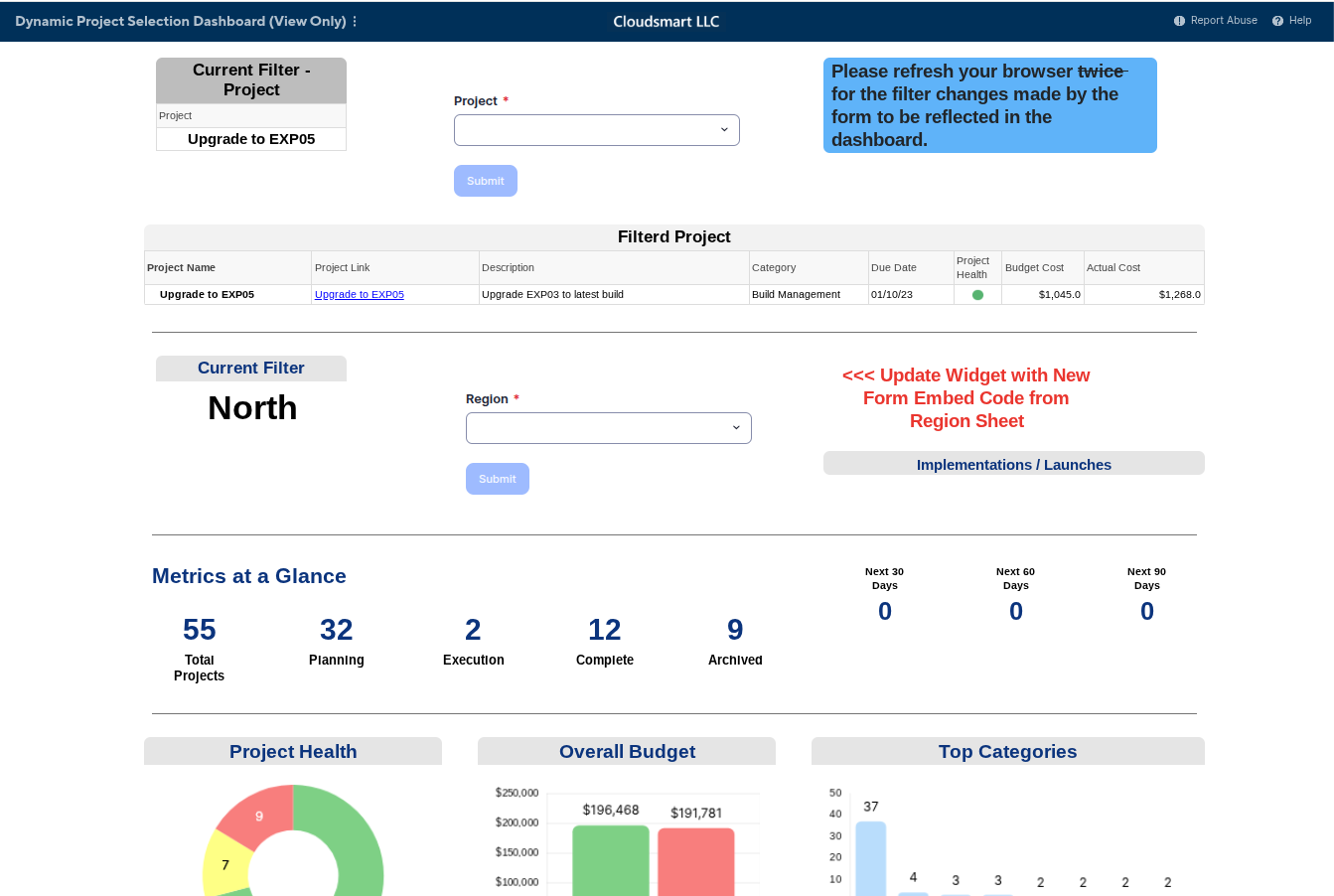
Thanks again for sharing and inspiring improvements on this method!

Re: Dynamic Filter on Dashboards
Hi All,
I hope you're well and safe!
To add to Naeem's excellent advice/answer.
When I develop client solutions similar to this one, I modify the form settings so that it loads the Dashboard automatically after the form has been submitted, updating the displayed data based on the selections made.
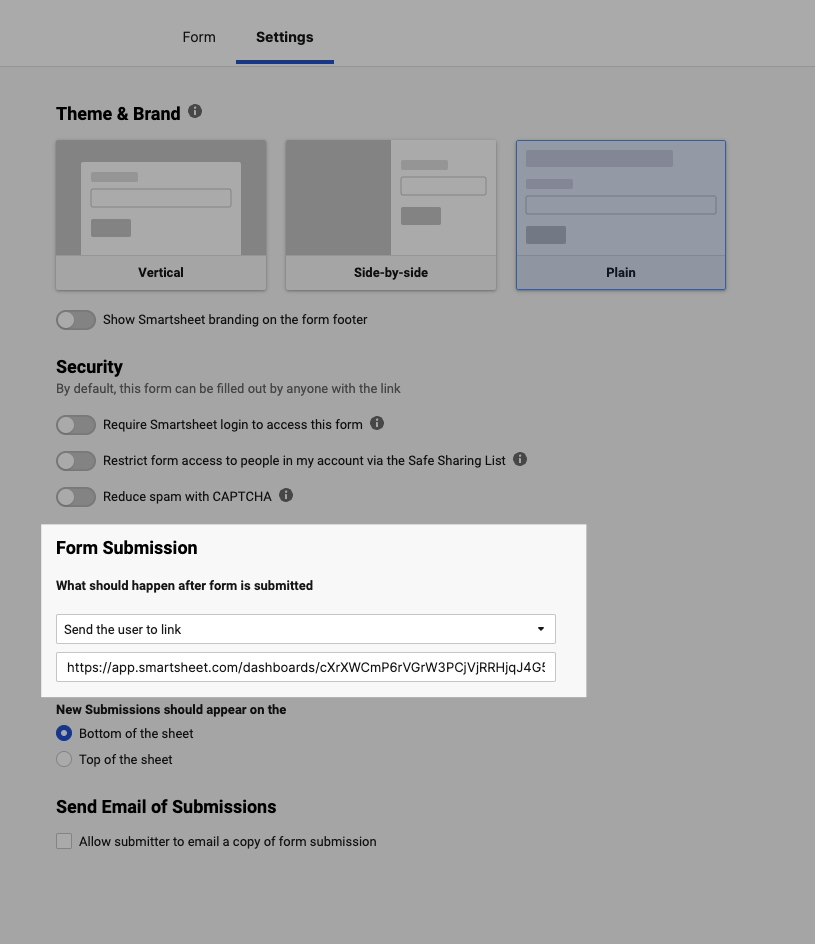
I hope that helps!
Be safe, and have a fantastic day!
Best,
Andrée Starå | Smartsheet Expert Consultant & Partner / CEO @ WORK BOLD
✅ Did I help answer your question/solve the problem? Please support with💡 ⬆️ ❤️, and/or ✅ Answer. This will make it easier for others to find a solution or help answer. I appreciate it, thank you! 🙏
 Andrée Starå
Re: Multi-factor Authentication
Please enable MFA for Business plans.
Most products nowadays offer MFA as standard - even to small businesses…. and its expected for general security compliance. (in Australia, it's mandatory for basic Essential 8 compliance….)
Smartsheet is trying to force us to upgrade and incur significantly higher costs for a feature that should be standard. This increased cost is not feasible for small businesses.
Mike_Sydney
Re: Quick Sort Card View (Sheets and Reports)
We need this feature as well urgently… I am wondering that such basic features that would support daily business compared to extensions like recent visual updates and licensing model change etc… are not getting priority. At least it would be helpful to read out the lane order number via formular would help… Maybe a formular function is available already for the grid view, so that based on the resulting value we could sort in the grid view? Has someone any idea? Thanks to the community
JUST PJM
Re: Quick Sort Card View (Sheets and Reports)
Well its clear the Smartsheet team doesn't actually value the suggestions made through this platform being that there has been no update for an entire year and no improvement for almost 2 years. Especially considering the most recent updates didn't address and just provided an obfuscated feature that is the same as the previously offered card view only prettier.
As identified in the original post "This is a fairly common features in most Kanban softwares and would be a welcome addition to improve Smartsheet."
I guess it is time to go to software that actually works for what I need it for.
imorris
Re: Quick Sort Card View (Sheets and Reports)
Has this function still not been added?
 CAS the CSA
Re: Blueprint - Dynamic Report Scope
I have a new project with a bunch of reports that have been created without the scope component. This is going to be a challenge. Can we turn the feature back on in Control Center to get them all added to the scope and then manage it from the report(s) thereafter. This seems like a problem to effectively have both avenues turned off forcing a re-creation of a batch of reports.
measterbrooks
Re: Blueprint - Dynamic Report Scope
Currently I have a report created. I want to add it to a report scope within Control Center, but the new report link is disabled. Also, when I navigate to the report directly under the scope tab, the option to add it is also disabled. Do we not have the ability to add it after the report has already been created?
measterbrooks
Report Scope Feature
I love this new report feature of being able to select Sheets or Programs for the Report Scope, but it has disabled a very important function of allowing you to be able to attach reports through control center. You no longer can create a report first then create a new program in control center and attach it. You also can not change a report that was initially a sheet scope to a program scope. This really creates double work if you later decide you need to use control center after creating a workspace with reports. An easy fix would be after a report is created as a sheet being able to change it from a "Sheets Scope" to a "programs scope". The new feature that could be amazing in my opinion has a very important flaw and has created a tremendous amount of rework in my workspaces.
Amy J. Hayden