Best Of
Export Dynamic View to PDF
Would be helpful for users to be able to export Dynamic view to a PDF.
 L Black
Re: Resetting AUTO NUMBER count in column
I was having this issue and I changed the Column Properties back to just Text/Number. Saved my sheet. Then changed the column BACK to Auto Number with my start number set and it worked as I wanted.
RiseUpPNW
Re: How do you implement Deadlines?
@MSK No, I just decided to use Milestones. I did a little twist on them, though. For each "gate" I wanted, I created two identical milestones, and made one a predecessor to the other with a "Start After Start" dependency. I put the predecessor milestone at the very top of my sheet, and put the other at the very bottom. This created vertical lines in my timeline for each of these gates. Then I could gauge if something passed one of these vertical lines. Best work around I could find. BTW, all project planning software I've seen suffers this same kind of issue.
FYI I don't use SmartSheets much anymore. I am no longer creating any new Smartsheets, only maintaining existing ones or ones other users in my company have made. I got tired of switching between my other programs and SmartSheets and had too much trouble copying data between them. I've basically switched back to traditional spreadsheets rather than using project planning software. There's some good ideas implemented in Smartsheets, but I just haven't seen enough of an advantage be worth the hassle of having sheets that are on a different server than all of our other files.
 BSADK
BSADK
Re: Right Click new Tab or window
Hello all!
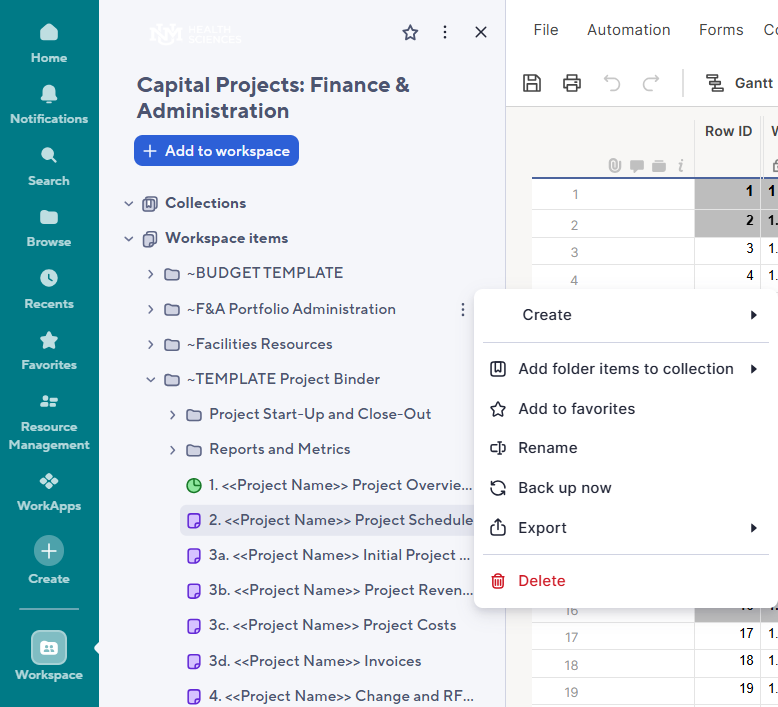
When I am knee-deep in a workspace, I would really appreciate being able to go to my workspace panel on the left and right-click to open a folder in a new tab. We can do this with sheets/reports/dashboards, but being able to do this with a folder would be an incredible time-saver! I think that this functionality is also available if you are in the Browse tab, so being able to integrate it in the Workspace tab should hopefully be an easy ask!
My workspaces may consist of folders with subfolders after subfolders. It can get rather busy! If I can open the folder I need in a new tab, that would save me tons of time!
 Deena Duran
Re: How do I find the closest matching row that is above my searching row?
Hi @mtuccillo,
I tested this on my end and was able to get the following formula working:
- =IFERROR(IF([PM Final Revenue]@row <> "", [PM Final Revenue]@row , INDEX(COLLECT([PM Final Revenue]:[PM Final Revenue], [FC Month]:[FC Month], [FC Month]@row , Auto:Auto, MAX(COLLECT(Auto:Auto, [FC Month]:[FC Month], [FC Month]@row , Auto:Auto, <Auto@row ))), 1)), "")
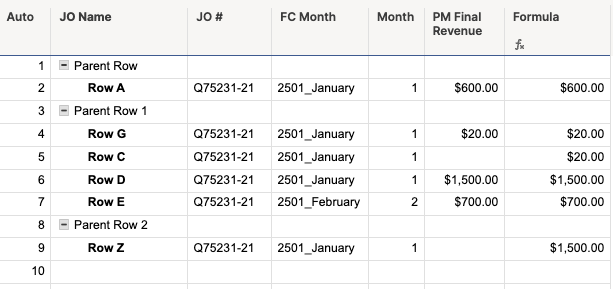
This formula says: If [PM Final Revenue] is not blank, use its value. Otherwise, find the most recent previous row with the same [FC Month] and return its [PM Final Revenue]. If nothing is found, return blank.
For this to work, you’ll need to have an auto-number column set up in your sheet - mine is named “Auto” and starts at 1. This is what the formula uses to find the most recent previous row.
You can see my test sheet set up in the same way as yours and the formula working in the 2501_January column in the screenshot below:
Does that work for you?
Georgie
 Georgie
Batch update URLs in Hyperlinks
It would be great if you could add a feature to Find & Replace addresses inside Hyperlinks, so you don't have to edit each one manually when you have a general URL update, Folder update, or different Drive where your links are pointing.
For example, Our company recently changed names, which effects our URLS. But all our items are saved in the same place, just part of the URL name is updated. It would be great if we could
Find: www.companyname.com/Item/location
Replace: www.newcompanyname.com/item/location
and it could update all 1000s of our links within a smartsheet.
lkymmell
Re: Request for Rollback - create sheets in Sheets folder
The inability to create folders in the sheet view is a significant loss of functionality! Why would you take away this functionality? If you have view access to multiple sheets that are in separate workspaces exactly how are you supposed to organize them? If someone shares a single sheet with me and not the entire workspace, I no longer have the ability to move that sheet to a folder for organization. Now, I just have a list of hundreds of sheets and reports shared with me in my Sheets view, which is very inefficient for keeping things organized.
 K Miller
Re: Why can't I add a new user to my account as a guest or viewer?
I agree. This process is absolutely counterproductive to anyone except Smartsheet and seems to be all about revenue as I don't see how this helps the user base at all. We are forced to add new users as members and then complete further steps when we know they should be viewers to begin with. This is wasting my time, not saving it. Smartsheet is making user management cumbersome and more complex, rather than helping make anything easier. Isn't the point of a tool like this to help cut down on the time you have to use doing mundane tasks? This has caused me to spend more time exponentially in Smartsheet. It's frustrating to say the very least.
HSabin
Re: What formula can I use to update the data based on a change in 1 cell with the date?
Hey Jessica! I think I see a bit. What I have done in the past for something like this is to either make an extra row or column that has my reference date(s) (usually the first row or a column on the far left). Then I only have to change the one cell to make all the other formulas change. So for the example you gave above the formula would be =COUNTIF({Launch Date}, $ReferenceCell$1) then you only need to change a single cell each week.
Would something like that work for you?
jjg279
Owner of Workspace - Is there a way to see who deleted a sheet?
Hello. I am the OWNER of the PMO Workspace at our company. All the PMs have ADMIN access to this workspace. With that access, which is required for them to create new items, they also have DELETE access. They can accidently delete a sheet. If something is deleted accidently by a user, is there a way for me (as the owner) see WHO deleted the sheet? How can I bring it back IF I was NOT the one deleting it. If I deleted something, it shows up in my delete folder which I can "undelete", however I cannot see who may have deleted the item.
Second Question - the DELETE folder also clears out deleted files after a certain period of time. What's the period and is there a way to configure the period?
Christine Cao