Best Of
Re: Outlook Add-in: Favorites Showing Blank
Same issue. blank screen when trying to launch the add-in on Outlook.
Legacy tokens are enabled as suggested by Smartsheets(Im the admin). Smartsheets is enabled org-wide for outlook.
 Adnan Syed
Re: Calendar App Integration with MS Outlook
Another update regarding the Outlook Calendar connector. There has been a lot of demand for this connector and the InfoSpark development team has been busy building out enhancements so that the connector can satisfy every single customer. We now support full two-directional sync, including creating calendar events in Outlook and having the data flow through into the correct sheet in Smartsheet.
Information is available on the Smartsheet Marketplace.
We also have a brief info doc available, which I've attached.
You can contact InfoSpark through the Marketplace listing, or directly via the InfoSpark web site.
Regards,
Lindsay

Re: Calendar App Integration with MS Outlook
@Ric T , the team I work with created a connector to push Smartsheet data (reports or sheets) into Outlook Calendar as events (with an actual start and end time, not just a day booking).
Would this help you with what you were aiming to do?
If this is of interest to you, check out the marketplace listing on the Smartsheet web site, and reach out if you have any other questions.
https://www.smartsheet.com/marketplace/apps/outlook-calendar-connector
Cheers,
Lindsay
Re: Metric Widget without Summary Sheet Report?
So with metrics widget I have found I can either create summary fields and access them or you can indent your rows with a =COUNT(CHILDREN()) as long as you have organised your data OK.
Summary field "Tulsa In Progress" with formula =COUNTIFS(City:City, = "Tulsa", Status:Status, ="In Progress"
Summary field "Tulsa Blocked" with formula =COUNTIFS(City:City, = "Tulsa", Status:Status, ="Blocked" etc. it is very longwinded to set up but once done you can either access by a summary report for charts or the field directly for Metrics.
Hope this helps & good luck
 SueinSpain
Feature: Allow pasting of multiple field names in Conditional Logic
I'd like to be able to paste MULTIPLE field names into the "Then show the following fields" area in Form Editing > Field Settings > Logic > "Then show the following fields" box. Similar to how we can do so when pasting names in sharing settings.
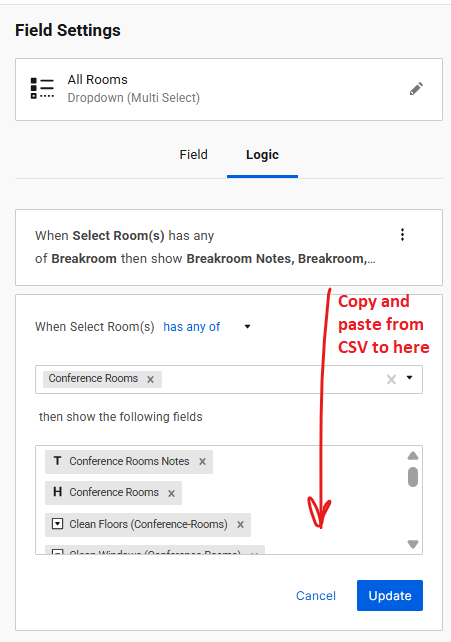
 NeilKY
Feature: Modify color of Form Editing Scroll Bar & Allow Pgup/Pgdn to scroll
When editing a form, the scroll bar is VERY difficult to see. The part of the bar that you can drag darkens slightly when you mouseover it, making it slightly more visible but not a lot.
No Mouseover:

With Mouseover:
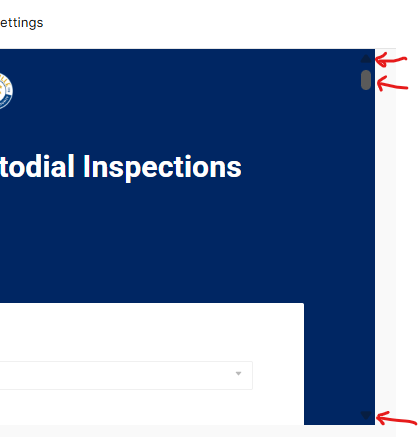
Also note that you cannot use "PG UP" or "PG DN" to scroll when editing, nor can you use the arrow keys to scroll.
Tldr;
PROBLEM: Combined, these two problems—A) hard to see and B) can't use the keyboard to scroll—make it cumbersome to edit a form with several pages of fields
Feature Request:
- If the background is dark on a form, please make the scroll bar light.
- Enable scrolling in forms using the keyboard pgup/pgdn and/or arrow keys.
NeilKY
Re: May Question of the Month - Join the conversation and receive a badge
That is a very good question that I am still seeking the answer to myself. If you ask anybody at my company what my role is, you will get just as many answers. So I would probably turn the question around to the 5 year old and ask them what they think my role is and it is probably a better answer. Going forward I could use that 5 year old's summary to explain my role when asked by others! 😋
 larak
larak
Re: May Question of the Month - Join the conversation and receive a badge
I'd say "Mommy fixes things" hahaha
 Cayla Davis
Re: Pull form responses into another sheet & display vertically
Hi,
I hope you're well and safe!
Yes, you could do that using cross-sheet formulas.
❓How many submissions and fields could there be?
I hope that helps!
Be safe, and have a fantastic day!
Best,
Andrée Starå | Workflow Consultant / CEO @ WORK BOLD
✅ Did my comment(s) help/answer your question or solve your problem? Please support the Community and me by marking it - Insightful 💡- Vote Up ⬆️ - Awesome ❤️ - or/and as the accepted answer. It will make it easier for others to find a solution or help to answer! I appreciate it, thanks!
 Andrée Starå