Best Of
Re: Critical Path - Remove a set of tasks from the CP
Alternative work-around:
Add a line that has a long duration and make the final pre-launch item a predecessor to it. As long as your new fake line has an end date past any other, you will see the critical path you want.
 Vince T
Adding Today Line in Gantt View to exported PDF/PNG file
Currently, there isn't a way to include the "Today Line" (current date line) in Smartsheet Gantt chart exports (PDF/PNG).
Frankly, this is baffling. Showing the current date on a Gantt chart isn't a luxury; it's a fundamental, basic feature that every project management software should offer. It's truly puzzling why this issue has persisted for years without a resolution. The absence of this simple visual marker significantly hampers our ability to share clear, actionable project status updates with stakeholders, forcing us into inconvenient workarounds.
This isn't just a minor inconvenience; it's a significant oversight for a tool designed for project management. I strongly urge the Smartsheet team to prioritize and implement this feature as
soon as possible. It's long overdue.
Please leave your comments and upvote this post if you agree. Let's make sure Smartsheet hears us and fixes this critical gap without further delay.
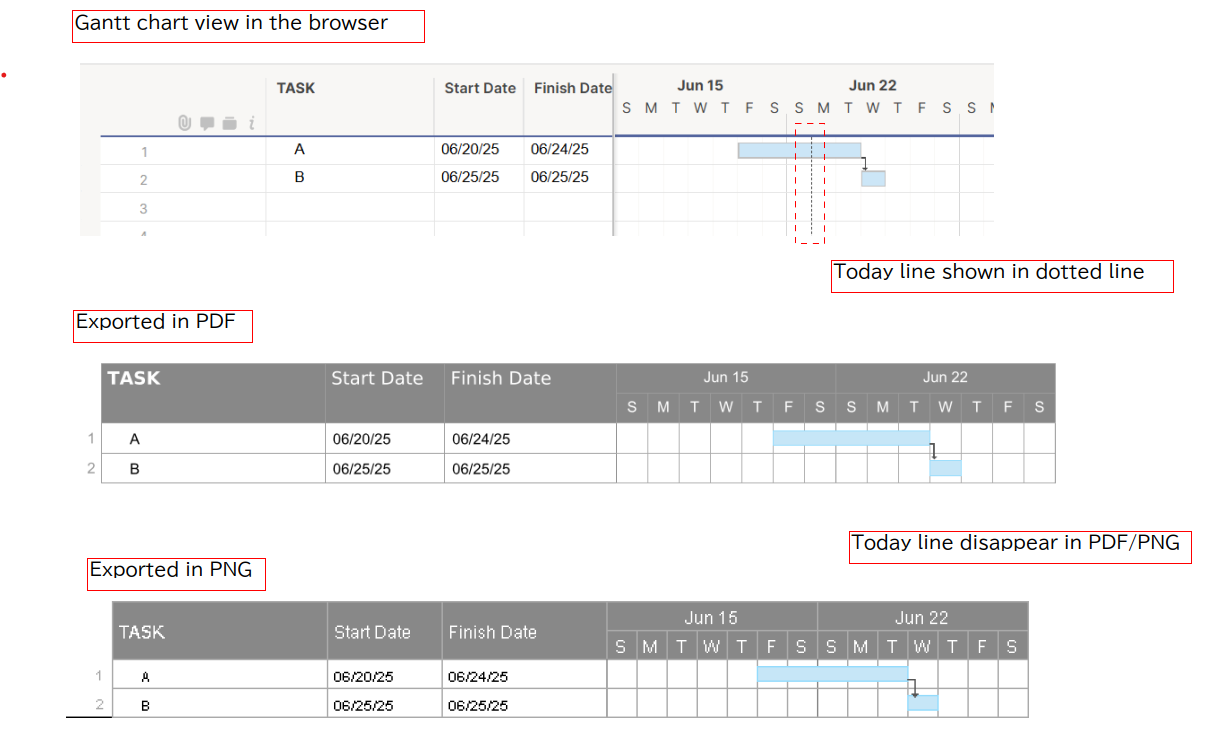 Yoshi_JPN
Re: Showing today's date in gantt view
How do we have the TODAY'S date dotted line "Print" in a pdf. In Gantt view it does not show in the print.
Is there a setting?
D_Arch
Having automated backups (such as weekly) the formulas also included
Having automated backups (such as weekly) the formulas also included.
It would be so good!
Mark_ K
Re: Manage seat types more effectively at scale!
Still a HUGE problem. Now that they will be downgraded they will be removed from their groups. This is going to cause a mess for myself as an admin and many different groups to realize what group they need to be put back in. I also will not know when and who was changed without having to go into admin center. This is a downgrade at best causing more issues then even just getting rid of the access where free users could at least comment.
 AngB789
Re: Manage seat types more effectively at scale!
@Ryan Dougal The viewer Downgrade function seems like a MAJOR problem, depending on how this message is read:
Changing someone to viewer triggers the following:

Changing this Member to a Viewer will impact their work on many items. They'll have to
request permissions on each item
to regain current permissions.
This change will:
- Prevent them from collaborating on all existing items by removing their Editor and Commenter permissions.
- Remove them from groups that were shared to items with Commenter permissions or higher.
WHY would the downgrade remove their access to all items, instead of just changing access on the items they have to view only?
Or, is that what it does, and so it's not REMOVING permissions; it's just UPDATING permissions?
RobR_ABC
Re: Text to Rows--Possible?
@KMH Spinner Bridge isn't the only option. If you have Microsoft, you can do something with Power Automate, or you can use something like Make to work it out as well.
Or custom script. Anything that can read from Smartsheet and write back will work.
 Darren Mullen
Re: Text to Rows--Possible?
@KMH Spinner Sure, anything is possible with time and money… and the right tools.
I assume this is going to be an ongoing process, so best would be to have something that runs on new form submissions, then if you want to stay in the Smartsheet ecosystem, use Bridge (if you have it) otherwise you'd have to use a different solution to process the data over the API and insert the rows in.
so, yes it can be done, but it's not a snap your fingers kind of solution in Smartsheet.
Darren Mullen
Can we auto provision users as Viewer instead of provisional members?
It appears the auto provisioning defaults EVERY ADDED USER to provisional. This creates and unrealistic burden given the new licensing model.
I would like to set up auto provisioning with these users being assigned viewer access, until/unless they get added to a sheet or workspace with higher access. Is this possible?
tzaczyk
Re: Chart Axis Customization
Has this issue been resolved? Without the ability to scale axis correctly, it misrepresents the data and essentially makes the chart functionality useless… Smartsheet; please provide an update on a update/resolution or work around.
McRae