Best Of
Re: Chart Labels: drag labels overlap & stacked column labels
Dashboard charts offers a setting to be able to rotate the text for the data labels. From the image, you can see that the data labels on the x-axis are hard to read for date and time when there are several data points. Being able to rotate the text will help for better readability.

 Derek311
Re: Chart Labels: drag labels overlap & stacked column labels
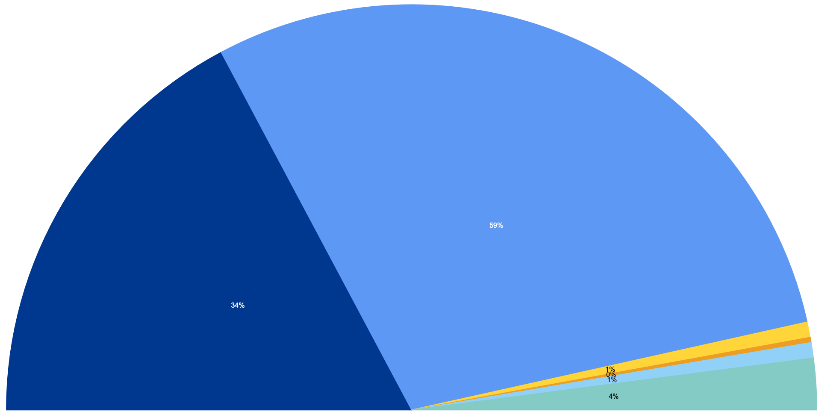
Still waiting for the chart label improvements. Pie charts must be used to show percentages without making substantive changes to sheets or reports. I've read solutions that say — just make your widget on the dashboard bigger… the imag below is a half-pie chart that spans the entire width of the expanded dashboard — and the numbers are still bad. This is obviously not a solution …. the ability to change the font size, or to plae the label outside of the chart section is really important — this is just really frustrating.
 Pauline J
Re: Dashboard Won't Share on MS Teams
Just found a fix today! I did the following:
1. Go to Account
2. Go to Apps & Integrations
3. Click on Microsoft Teams Tabs (this should be there if you logged in through Teams already)
4. I was redirected to a pop-up that you had to grant authorization (this never came up before for some reason but make sure your pop-ups are enabled on your browser)
5. Note: After I clicked Authenticate, it never loaded so I clicked Skip and it led to me to a log-in page. I signed in and then went back to Teams and was able to add it.
ividamo
Add Attachment (instructions) to Header Column
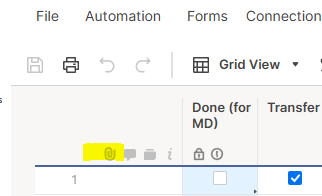
I would just love to add an attachment (SOP) to my Sheet Header Column. This would be helpful for succession planning. For the time being I am adding instructions on a separate sheet in the workspace (clunky and not intuitive). Here would be best:
 Kristal T
Re: Select Different Colors for Select and Multi-Select dropdown results
Regarding the new status:
"This will soon be released in the new Table View, which is currently available to members of the Early Adopter's Program. In Table View, you will be able to configure the colored dropdown values from in the column properties menu. These colors will then be reflected in all the new views (Board and Timeline) and in the record details panel. Stay tuned!"
Will it work with conditional formatting? or will that be purely manual?
 Archiduc
Re: Add 'sort order' to Filter Views
Me too. I would love to see specific sorting depending on certain saved filters. However, there may be too many combinations to rely on sort parameters in saved filters. The sort feature should /also/ be independent from the filtering. So once you select your filter, maybe you also have a sort associated with it. But you may want to reverse the sort on the fly, WITHOUT having to alter the saved filter.
 spauliszyn
Re: Add 'sort order' to Filter Views
it would be very helpful being able to filter sheet after applying filters.
Helena P.
Re: Add 'sort order' to Filter Views
Create method to auto sort a filtered sheet. If date is selected for sorting and Status field is filtered to Open. Current method is to turn filter off, select date field, select sort, select OK, change filter back to Open. I would like an automatic sort/workflow to accomplish this.
dojones
Paid users to check a box or add a comment?
Our company has a small number of licensed users. We distribute weekly reports and request individual stakeholders to check a box when their task is complete or add a comment to the row. So far, I have not found a workaround for continuing this process without adding 300+ stakeholders as paid users. Do you have any suggestions on how to not completely disrupt a process we have used for several years?
RMikelson