Best Of
Re: How do you delete tags in File Library?
Thanks for verifying, Isaac!
I am the owner of the Workspace.
I will reach out to Support in hopes that we can find a solution.
All the best,
Kyle
 Kyle Morgan
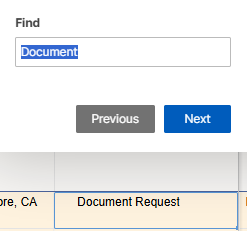
Grid View Search Feature - Highlight Cell
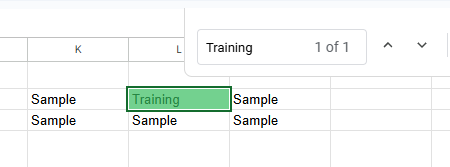
It would be great to have a search result highlighted in Grid View similar to other tools:
Smartsheet search results are only outlined:
Thanks!
 Kristal T
Grid View Search Results - Return Count
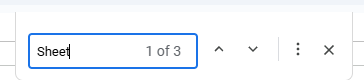
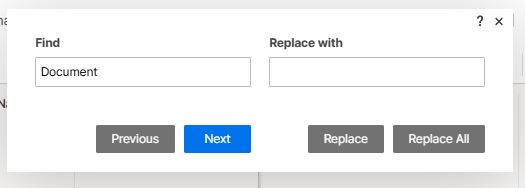
It would be great to get a count of search results (similar to Word/Google [above] etc) when searching in Grid View…frankly in any view. I know that we can get a count using filters but that takes much longer.
Smartsheet:
 Kristal T
Re: The ability to omit blank fields in email notifications
Having this as a drop down option on the Email Automation would be a massive help for our company, would be beneficial to just receive the information we actually need rather than the whole form.
Zoe Fox
Re: Constraint Types in Gantt View
+1 requesting this. It's a major gap in functionality compared with MS Project. Please add this!
Brian Helminski
Deleting an attachment in dynamic view?
It seems that regardless of settings/permissions, you can't delete an attachment from dynamic view, even if it's an attachment you just added in dynamic view.
Is that accurate?
 Julia C Peterson
Re: Fix Form Size in Dashboards and Mobile
I have to rework all of our dashboards, too. I have 167 forms to resize, and that's only the first portion of this project - I'll have three times that once we finish updating dashboards for all of our projects! That's 2-8 hours of manual updates for something that was working perfectly before just to get it functional again!
Please allow us to revert back to the old form layouts, Smartsheet!
 S.Stone
Re: Saving a "Form" for later use without submitting as of yet
We’re using Smartsheet forms to support clinical audit workflows — specifically Surgical Safety Checklist audits. These audits span multiple phases of a procedure (e.g., Briefing, Time Out, and Debriefing), and form completion can’t always happen all at once.
Right now, our workaround is to print a PDF of the form, complete it manually in real time as the procedure progresses, and then have someone enter all the data into Smartsheet later once everything is finalized. This leads to duplication, delays, and increased risk of transcription errors.
We’d love to see a “Save and Resume Later” feature for Smartsheet forms that would allow:
- Users to start a form, pause midway, and return to complete it later
- Ideally, the form could be resumed using a secure link or by reopening a session tied to the original entry
- Even a basic autosave or draft mode would be incredibly helpful
This would allow clinical teams to enter information in real time without needing to complete the full form in one sitting, especially when parts of the workflow (like Debriefing) happen much later.
Thanks for considering this — it would be a huge improvement for users in complex, real-world environments!
Michael B
Re: Duplicate conditional format
You would need a helper column that can be hidden after setting up that will flag duplicates. You would then create your conditional formatting rule based on this helper column being flagged.
 Paul Newcome
Re: Can Smartsheet send a notification to a TEAMS channel that is private?
Hey @Robert Schaad, @Dan Smock, @Chad Brack -
I know this is an old post, but since there's still no solution to it I figured I'd let you know that I did figure out a way to send Smartsheet updates to Teams with Private Channels via Microsoft's Power Automate platform. It actually works for both "Standard" and "Private" Channels, and is easily viewable on Desktop and Mobile (and could be customized to look basically however you'd like).
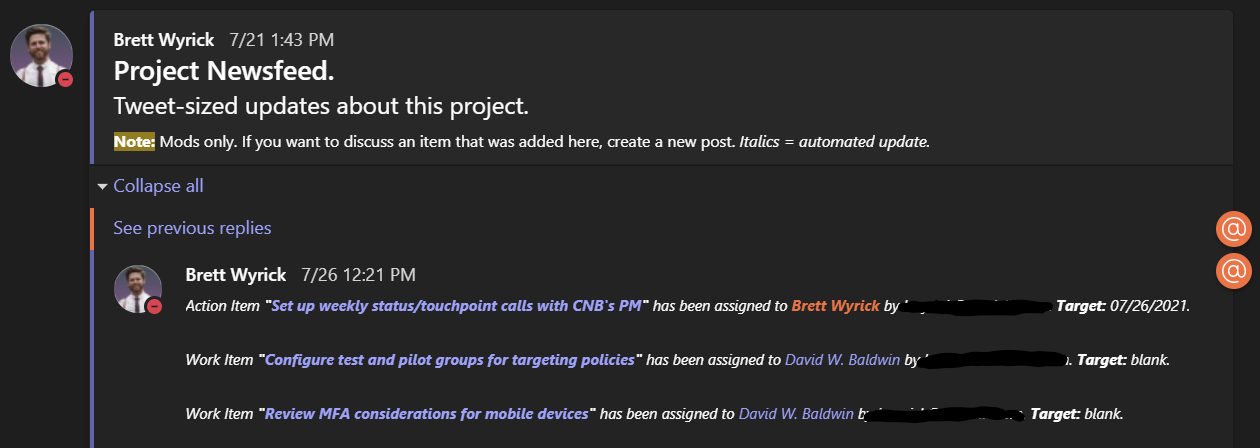
Basically, it's a line-by-line update of rows that get updated based on whatever column you want to trigger. I call it the "Project Newsfeed". Tweet-sized automatic updates on each project I run. It involves setting up a couple of webhooks and processing the info via Power Automate. Many organizations have Power Automate available, but do not utilize it.
I just started a new project, so a bunch of updates came in for my "Assignee" column. Here's what it looks like:
Here's an example of an update for a "Status Column":

And an example of an update when an item is late:

Note that each item has a link to the exact row that is being updated (the text in purple is Teams' default color for hyperlinks).
The benefit of doing this my way is that every single change gets added to this Newsfeed. No more notifications from Smartsheet that are batched, saying something simple like "4 rows were changed". You'll know exactly what changed.
I also have this set up for other features within the M365 stack. So it also can do things like give updates when files are added to the Teams "Files" tab, emails related to the project are received/sent and when calendar events are about to begin that are related to the Project. Those look like this:

Ideally, a "service account" would be great for this - think of it as a "bot" that does work and automations for you. Something like "NewsfeedBot@yourcompany.com" would ideally be created then added to each Private Channel - but as you can see above, it also works with a user account as well.
This can be triggered to be set up every time a new Sheet is created (with parameters, obviously) - it has greatly helped the company I work for set up new projects quickly with very little manual work.
Let me know if this would be of any interest to you.
Now that I've gotten you to the end, I'll drop the hammer:
I am selling this as a per-hour build, based upon your org's requirements. It'll include both the building of the automations and training on how to edit and maintain the automations. Open for a demo as early as this week if you're interested. I came from a background of little to no coding experience and this can be taught to anyone who's at least a little tech savvy. Most everything is drag-and-drop "no-code" automations. My email address is in the signature below.
 Brett Wyrick