Best Of
Re: Saving a "Form" for later use without submitting as of yet
We’re using Smartsheet forms to support clinical audit workflows — specifically Surgical Safety Checklist audits. These audits span multiple phases of a procedure (e.g., Briefing, Time Out, and Debriefing), and form completion can’t always happen all at once.
Right now, our workaround is to print a PDF of the form, complete it manually in real time as the procedure progresses, and then have someone enter all the data into Smartsheet later once everything is finalized. This leads to duplication, delays, and increased risk of transcription errors.
We’d love to see a “Save and Resume Later” feature for Smartsheet forms that would allow:
- Users to start a form, pause midway, and return to complete it later
- Ideally, the form could be resumed using a secure link or by reopening a session tied to the original entry
- Even a basic autosave or draft mode would be incredibly helpful
This would allow clinical teams to enter information in real time without needing to complete the full form in one sitting, especially when parts of the workflow (like Debriefing) happen much later.
Thanks for considering this — it would be a huge improvement for users in complex, real-world environments!
 Michael B
Re: Duplicate conditional format
You would need a helper column that can be hidden after setting up that will flag duplicates. You would then create your conditional formatting rule based on this helper column being flagged.
 Paul Newcome
Re: Can Smartsheet send a notification to a TEAMS channel that is private?
Hey @Robert Schaad, @Dan Smock, @Chad Brack -
I know this is an old post, but since there's still no solution to it I figured I'd let you know that I did figure out a way to send Smartsheet updates to Teams with Private Channels via Microsoft's Power Automate platform. It actually works for both "Standard" and "Private" Channels, and is easily viewable on Desktop and Mobile (and could be customized to look basically however you'd like).
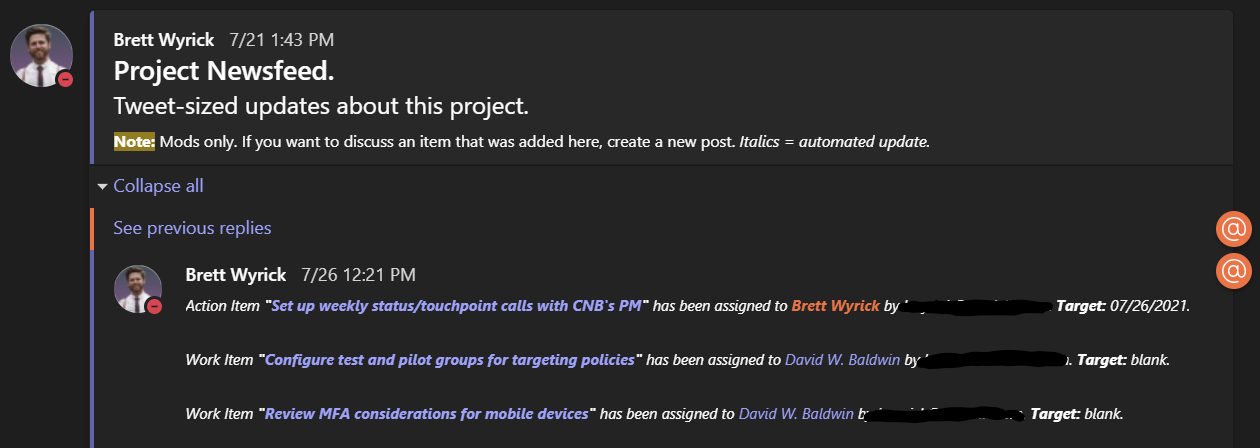
Basically, it's a line-by-line update of rows that get updated based on whatever column you want to trigger. I call it the "Project Newsfeed". Tweet-sized automatic updates on each project I run. It involves setting up a couple of webhooks and processing the info via Power Automate. Many organizations have Power Automate available, but do not utilize it.
I just started a new project, so a bunch of updates came in for my "Assignee" column. Here's what it looks like:
Here's an example of an update for a "Status Column":

And an example of an update when an item is late:

Note that each item has a link to the exact row that is being updated (the text in purple is Teams' default color for hyperlinks).
The benefit of doing this my way is that every single change gets added to this Newsfeed. No more notifications from Smartsheet that are batched, saying something simple like "4 rows were changed". You'll know exactly what changed.
I also have this set up for other features within the M365 stack. So it also can do things like give updates when files are added to the Teams "Files" tab, emails related to the project are received/sent and when calendar events are about to begin that are related to the Project. Those look like this:

Ideally, a "service account" would be great for this - think of it as a "bot" that does work and automations for you. Something like "NewsfeedBot@yourcompany.com" would ideally be created then added to each Private Channel - but as you can see above, it also works with a user account as well.
This can be triggered to be set up every time a new Sheet is created (with parameters, obviously) - it has greatly helped the company I work for set up new projects quickly with very little manual work.
Let me know if this would be of any interest to you.
Now that I've gotten you to the end, I'll drop the hammer:
I am selling this as a per-hour build, based upon your org's requirements. It'll include both the building of the automations and training on how to edit and maintain the automations. Open for a demo as early as this week if you're interested. I came from a background of little to no coding experience and this can be taught to anyone who's at least a little tech savvy. Most everything is drag-and-drop "no-code" automations. My email address is in the signature below.
 Brett Wyrick
Re: Collections
- Find it in the
"Collections" panelif they created it or it was shared and added to their view.
My users are not able to find the collections panel, unless they are already in it. Which is a circular problem because they can't find it to get into it, without the panel.
Angelina
Re: Customers asking access to the wrong sheet
@Naeem Ejaz Please check your answers before posting them. Some of the things you mention are incorrect, misleading, or reference features that just do not exist in Smartsheet.
@Martine Anne My first suggestion would be to reach out to them and ask….
- Where did you get the link to the sheet from?
- Why do you feel you need access to the sheet?
You can also double check the sheet they are trying to gain access to. Are there any automations set up in that sheet that could be sending an alert or something like that? Automations that send messages can include a link to the sheet within the email that it sends. You would need to adjust the automation.
Another possibility would be if there is a link to the sheet on a dashboard that they have access to. In that case, you cannot stop them from clicking on the link, but you can include instructions on the dashboard or explore other options for getting that data on the dashboard.
Paul Newcome
Workflows made simple
Hi all,
Some ideas about making workflows flow better:
- Ability to download the chart into .pdf or .png for others to review/understand without sharing workflow itself
- Adding multiple actions under same condition path
- Ability to create own workflow template that can be re-used on multiple sheets
- Making the update request set up a little more integrated with workflows, to ensure that we can trigger it with specific conditions AND then wait - if the feedback is provided, then good, if not, re-send update request.
Thank you!
Re: Why isn't automation working?
Hi Both,
Just as a comment really but I always set my status = New as a default in any form as I find that triggers as it has a value better than blank.
 SueinSpain
Re: Editable field within workflow before approve or decline
The only way to include more editable fields is to switch over to an Update Request.
Paul Newcome
Re: Editable field within workflow before approve or decline
Update Requests can be automated using a workflow / automation the same way an approval workflow / automation is set up. It's just a different action.
Paul Newcome
Re: NEW! Modern forms submission experience with accessibility enhancements
For all users having issues with the sizing… Smartsheet support simply apologized for the "inconvenience" and told me to start a product idea thread to try to get it fixed, so here it is…
Paul Newcome