Connect with peers, share your expertise, and inspire what’s next in Smartsheet — from proven practices to practical how-to insights from fellow users and product experts.
Sign in to join the conversation:
I have a project plan that was sent to me in a Excel spreadsheet that I'm trying to import into Smartsheet; after some trial and error, I've fixed up the fields but even with duration, start, end date and predeccesors enabled, I cannot get the % complete column to populate.
https://app.smartsheet.com/sheets/j58HgGwQQMQcWq9jfH3QPfwPGjfGVfm6RG6j7wG1
Hi,
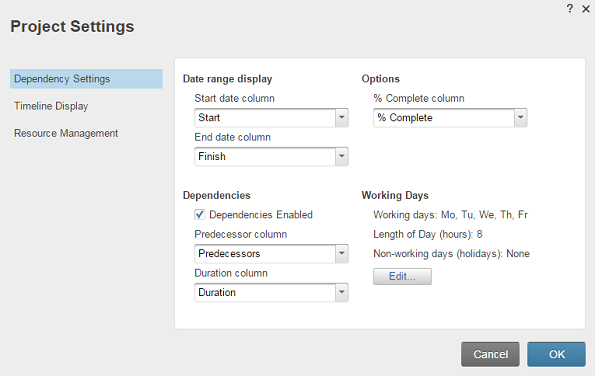
Have you activated the functionality in the Project Settings?
More info: https://help.smartsheet.com/articles/765755-modifying-project-settings
I've also requested access to the sheet.
I hope that helps!
Have a fantastic day!
Best,
Andrée Starå
Workflow Consultant / CEO @ WORK BOLD
I am writing as a Workspace Admin to express significant frustration with the new "Browse Preview" interface. It introduces major workflow regressions that break basic file organization. Specifically, the following core features are broken or severely degraded: Loss of Expandable Workspace Trees: The classic expandable…
The dashboard dropped the editing capability … in addition, I can't move files into the shared workspace … where I am listed as an admin and a paid member.
Hello, I have been noticing that the confirmation email does not send once a user submits a workflow. It was working before and not sure what happened. I don't know where to look besides here.