Sign in to join the conversation:
Hi there Smartsheet Guru's!
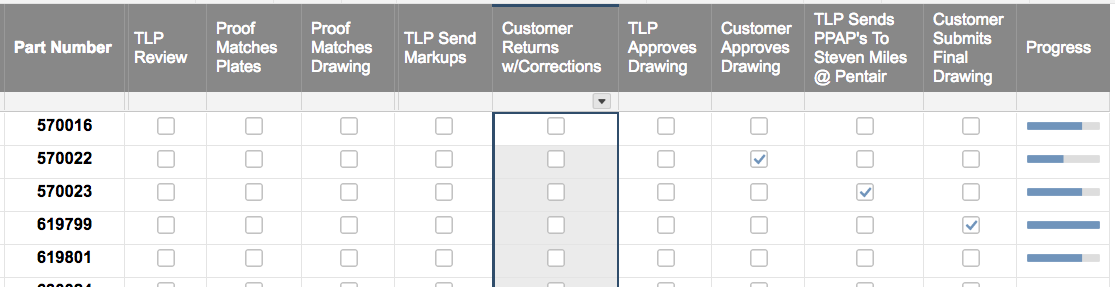
Im trying to figure out the best way to automate a progress bar, based of 9 columns that all have check boxes. Screenshot shown:
Hi @Paul Newcome - I'm also doing something similar, except I'm referencing a different sheet. This is the formula that keeps getting #UNPARSEABLE
=IF(COUNTIFS(CHILDREN({5060 Milestones Done}@cell), 1) < 1, "Empty", IF(COUNTIFS(CHILDREN({5060 Milestones Done}@cell), 1) < 4, "Quarter", IF(COUNTIFS(CHILDREN({5060 Milestones Done}@cell), 1) < 8, "Half", IF(COUNTIFS(CHILDREN({5060 Milestones Done}@cell), 1) < 11, "Three Quarter", IF(COUNTIFS(CHILDREN({5060 Milestones Done}@cell), 1) = 13, "Full")))))
I tried replacing the 1 within the COUNTIFS with true and that unfortunately didn't work either. I've also tried using @row rather than @cell and that didn't work either.
@crokicki your COUNTIFS syntax is off for each of them. You also cannot use hierarchy based functions with cross sheet references. You would need a helper column on the source sheet that brings the parent row data down onto every child row and then include that in the COUNTIFS.
I would also suggest making it more dynamic so that it doesn't matter how many children are there, it will calculate based on the percentage of children that are checked.
COUNTIFS({Helper Column}, @cell = "5060", {Checkbox Column}, @cell = 1) / COUNTIFS({Helper Column}, @cell = "5060")
The above would give you
0 = 0 = "Empty"
0.25 = 25% = "Quarter"
0.50 = 50% = "Half"
0.75 = 75% = "Three Quarter"
1 = 100% = "Full"
Smartsheet Community - I AM STUMPED!! I am trying to do a crosssheet SUMIFS formula with 1 Column and 2 Rows of Data. I need to sum across {Weeks 1 to 104} Column to match : {Helper Column} = Baseline@row Vertical Rows {Month} needs to match Month@row, and Row {Year} needs to match Year@row I have tried SUMIFS, JOIN,…
Hello I am looking to create a Smartsheet formula that returns the following result: Column A "Created Date" - this column type is a Created date and show results with date and time Column B "Received Date" - this column would round up the "Created Date" and just show date, no time. If the "Created Date" was after 2:00pm…
Cant figure out why this is not working. It comes back NO MATCH. I have changed it to true and to 1. Nothing works. HELP