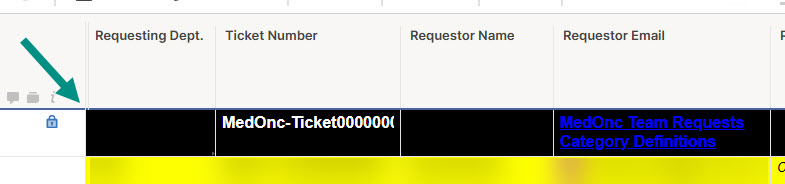
Enhancement request to add capability to freeze row (like freeze column)
Sign in to see the current vote count, add your own vote, or leave a comment.
Hi, I hope you're well and safe! As a potential workaround, add the information to the Sheet Summary section and open it up as needed or keep it open all the time. Would that work/help? I hope that helps! Be safe, and have a fantastic day! Best,Andrée Starå | Workflow Consultant / CEO @ WORK BOLD ✅ Did my comment(s) help/answer your question or solve your problem? Please support the Community and me by marking it - Insightful 💡- Vote Up ⬆️ - Aweseome ❤️ - or/and as the accepted answer. It will make it easier for others to find a solution or help to answer! I appreciate it, thanks!
Thank you. Perhaps we could create a Sheet Summary and link the field to the Project Name from the Profile Data. Our Control Center solution does not use Sheet Summaries, so we would need to update our templates to do this.
Happy to help! Yes, that's usually what I do in my client solutions. This also simplifies adding the data on each row using column formulas, so it might be easier to report on. ✅ Remember! Did my comment(s) help/answer your question or solve your problem? Please support the Community and me by marking it - Insightful 💡- Vote Up ⬆️ - Awesome ❤️ - or/and as the accepted answer. It will make it easier for others to find a solution or help to answer! I appreciate it, thanks!
Upvoting this feature as well. Desperately needed! We have several header rows and navigation rows at the top of each sheet, and every time we sort the sheet the header rows get sorted as well. Major pain!
This is basic spreadsheet functionality that Smartsheet has overlooked. I hate to be negative, but some of the "enhancements" that engineers have spent hours developing are much less impactful than this simple request. Smartsheet, get it done please.
This definitely should be on the roadmap!
Being able to free the top row in grid view would be incredibly helpful. Sorting is already in place with the filters, but being able to scroll down while maintaining visibility to the top line.
Does anybody know if this is on the road map for the Table view?
And here we are, 3 years later and still unable to freeze a header row.
Oh, but Smartsheet has "improved" the Sheets view so that we can't create and move sheets between folders! Everyone sure wanted THAT change!
I would love the ability to freeze the top row for long sheets.
Would love to see this addition. It would be helpful in so may ways with how we are using it today and plans for tomorrow.
need the ability to freeze top rows so that when info is sorted it does not affect the un-frozen rows underneath
Highly useful
Can you add a feature to freeze a top row to prevent new form entries from being added above it? I know there is an option to add new form entries to the bottom; however, we prefer to have them added to the top and want a resource row to remain at the top
Please add the function to be able to freeze the top row so it remains in place while scrolling.
Good afternoon, Recently there was a change that made searching a dropdown by typing inside of it switch from an exact match method where typing S would only show entries that begin with S to a search within method where typing S would show all results with the letter S in them. I can see how this would be beneficial in…
Custom branding works on Alert type automations, but it would be great if that same branding was applied to Update Request automations as well.
We would like to raise a request regarding audit visibility for group management in Smartsheet. We are currently unable to determine who added a user to the group. We check the Admin Center, but could not find any information. Could you please let us know if there is a way to: Identify who added a user to a particular…