Connect with peers, share your expertise, and inspire what’s next in Smartsheet — from proven practices to practical how-to insights from fellow users and product experts.
Sign in to join the conversation:
Based on a suggestion I read on this board, I am posting a product enhancement request I just submitted for the community to see.
OneNote integration in Smartsheet to easily paste in a link to a OneNote page/paragraph/section/section group in one click, and then designate whether to open in the OneNote desktop version or web app.
Hi Craig,
What would be the advantage of defaulting to the OneNote web app vs desktop app?
Shaine,
We use OneNote internally for team collaboration on projects. Desktop OneNote is the version that offers all available features while the web app just offers a subset of that functionality, so for serious users that "live" in OneNote, the desktop version is the only option. We want to add hyperlinks to project tasks that directly open the relevant OneNote sections/pages we have set up for the task in desktop OneNote. I also mentioned a use case for external use with clients where it is preferable to have the hyperlink open the OneNote web app. Hope this explanation helps...
I would like to see a way to pull OneNote Tags into Smartsheet. We use these tags to track action items for project, but currently have to manually update the smartsheet. If there was an option for tags within a OneNote page to interface into a smartsheet page, it would eliminate duplicity and keep us nearly 100% in Smartsheet.
In your workaround above, are you copying a page from OneNote and pasting into Smartsheet? And, when you paste into Notepad, you have 2 ++ signs...what does that mean? I am trying the workaround, however confused on the workflow direction. Can you enlighten me? Thanks.
George
Craig,
I have found a way to link to the desktop version:
1. copy link to location in desktop app
2. create shortcut(on desktop is easy, though anywhere works) and paste OneNote link there
3. click Attachments box
4. drag and drop newly created Shortcut to here
this creates a direct link to the OneNote location.
Ryveted,
Sorry for the delay in getting to this. Can you clarify the steps you gave above? Specifically,
-In #2, create a shortcut to what? Usually you need to select a file or app or something to create a shortcut to.
-In #3, click Attachments box where? In Smartsheet on a particular task, or ??
Thanks
It looks like the request I was going to make has already been made. I guess I will add one more affirmative voice for development requests above.
Thanks,
Hi everyone,
Please submit an Enhancement Request when you have a moment to have your vote addedA New Way to Submit Your Feature RequestsTo make your Enhancement / Feature Request count, send in the form above because there isn’t a guarantee, it will be registered otherwise.Original Post: https://community.smartsheet.com/announcement/new-way-submit-your-feature-requests
Have a fantastic week!
Best,
Andrée Starå
Workflow Consultant @ Get Done Consulting
This is exactly the issue I also have, is the request already created, and how/were can I vote?
Can't imaging that it would be hard to allow a different type of URL
Bumping this thread to see if there has been any update to the OneNote integration with Smartsheet. My team is currently in Smartsheet implementation and meeting notes are a glaring gap we need to resolve. Currently, we utilize PWA with a OneNote notebook and we love that aspect of PWA. The hope was we could find a workaround to integrate a OneNote to Smartsheets, or, that Smartsheet would have a comparable meeting note solution. So far, we have not seen one, although we are in Sprint 1 of implementation.
Does anyone have a meeting note solution that works well for them? We are in the habit of taking extensive notes and using OneNote tags on Action Items, Decisions, Important, Critical items, etc.
I agree! This is something that I am seeing as a gap as well. The only thought right now as a workaround is to create a folder on another drive that has the onenote files on there and create a link to the file on the smartsheet. This way people would be able to access the notes and the OneNote can be synced with the desktop application for the PM to use.
Has anyone found they are able to integrate OneNote to Smartsheet yet? We would like to trigger action items to go into Smartsheet from our OneNotebooks. I see many post but no actual solutions....Going to Engage next week and hope to ask IP.
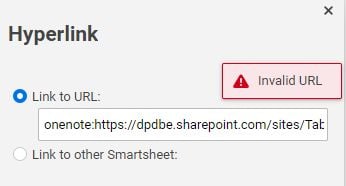
I used the proposed solution successfully. I am able to add a text "Notes" and after editing the dual links in the URL get it to launch the OneNote page in the web. However, after I use this process, the desktop app no longer works. I get the following:
Nothing resolves this except clearing out the "C:\Users\%user%\AppData\Local\Temp" folder. Has anyone found a better solution to launching into a specific page in OneNote?
Thank you
My company has smartsheet and my other co-workers use DataMesh. I have the same permissions as them but I can not use the DataMesh feature. I get this error message, "This is the Sorry! You don't have permission to use this app."
Hi Community, Has anyone migrated a complex Smartsheet solution from the NA instance to the EU instance? The solution includes Control Center/Blueprints, sheets, cross-sheet references and formulas, reports, dashboards, forms, workflows, approvals, and sharing permissions. I’d be interested to understand: What can be…