Connect with peers, share your expertise, and inspire what’s next in Smartsheet — from proven practices to practical how-to insights from fellow users and product experts.
Sign in to join the conversation:
I want to insert a couple of cross sheets formulas in the monthly data file that I add to smartsheet. It was easy to do but now I need to go back and add new columns and the formulas to past data files (several hundred). This is tedious but can be done over time. Is there any way to create a cross sheet formula in one sheet then copy the cell (with formula) to another sheet. I'm fairly certain this is not possible but would be very happy if I'm wrong. Please let me know if you have a solution or workaround. Thanks!
Hello,
Currently, we don’t have a method to copy one formula to another sheet utilizing a formula but this will be considered as a possibility for future development.
Cheers,
Eric
Smartsheet Support
Hi Eric,
I'd like to put in a vote for this functionality. I've been able to copy other formulas from one sheet to another and am dissapointed to find that I can't do the same thing with cross-sheet formulas.
Thanks,
Brianna
Hi Brianna,
You can copy one cross-sheet formula to another sheet utilizing copy and paste. However, you are correct currently we do not have a method to achieve this utilizing a formula. Formulas can reference formula produced values but not the formula itself.
This will be considered as a possibility for future development.
Have a wonderful day. Thank you for contacting Smartsheet Support.
EricSmartsheet Technical Support
Hi,
not sure if the question is well understood: it is NOT possible to copy/paste cross-sheet formulas from one sheet to another: the range references to the other sheet in the formulas seem to be defined only in the sheet where you create the formula so you get "INVALID REF" when you try and do that.
That is correct, currently, we don’t have a method to copy the cross-sheet references from one sheet to another but this will be considered as a possibility for future development. To accurately achieve this you'll want to re-establish the reference.
You still need the references to exist on the destination sheet for formulas to work.
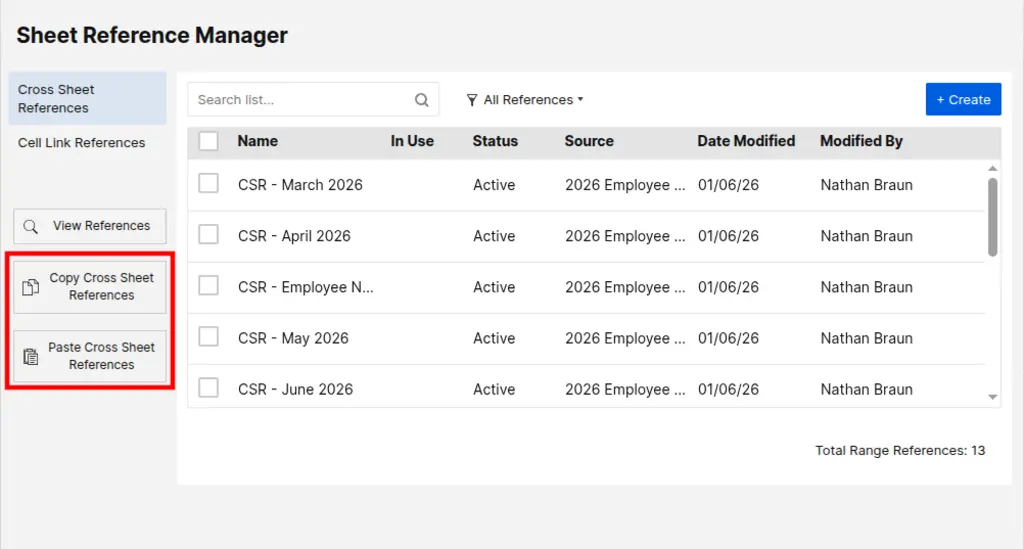
The SSFeatures browser extension can help - it adds Copy and Paste buttons for cross-sheet references. Copy your references from the source sheet, paste them on the destination sheet, then your formulas can use the same reference names.
You can read more about this feature here:
Best!
Disclosure: I'm the creator of SSFeatures.
Anyway we can make this view only for security purposes? We would like to prevent users from sending responses to other users by accident.
I am currently setting up an automation for people to get notified through their email, when they are prompted. But is there a way that they can reply in the email of a comment that will then go to the specific sheet. This way they do not have access to the sheet, but can just comment through email with updates?
I am extremely frustrated and disappointed with my current Smartsheet experience. I have paid for a Pro subscription, I am the owner and administrator of my account and sheets, and I have confirmed I am logged into the correct account. Despite this, Smartsheet is not recognizing my Pro subscription, and I am unable to…