Best Of
Re: Auto-Create Child Rows WITHOUT Bridge or API
@Paul Newcome This is a great solution ! I always see your helpful comments and decided to make an account to say thank you. I am an intern of a PM team, and currently I am designing a process to track on/off boarding employees so PMs can make changes to items like dashboards, roadmaps and forecasting sheets. My current design is a form+sheet to track who is joining and leaving. Another sheet to make it like a project/milestones (parent/child rows) to track the task progress of making changes and which PM is working on that and other detail, and group every single related workspace items into a WorkApp. I stuck at how to make the tasks tracking more automated until I saw your post. Now I am trying to combine the tasks tracking and employee tracking together. How does this design sounds to you as a pro, any feedback is greatly appreciated. Thank you again champion!
 Mike Chiu
How do you implement Deadlines?
This is sort of a feature request, but I'm posting here to see what other people do in Smartsheet or maybe even other planning software to show a deadline.
It's a funny thing, as I've seen this better implemented in hodge-podge put together spreadsheets than I've seen it in actual planning software. In such spreadsheets, I've seen people show a deadline as either a graphical dashed line superimposed over top of the cells or other graphics (yuck!) used to make a Gantt chart. However, this one thing was easier to implement - you knew if certain items crossed that line when you moved them, you had a problem.
In any company we have "hard" deadlines - or at least deadlines that are really hard to change, or that we consider ourselves to be "losing money" as time passes after and we don't have a product out the door. These may be launch dates, gate review dates, etc. But highly important dates that generally require a committee to change and/or have severe consequences if not met.
In Smartsheet and other project planning software, here are the options as I've seen them used:
- Add the deadline as a milestone in one of two ways:
- Completely independent, no predecessors or parents.
- Dependent, not directly a child task to a parent, but tied to one or more parent tasks as predecessors to this one.
- Use the baselines feature
Each of these approaches have different advantages and disadvantages:
1a. Having an independent milestone means it won't move when you shift other dates. Therefore, if you know what events need to be done before that milestone and you see their dates pass that date, you know you have an issue. However, since the predecessors aren't clearly defined, you may not know that a particular task needs to be complete before that milestone and not realize you have a problem.
1b. Having a dependent milestone means that you will directly see the effects of sliding dates on that milestone. So, when you move out your other dates, you see their direct effect on the milestone. However, if you're not watching closely - you may not see that the milestone slipped. It will move it for you, and doesn't indicate that you've missed an actual deadline. You may not even realize there's a problem if you don't have full visibility.
2. Baselines is nice, as it gives you all your original dates to compare all of your events to and you can see if your dates are slipping. But there are also a lot of disadvantages. For one, it creates a "busy" or "messy" chart with lots of dates all over, making it harder to read. I likely don't care about every single task on the list if it slips by a day or two, I only care about the effect on the final date, or one of the gates/milestones. And it still doesn't clearly show you which one of these many, many tasks is the one you really have to look out for. You could lose it in all the chaos. And maybe, you set a date for your gate review that was, say a week early from the actual deadline - so it's OK if it slips by that week, just not any further. This doesn't show you that clearly, either.
So none of the options I'm aware of give you a clear view of when you're actually "in trouble" and may miss an important date. They all require you to remember or look up information elsewhere to compare to in order to see if you're in trouble.
I would propose a feature called "deadlines" or "gates". It could be stored as a list separate from your sheet and tied to specific tasks/milestones. The interface could be similar to the current "conditional formatting" dialog box.
Instead of "If <set condition> then apply this format to the entire row"
It would read something like "The deadline for <task name> is this date"
Clicking on <task name> would then bring up a list of rows with names from your Primary Column, then clicking on this date would bring up a calendar date. You can add as many deadlines as you wish, similar to adding as many conditional formatting rules as you wish.
Once that's set, when you look at the Gantt view, it will show a tag at the top (I'm imagining a price-tag like symbol with the point pointing downward, superimposed over the dates in the Gantt chart header, lined up with the end of the deadline / due date) and a heavy dashed line from the point down to the row that must meet that deadline, where it would stop. Then you get an easy, at-a-glance view when a change in dates makes that task/milestone (presumably a "gate review") run past your deadline, or if you're even nudging close to it when looking in Gantt view. I'm running out of time today, but if anyone's interested I could mock this up for better illustration and upload it here next week.
"Past its deadline" could also be a condition in conditional formatting for date columns (normally used on the "End Date" column, I would imagine), as well, so you can highlight rows that aren't meeting their deadline.
So, I have two questions for the community (if anyone is still reading at this point):
- What methods do you have to illustrate deadlines?
- Would you like to see a deadline feature like I described above?
 BSADK
BSADK
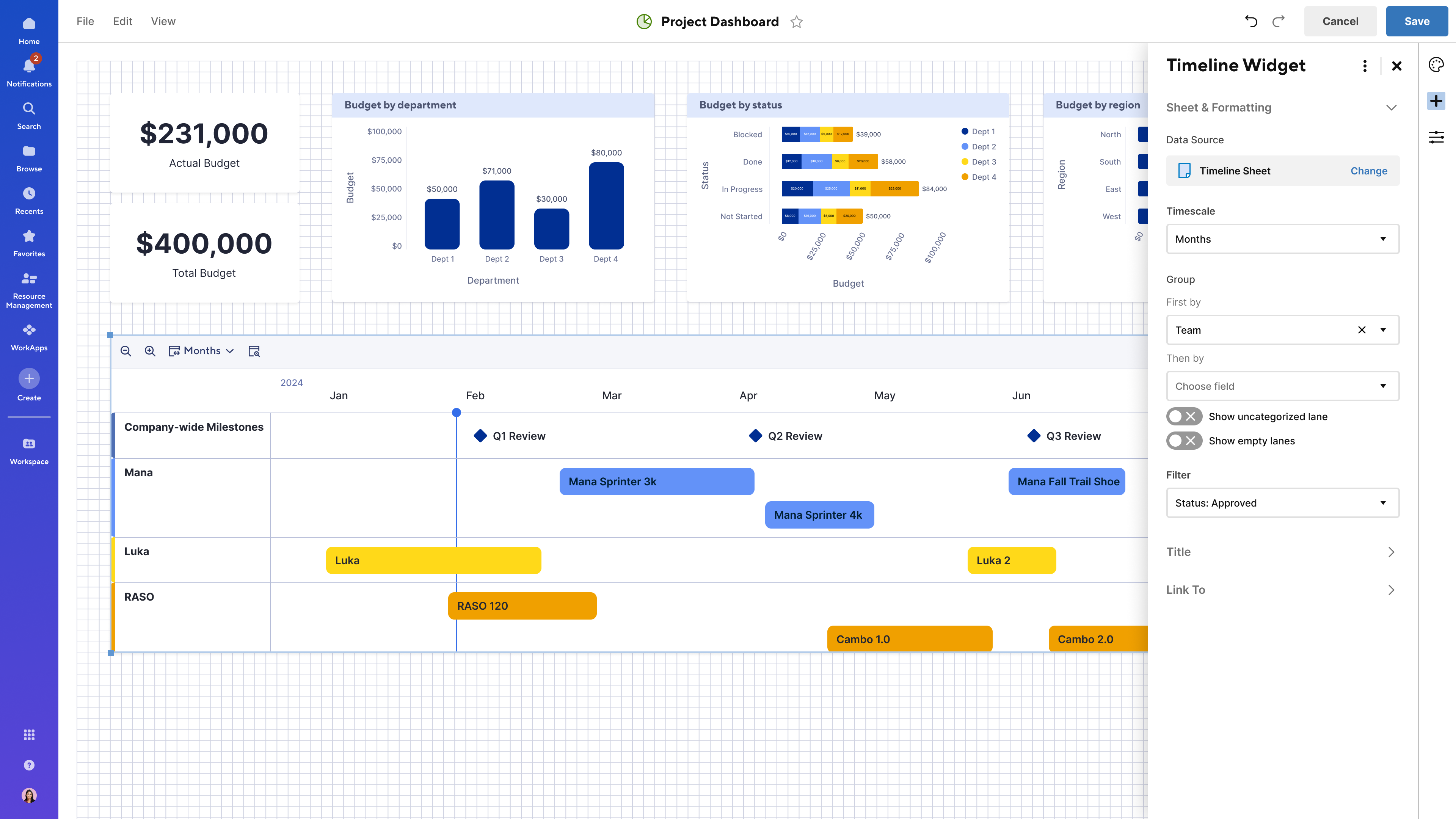
NEW! Timeline view widget in dashboards
We’re excited to announce that the highly requested timeline view widget in dashboards is now generally available! With this new widget, you can easily bring timelines from large-scale projects into a single, centralized dashboard, giving stakeholders a clear, at-a-glance view of key initiatives and milestones.
When adding a timeline widget to your dashboard, you can choose from any sheet that contains at least one date column and where you have Viewer or higher permissions. Learn More
This feature helps teams, managers, and stakeholders:
- Visualize project phases and critical milestones in real time
- Track progress alongside other relevant metrics on the same dashboard
- Quickly surface insights and drill into details to stay aligned
- Make faster, more informed decisions with improved portfolio visibility
Note: The timeline view widget fully supports dashboard themes, and users can choose whether bars and milestones reflect the dashboard theme or retain colors from conditional formatting or manual settings in the sheet. This release does not include support for timeline view reports in dashboards.
Environments availability: Commercial US, Commercial EU
Plan availability: Business, Enterprise, Advanced Work Management
Subscription Model Availability: Legacy Collaborator Model, User Subscription Model
Stay informed by subscribing to receive product release updates for curated news of recently released product capabilities and enhancements for the platform of your choosing, delivered to your inbox. As new releases occur, you will receive a weekly email with news of what's released every Tuesday.
 Jason DelValle
Re: Forms logic for single (pro users)
Great idea. As a single shop, the business account is not feasible. I have the Pro plan and being limited by the permissions is very frustrating.
 Meg Y
Meg Y
Re: Formula within cell
HI Paul,
I just managed to figure it out.
It seems that SS does not like the auto number fucntion within a cell, so I had to do a a HELPER column with auto numbering, and then the formula calls the the numbering from the HELPER column.
The formula looks like this:
=UPPER(LEFT([Stand type]@row , 3)) + "_" + RIGHT("0" + DAY([Date Requested]@row ), 2) + RIGHT("0" + MONTH([Date Requested]@row ), 2) + YEAR([Date Requested]@row ) + "_" + [Auto ID]@row
ICJ2025
Re: Working with Project Management Office
@Pete Spin You were absolutely correct that I was in the wrong template space. Thanks again! This time I made no changes/updates to the intake form and it all went as planned. But I am still afraid to make any changes so that I don't break any links! But at least I'm a step further thanks to you :)
tracey eppes
Re: Why can't I add a new user to my account as a guest or viewer?
I agree. This process is absolutely counterproductive to anyone except Smartsheet and seems to be all about revenue as I don't see how this helps the user base at all. We are forced to add new users as members and then complete further steps when we know they should be viewers to begin with. This is wasting my time, not saving it. Smartsheet is making user management cumbersome and more complex, rather than helping make anything easier. Isn't the point of a tool like this to help cut down on the time you have to use doing mundane tasks? This has caused me to spend more time exponentially in Smartsheet. It's frustrating to say the very least.
HSabin
Why can't I add a new user to my account as a guest or viewer?
I do not want to add all new users to the account as 'Members'. I see no justification for Smartsheet making the new user default 'member' other than greed. To make this even more frustrating, I am unable to change the user-level until AFTER THEY HAVE ACCEPTED THE SMARTSHEET invitation email! Please stop frustrating your dedicated users.
tzaczyk
Re: How to Add and Equate for an Empty Field?
Does it work if you plug this in?
=IF(OR([Helper 1]@row = "1", [Helper 2]@row = "1", [Helper 3]@row = "1", [Hr 1]@row = "1"), "Fail", "Pass")
 Paul Newcome
Re: How to add card and calendar view on Dashboard
Any update on this? It doesn't make sense to me that there's no calendar-view widget for the dashboard to begin with, but not having any options to customize the published/embedded calendar doesn't make sense either. I just want to display the calendar on my dashboard, and not give people the option to flip through different views of my sheet.
Laura Chow