Best Of
Re: Looking for hopefully simple formula
You can use
=DATE(YEAR(TODAY()), MONTH(ColumnA@row ), DAY(ColumnA@row ))
in column B (your target column) and then make it a column formula.
 Jacob Minnich
Re: Automation w/ nested If, Then, Else capability
Happy to hear this worked out for you!
 =Chris Palmer
Re: Automation w/ nested If, Then, Else capability
Thank You Chris!! I knew there had to be a way! I was apparently having a SR moment…
 Paul Perger
Re: Sharing to unlicensed users
@patricia0002 Are they internal or external users? Do their email addresses have the same "@domain" as you?
If they have a different domain (are external users), you can add them as guests that can edit with no additional licensing costs. If they are internal users, they will need a paid license to edit.
Some work-arounds to this include update requests and the premium add-on Dynamic View. Both of those options allow users to update data without requiring a license regardless of internal vs external.
 Paul Newcome
Re: Creating a formula to calculate Created Date column - not working correctly
Hi @Lyndie
When you are dealing with a system column like Created Date, you need to be aware that the display value and internal or back-end value are not the same.
Time zones and system columns
System columns always use UTC in the back-end, while the display value matches the time zone of the last person to access the sheet. This means that, although the display value is in the sheet-viewers time zone, formulas and API calls using system column data may return based on the UTC time zone.
In the demo sheet below, since my time zone is UTC+9 in Tokyo, any Created date before 9:00 AM shows yesterday when I apply the ISDATE function, whereas it displays today.
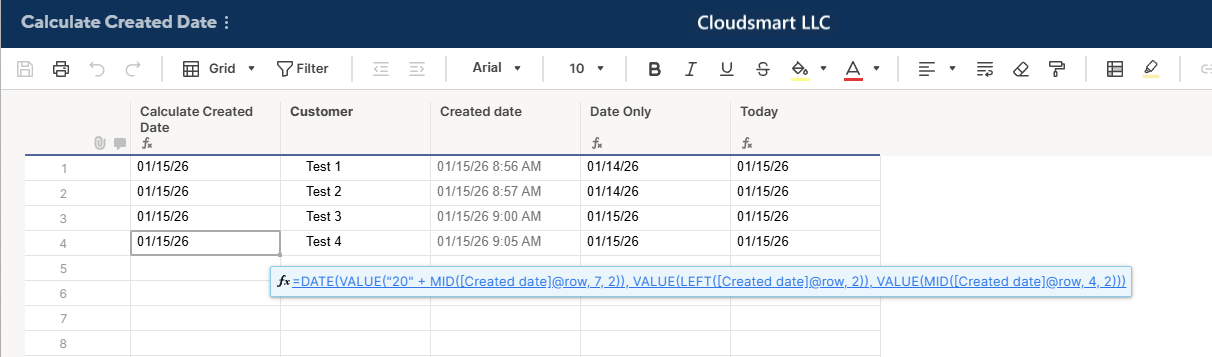
To calculate Created Date as you see it in the system column, you can use the combination of the DATE function and text functions, like the MID or LEFT, and the VALUE function.
=DATE(
  VALUE("20" + MID([Created date]@row, 7, 2)),
  VALUE(LEFT([Created date]@row, 2)),
  VALUE(MID([Created date]@row, 4, 2))
)
Once you get the desired date, you can reference it in your cross-sheet reference formula.

Re: January Question of the Month - Join the conversation and receive a badge
As a personal new years resolution, I'm hoping to be more intentional! Whether it's with my shopping habits, actually making an effort to use things I own (journals, fragrances, accessories), or maintaining relationships. I'm really excited about my progress only a few days into the new year already :)
 meagans
File menu operations in new views, now generally available!
January 14, 2026
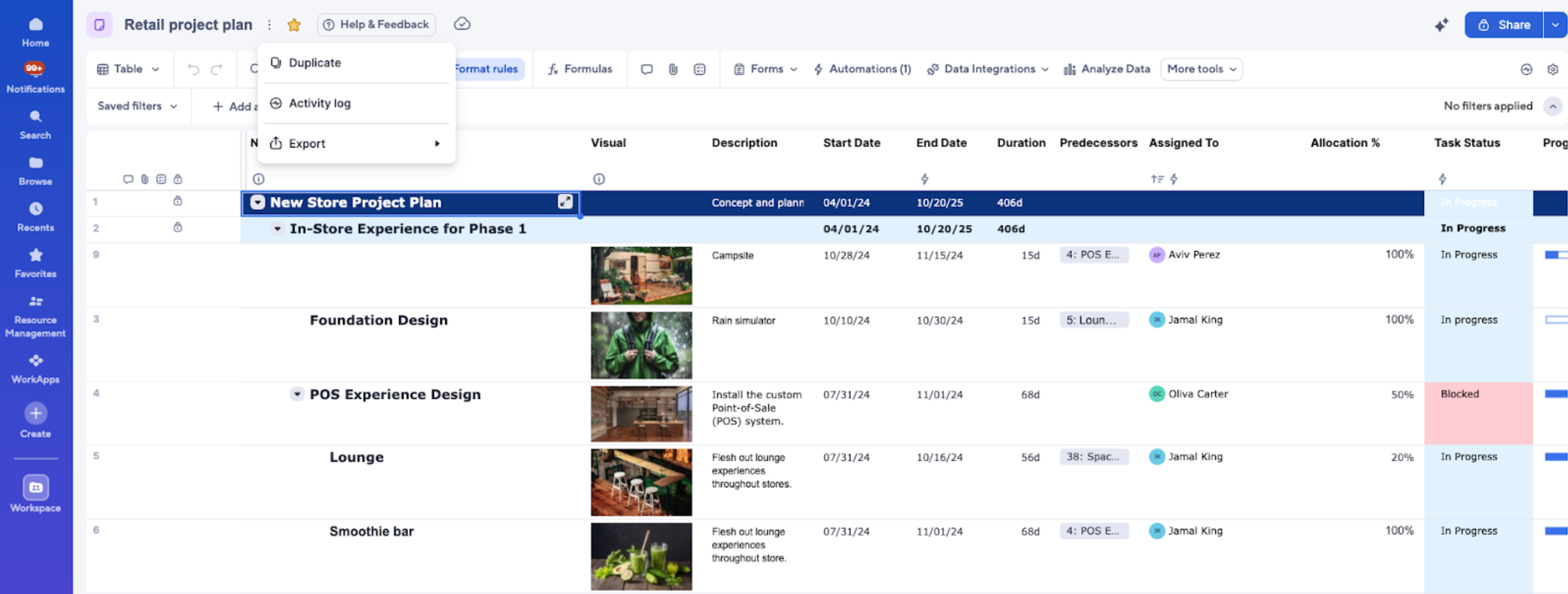
New views (table, board, and timeline) now support the File menu, which centralizes key sheet-level actions in a single, easy-to-access dropdown located beside the sheet name in the toolbar. With this menu, you can duplicate, export, and see the activity log, without needing to switch views or navigate elsewhere. Stay tuned, as additional File menu operations will be added over the course of this year.
Environments availability: Commercial US, Commercial EU, Commercial AU
Plan availability: Pro, Business, Enterprise, Advanced Work Management
Subscription Model Availability: Legacy Collaborator Model, User Subscription Model
Stay informed by subscribing to receive product release updates for curated news of recently released product capabilities and enhancements for the platform of your choosing, delivered to your inbox. As new releases occur, you will receive a weekly email with news of what's released every Tuesday.
 Lekshmi Unnithan
Re: Enhancement Request: Native SCIM 2.0 Support for Google Workspace (Identity Management)
Yes, please! I need to be able to have users assigned to Smartsheet groups immediately, without the extra effort of manually doing so.
Amanda Baker