Best Of
Re: Show Off your Smartpets
Bruno is on the left, and JR (Bruno Jr.) is on the right. Bruno is JR's Dad. Bruno passed away this past July, but he is still very much loved and missed every day. We had Bruno since he was 6 months old; he was 15 years old when he passed away. JR will be 14 years old this November.

 Ruby Gonzalez
Re: Does NOT contain formula
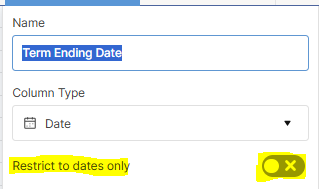
@n7teixeira Make sure all of your date columns are setup identically. In this case, since you are using a non-date entry in two of them, make sure all three have this following option toggled off:
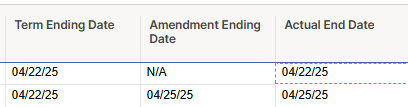
Below you will see that my table is producing the results that you are looking for. To do so please use the following formula:
=IF([Amendment Ending Date]@row = "N/A", [Term Ending Date]@row, IF([Amendment Ending Date]@row <> "N/A", [Amendment Ending Date]@row))
I hope this helps!
Regards,
Brian
 Brian Wilson DC
Re: Presenting attachments on a report widget in a dashboard
Okay, It's been five years since the first enhancement request, is there any solution for this problem, I am still facing issues with the attachments that are available in the Source report file but not visible in the Dashboard?
Ramakrishnan S
Re: April Question of the Month - Join the conversation and receive a badge

Looking up at these photos of hanging out with my BFF of 45 years keeps me grounded and reminds me of what's truly important.
 LBP_Jeannette
Re: AI Text and Summaries Column Formula
Any movement on this? I could also see this being useful to summarize what's happening on an entire row for purposes of executive summaries. I work in municipal government and we have a sheet that tracks "problem properties" (e.g. abandoned homes used for illegal activity, properties with constant blight violations, etc.) and has multiple different departments (police, buildings safety & environmental, public works, etc.) working on each property to tackle it in a coordinated manner.
It would be nice to use this column formula to have a dynamic summary of what's going on with each property that could be used for weekly updates to the mayor. Even better than that, we could then use data shuttle to create a running tally of the summaries week to week to see how things are changing over time and what progress is being made.
Tim Killeen
Welcome to the new AI Community!
This is a space for Smartsheet users that love AI to connect, share ideas, challenges, best practices and how you are using Smartsheet AI and others to transform your work.
Our Smartsheet team will be sharing helpful resources, upcoming industry events, discussion questions, and more. You’ll see us jumping in from time to time, but first and foremost, this space is yours to connect and collaborate with peers.

By participating in this community, you can earn the AI Adopter badge to showcase on your profile and use to connect with others. Introduce yourself and start engaging with your peers and the badge will be automatically added to your profile.
Need a little inspiration? Tell us:
- How long have you been using Smartsheet?
- How are you using Smartsheet AI today or planning to in the future?
- What would you like to learn from your peers using AI?
 Elizabeth Matson
Re: Core Product Certification
To be candid I would take it today and see if I pass it, assuming you have gone through the training. If you fail you can rebuy the course before the offer expires, you have 60 days to take it. I failed my PM exam by 2 points, I then went over the material again with a better understanding of what the test was asking. I passed on my second try.
 Leroy Noriega
Core Product Certification
Hi all - I am planning on getting Core Product Certification. Besides the training sessions Smartsheet offers, any recommendations on preparing for this test?
Thanks!
Re: How to simplify SUMIF formula
Hi Kowal and Kelly,
Thank you for taking the time to work through a couple of solutions. With some trial and error, we've added two rows to the top of our sheet; a row for the number corresponding with the month and a row for the year. After we update the references in the January column, we can then simply drag across and the formula updates for the rest of the year. So far, this is working well for us, but in the meantime, I'll also check out the Pivot App.
=IF(SUMIFS({USD Amount}, {Date}, AND(IFERROR(MONTH(@cell ), 0) = January3, IFERROR(YEAR(@cell ), 0) = January4)) = 0, "-", SUMIFS({USD Amount}, {Date}, AND(IFERROR(MONTH(@cell ), 0) = January3, IFERROR(YEAR(@cell ), 0) = January4)))
Jo Kuhn
Re: Formular Workday Count
Assuming your sheet is configured so that work days are Monday, Tuesday, Wednesday, Thursday, and Friday…
You start with Thursday 4/24/25.
Add 1 day and the due date is Friday 4/25 (1 work day after 4/24)
Add 1 more day (2 work days total) - Monday 4/28 as Sat 26 and Sun 27 are not working days.
Add 1 more day (3 work days total) - Tuesday 4/29
Add 1 more day (4 work days total) - Wednesday 4/30
Add 1 more day (5 work days total) - Thursday 5/1
Add 1 more day (6 work days total)- Friday 5/2
Add 1 more day (7 work days total) - Monday 5/5 (again skipping Sat and Sun)
Add 1 more day (8 work days total) - Tuesday 5/6
Add 1 more day (9 work days total)- Wednesday 5/7
Add 1 more day (10 work days total) - Thursday 5/8
Add 1 more day (11 work days total) - Friday 5/9
 KPH
KPH