Best Of
Re: LEN ... FIND ...
I got an error with that formula but you got me close enough that I was able to work it out the rest of the way. New formula I used:
=LEFT(SUBSTITUTE([Presenter Link]@row, "https://zoom.us/s/", ""), 11)
Thanks!!
 Jennifer Kaupke
Manage seat types more effectively at scale!
To provide you with greater control over your Smartsheet subscription, we have implemented the following updates:
- Modified Provisional Member counts: Now, Provisional Members are considered anyone who’s commented, edited, or created in the last 90 days versus just being shared to assets with Commenter or Editor access. Learn more.
- Quick filter to see who’s converting to paid: The new Billing column and filter show who’s converting to a paid Member this cycle, so you can quickly identify which users to review. Learn more.
- Faster seat management: We increased bulk seat downgrades from 20 to 200 users at a time to allow for scaled, systematic management. Learn more.
Environments availability: Commercial US, Commercial EU
Plan availability: Pro, Business, Enterprise
Subscription Model Availability: User Subscription Model

Stay informed by Subscribing to receive product release updates for curated news of recently released product capabilities and enhancements for the platform of your choosing, delivered to your inbox. As new releases occur, you will receive a weekly email with news of what's released every Tuesday.
 Ryan Dougal
Re: Rounding Up only.
Hi @Saj,
You were on the right track with the ROUNDUP function, but when you put a 10 after the Total@row, you are asking it to round to the nearest tenth decimal place (100.0000000000).

To round to the tens place (100.0) you need to use a negative one in your formula:
=ROUNDUP(Total@row, -1)
This will give the following result:

If you want the four rows with 100 to round up to 110, you can add the following modification to your formula:
=IF(RIGHT(Total@row, 1) = 0, ROUNDUP(Total@row, -1) + 10, ROUNDUP(Total@row, -1))
This will add ten to any number in the TOTAL column where the rightmost digit is a zero.

Hope this helps!
~Andy B
 Andy_B
Re: Selected data cannot be charted - shouldn't be happening
Hi,
I received the same error, and I tried 2 different things, one I made sure there were commas where they should be so smartseet would recognize the column data as numbers, for the columns where commas did not apply, I added a new row and manually input the data in to the new column and it worked. I hope this helps.
nwhite1020
Expanded item details, attachments, and conversations in timeline view, now generally available
June, 03, 2025
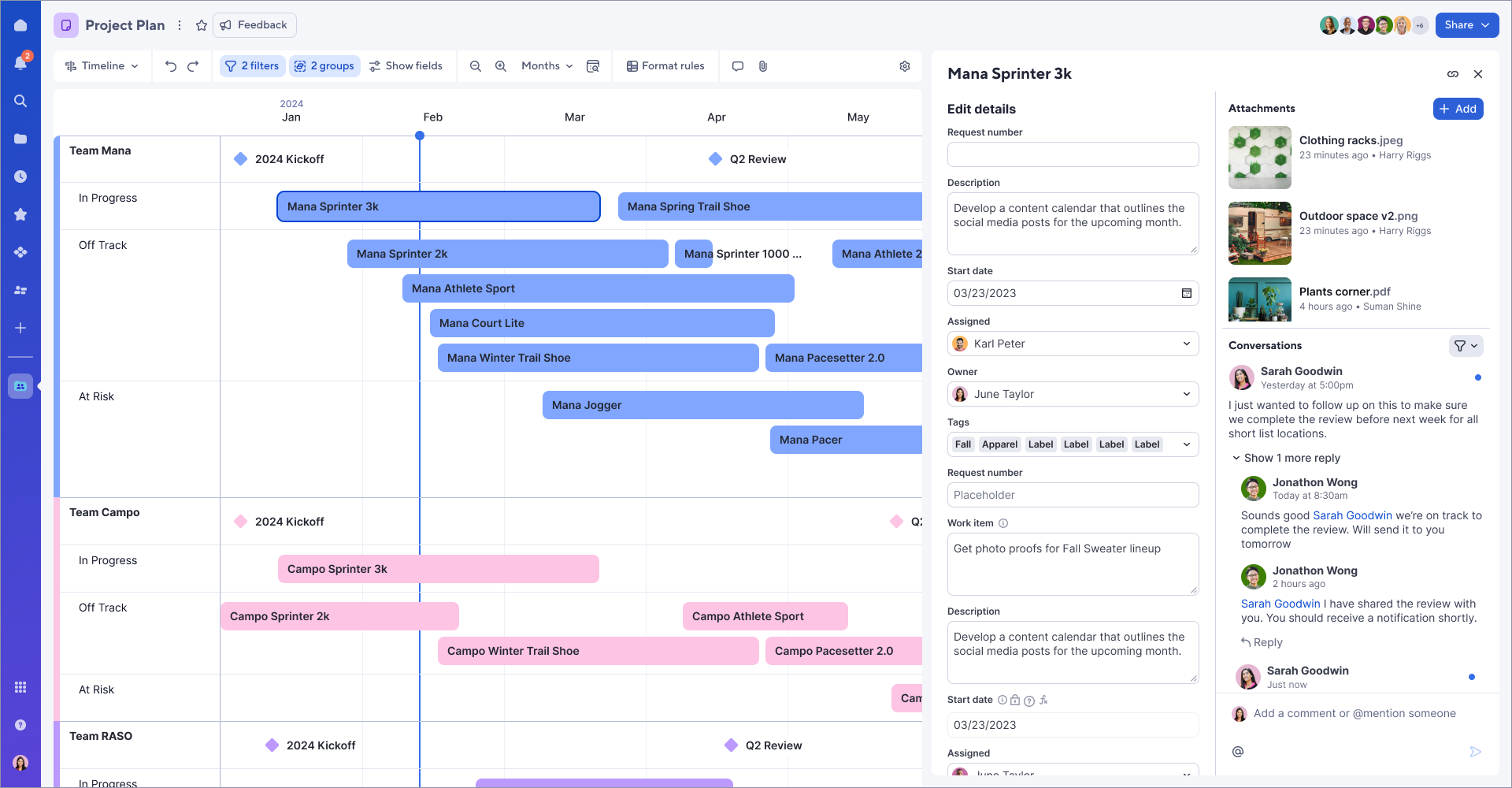
Users can now quickly and simultaneously view details, conversations, and attachments for any bar or milestone on timeline view. Simply double-click on a milestone or bar to see this information in a new right panel experience. Learn More
Environments availability: Commercial US, Commercial EU
Plan availability: Pro, Business, Enterprise, Advanced Work Management
Subscription Model Availability: Legacy Collaborator Model, User Subscription Model
Stay informed by subscribing to receive product release updates for curated news of recently released product capabilities and enhancements for the platform of your choosing, delivered to your inbox. As new releases occur, you will receive a weekly email with news of what's released every Tuesday.
 Lekshmi Unnithan
Re: June Question of the Month - Join the conversation and receive a badge
The best example of community I've ever seen - at the risk of being too serious - was my own social and professional circle earlier this year. A life-threatening illness struck my family and suddenly I found myself in a primary caregiver role, attending doctors appointments and spending most of my free time in the hospital as a visitor.
Everyone in my life stepped up beyond what I could've imagined. My team at work sent my household a Spoonful of Comfort box (look them up, they're the best!). My next door neighbors cooked us multiple meals. I had friends and family checking in consistently and allowing me a safe space to vent my fears and concerns.
Circumstances have greatly improved and life is mostly back to normal, but I'm beyond grateful for the outpouring of support I received. I now know the impact of doing small things like checking in or grabbing takeout for someone in a tough spot and will be paying it forward!
 meagans
Re: Introduce yourself & get to know your peers!
Hi I'm Isis. I'm not new to the Community, but this is my new profile. I recently took the plunge and got my own Smartsheet subscription.
 Isis T
Re: June Question of the Month - Join the conversation and receive a badge
🚀 "Automate more, stress less – connect with experts in the Smartsheet Community!"
 Naeem Ejaz
Re: June Question of the Month - Join the conversation and receive a badge
The Smartsheet Community is THE BEST. It is a supportive and resourceful group where members generously help each other, and I try to contribute by answering questions.
Isis T
Re: June Question of the Month - Join the conversation and receive a badge
What is the best example of a community you have seen?
The best example of a community that I have seen was the library network admin support group for the Sirsi-Dynix Integrated Library System from the year 2006 to the year 2011.
That group was small enough and specific enough that we spoke the same 'tech' language with each other, and we came together from all over the world to support each other in our day-to-day challenges.
Participation was optional, but due to the nature of the work it became necessary for me to follow along every week.
Plus, this was at a time when our employers would send us to the annual conference to meet each other face-to-face, which also made our connections to each other stronger.
Library folk are naturally inclined to seek and share information with each other, and it was a perfect recipe for a strong community.
 virgh
virgh