Best Of
Re: 作業時間収集
@Takeshi Matsuo さん、お疲れ様です。
毎日、ワークフローでアラート又は更新リクエストを行うために、フォームのデータが入る作業時間収集シートのほかに、作業時間収集リクエストシート、のようなシートを用意します。

シートにはリクエストしたい人のメールアドレスと、フォームのURLを配置します。
(例ではサマリーフィールドに配置し、列の式で参照しています。)

式 =FormURL#

ワークフローは以下のように設定します。順番が逆になりましたが、上のメールのイメージは、テストで送付してみたものです。

下はURLをクリックしてフォームに入力した結果です。
ちなみにログインを求めてメールと日付は自動で取得するようにしています。


Removing Old Users from Member True Up
In the admin centre when I change old members to 'No Access' but they reappear as members the next day. How can I remove them completely and stop this happening?
 Andrew Gardner
Re: Conditional Formatting Combined with Dropdowns and Dates
Hi @Scarlet Johns! Thank you for the response! I gave it a try and got unparseable. Is the formula placed in each cell, adjusting the letter/number based off the cell location? Also, I'm not sure what Scarlet direct install sheet is..?
Is this possible - Lets say the date in the yellow cell is 5/1/2025 and the dropdown for a task cell in the same column is Not started. Can a formula keep that cell white until it is 5/1/2025 and then on that date, turn the cell pink? (that may be what you answered, but I could be misinterpreting it).
 melissalk
Re: April Question of the Month - Join the conversation and receive a badge
I assemble and dissemble my workspace every morning and evening as I work from home and it's a small home! I am lost without my remarkable and a second monitor, which makes me very pragmatic in my desk space area. My "desk" (kitchen table) looks out on a tidal split from the New River and I get birds and lizards and people SUP and canoeing by on their day while I toil in documents, spreadsheets and projects.
 Lisa Larson
Re: April Question of the Month - Join the conversation and receive a badge
As I'm often changing desks, the good old fella who is always following me around is my cup of coffee! Recently, my bottle of water has also been trying its best to keep up the pace, but I should be more supportive of it. 😅
 nat_ss
Get Ready for the AI + Smartsheet Webinar on PDFs
🧠 AI-Powered Document Analysis: Transform Any PDF into Smartsheet Workflows
📅 Wednesday, 14 May 2025
🕐 13:00–14:00 CEST (Berlin)
📍 Online | [Add to Calendar – attachment included]
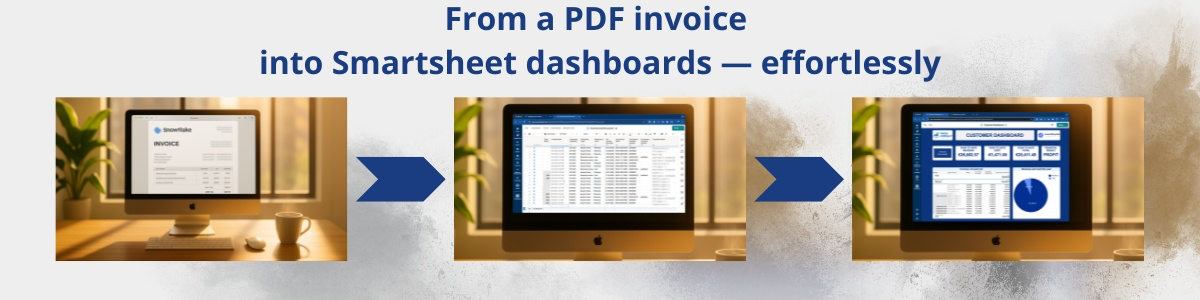
We’re excited to welcome you to this free, interactive 1-hour session where we’ll explore how combining Smartsheet with Azure OpenAI is changing the way businesses process documents — faster, smarter, and more securely.
✨ What you’ll experience:
- Live Demo: Watch how invoices, purchase orders, and specifications turn into tasks, Gantt charts, dashboards & alerts — all within Smartsheet.
- Real-World Use Cases: See how to save time, reduce errors, and launch projects faster.
- Expert Insights: Dive into the science behind AI-powered workflows and secure document processing.
- Interactive Polls & Kahoot Challenge
- Q&A with our experts and a special offer revealed at the end!
🎙 Meet Your Speakers:
Maxim Lobko – Smartsheet Expert and Founder of MASA Consult
📊 Maxim will showcase real-world document automation in action.
Dr. Alexander Askinadze – Data Scientist
🔍 He’ll break down the AI behind the scenes and how your data stays safe and GDPR-compliant.
Feel free to connect with our speakers on LinkedIn ahead of time — they love engaging with forward-thinkers like you!
📌 Don’t forget: Your calendar invite is attached.
We’ll also send you a reminder on the day with your access link and additional goodies.
Looking forward to seeing you on 14 May!
 kowal
kowal
Re: Symbols
Hi,
I hope you're well and safe!
You can use other symbols such as UNICHAR, CHAR, or Emojis.
More info:
Great resource that Paul Newcome put together
Would that work/help?
I hope that helps!
Be safe, and have a fantastic day!
Best,
Andrée Starå | Workflow Consultant / CEO @ WORK BOLD
✅ Did my comment(s) help/answer your question or solve your problem? Please support the Community and me by marking it - Insightful 💡- Vote Up ⬆️ - Awesome ❤️ - or/and as the accepted answer. It will make it easier for others to find a solution or help to answer! I appreciate it, thanks!
 Andrée Starå
Re: Random assignation
Hi Alberto,
James' solution would definitely work, but here is an alternative: If you are good with assigning tasks round robin where task 1 goes to person 1, 2 to 2, etc then task 5 goes to person 1 again you could do this:
create a separate sheet with the list of team members and column for a Row ID

Then add two columns to the sheet with the intake form, one is Row ID which is an Auto-Number the other is a contact column with the following formula: =INDEX({contact}, MATCH(MOD([Row ID]@row, MAX({LU})) + 1, {LU}, 0)). /* {contact} is the Team Member; {LU} is the Row ID Lookup.

This is also flexible if you want to add or delete team members to the Team Assignment list as long as you keep the "Row ID Lookup" in sequence.
Bob Kahn
Group Management: Download list of group members
Hi! I am a sys admin and manage groups for our account.
I have to do an audit/update of a large Group in Group Management. I received a new csv master list of the group of members, including all who are already in the group, and those new members who will need to be added to the group.
I think I have to compare who is in the list against the csv file so I can determine the new members I'll need to add.
But I don't seem to be able to capture the member list from Smartsheet. The Group Sheet Access Report does not contain the list of members.
And I don't see any option to download a member list, nor will it allow me to select the text of the list of members within my browser so that I can copy and paste into my excel file.
Any suggestions?
 Jodie Kelley
Re: How to match two columns with text and return "match" or "no match"
Try this:
=IF([TSA Scope Description (NEW)]9 = [TSA Scope Description (Old)]9, "Match", "No Match")
Alternatively, if you're doing multiple rows, you can use:
=IF([TSA Scope Description (NEW)]@row = [TSA Scope Description (Old)]@row, "Match", "No Match")
 SteyJ
SteyJ