Best Of
Re: Table View: Prevent Chrome Save Pop-up Window with CTRL+S
Thanks for the feedback, Neil! Team has a fix in for this that should be showing up sometime in the next week or so. Keep the feedback coming!
 tyson
tyson
Re: Who can help identify my issue with cross sheet index matching formula?
Please try changing [MRN] to MRN@row.
=INDEX({Destination Care Fund Statement of Need Range 1}, MATCH(MRN@row, {Destination Care Fund Statement of Need Range 2}, 0))

Re: Color Coding for Calendar View
@Peggy Parchert that was very helpful. Thank you.
 LizM_Genesee
Re: Smartsheet Intelligent Work Management and McLaren Formula 1
Great video, McLaren. The ideal way that Smartsheet is to work is to make sure all 14,000 parts, and schedules are aligned.
I use Smartsheet as a PMO within an Agricultural Shared Services Company. From Project Intake, to Prioritizing, to Project Plans for simple to complex projects. Smartsheet is our preferred platform we use (that I introduced to the company). So honored to be its ambassador ! I love using the automations, and notifying individuals. The less people have to remember, and have smartsheet remember for us, takes some much out of our minds, and gives us peace!
 Paul.Woodward
Re: April Question of the Month - Join the conversation and receive a badge
@Paul Newcome Thanks Paul! Hey, congrats yourself! It's cool knowing there's other folks here who have also overcome nicotine - we've definitely got this!
 Will Duplex
Color Palette

OK,
So I figured others might find this useful. I couldn't find it, so I made it by exporting the palette from SS into Excel and divining the numbers. It's the RGB color scheme for Smartsheet for Excel 2013.
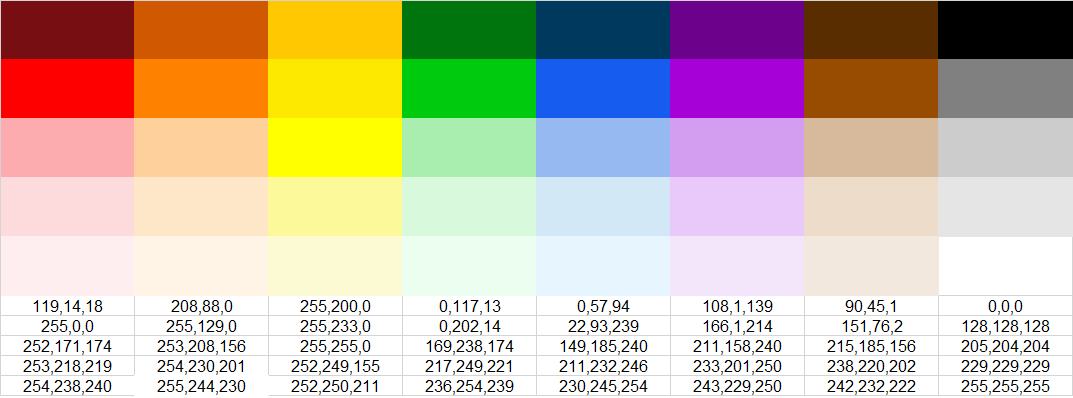
 Brad Jones
Re: April Question of the Month - Join the conversation and receive a badge
Looks like it was fixed behind the scenes. I should know better than trying to attach a google chat item. The Hoya is great; it reminds me of my people and is hard to kill.
 CharlieMN
Re: Display a date from one column into a text column of another
Your last one is the closest. Try adding a plus before the quotes.
=INDEX(…………….) + ""
 Paul Newcome
Re: Dashboard - How to Add Dynamic Editable Text on Dashboards
@Devi An Devi: Here's the best way to manage this. You will need four separate documents:
Documents
- A sheet to capture all of your PM tweets. You will need to have three columns: "PM Name," "Update Date," and "Update Tweet" (or something along those lines)
- PM NAME: Make this Column2 and change it to a dropdown menu. Add all of your PM names here.
- UPDATE DATE: Make this Column3 and change it to a "Date Type" column and make it "date only."
- UPDATE TWEET: make this your Primary Column, since this only needs to be a text field.
- Using the sheet to collect the data above, make a form that directs back to this sheet. You can provide the same form to all of your PMs and this will function as a repository for all of the data you wish to push out to your dashboard.
- You will need a data sheet designated to act as a place to collect the most recent data to push to your dashboard AND as a helper column location to navigate your desire to have this data change live. I will include the formulas below.
- Your dashboard. This will direct back to your data sheet in step 3.
For the Data Sheet your first step will be to create Helper Columns to allow you to navigate identifying the most recent data a PM has put an entry. To do this you will need Three Separate Columns:
NAME OF PM - In this column list every PM that you need to collect an update tweet for. Please list one PM per row. It should look something like this:

Last PM Entry Date - The second column needs to be a date column, but do not select "Date Only" as you are going to need to enter in a formula to collect this date. The formula is as follows:
=MAX(COLLECT({Update Date Column From Your PM Data Sheet in Point 1 Above}, {PM NAME Column From your PM Data Sheet in Point 1 Above}, [NAME OF PM]@row))
What This formula will do is reference the entire Date Column on Your Sheet that collects the submissions rom your form and pull back the MAX, or most recent date for the name of the PM you assign to this search. Make sure for the two parts of the formula above that reference the other data sheet (Point 1 above), that you select the entire row as the reference, so as new data populates it catches it).
PM UPDATE TWEET - The Third column on this data sheet will be the equation that takes your date you've identified as the PM's most recent tweet date and then goes and finds the Tweet that matches both the PM name and the Date you've identified. That formula looks like:
=INDEX(COLLECT({Reference the entire UPDATE Tweet Column from your data sheet from point1}, {Reference the PM NAME Column from your data sheet in Point 1}, [NAME OF PM]@row, {Reference the entire Date Column from your data sheet in Point 1}, [Last PM Entry Date]@row),1)
So your data might come back looking like this:
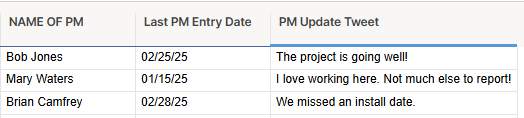
Then you simply build your dashboard and have your Text Widgets Just be a fixed name for your PM and then the actively changing widget point back to the tweet. You could also add a widget that points back to capture the most recent date.

I hope this helps!
Brian Wilson DC
Re: Is it possible to copy an automation workflow from one sheet to another sheet?
@SSFeatures - Man, this was exactly what I needed. I had to copy a new, two-part automation across almost 15 sheets. This saved me so much time! Thank you.
I still had to update one of the automations on each sheet, because it had settings that wouldn't carry over, but this was still a big time saver. I'm interested in seeing what else you have planned for this extension.
 Kevin M.