Best Of
Re: Community Corner Newsletter [May 2025]
Hello! Yes, Spring has Sprung! I moved to California 2 years ago from Michigan, so Spring starts earlier here. So amazing. I am not sure I am cut out for cold any more!
Welcome to all of the new Community Members!
I really like table view, and since it is relatively new still, I am still learning, and growing with it. Excited to see where it leads!
Happy May, Everyone!
 Paul.Woodward
Re: SmartStories - Celebrating 10 Years of the Smartsheet Community
This is awesome! I love all the comments mentioned and the ones I read on the announcement. Thank Q 💙
 Yvonne Smythe
Re: Sumif, index/match and iferror help
If I'm understanding correctly, you're trying to total "Untreated" where the date on the source sheet is the date on the current sheet row and the shift on the source sheet is "1st."
If that's accurate, I think you're complicating matters with the Index/Match. You can do what I'm describing using SUMIFS. Note the plural - so the difference between this and your SUMIF is essentially "the sum if this and if that and if the other and so on" multiple criteria are met, instead of looking for just one criterion.
=SUMIFS({Untreated}, {Date}, Date@row, {Shift}, "1st")
More on the SUMIFS function:
Good luck!
 Kerry St. Thomas
Re: Workspace Access member list
Hi @JinwonK!
For the first part, it sounds like you might be referring to the Sheet Access Report. This report shows who has access to items in your account, their permission levels, and the last time they accessed something, very useful for audits!
To generate this report:
- Sign in to Admin Center
- Go to Users and Groups > User Roles and Reports
- Select More Actions > Sheet Access
- Check your email for the report
More info here: Sheet access and published items reports
As for your group-related questions:
- Yes, you can create Groups if you’re a Group Admin or System Admin. If you're not, you’ll want to ask your System Admin for access.
- Once created, Groups can be used to quickly share items or send alerts—all members will be included when you use the Group name.
- Everyone in the Group will receive the same permission level you choose when sharing an item.
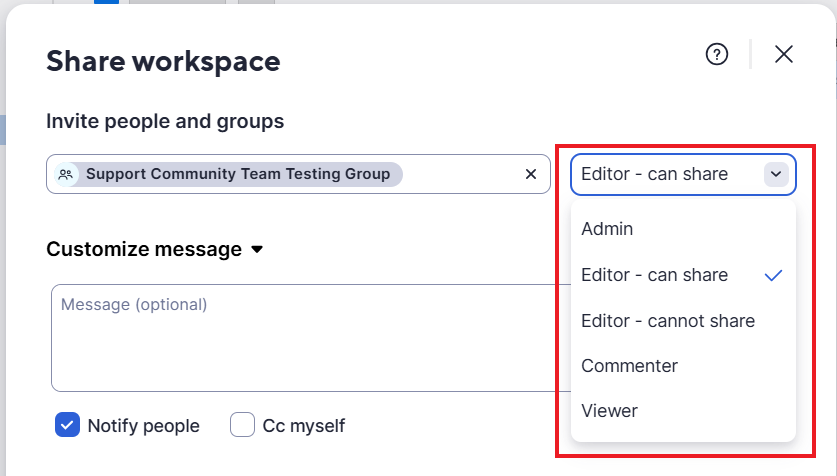
- To create a group:
- Go to Admin Center
- Go to Users and Groups > User Roles and Reports Click Create Group
- Add a name and members, then hit Create
You can learn more about Groups here: Manage Smartsheet contact groups
Hope this helps! Let me know if you have more questions.
Cheers,
Isaac.
 Isaac A.
Re: Community Corner Newsletter [May 2025]
We're so proud of you @Maxwell Griffith! I have the best running coach in the game for my lil cutie 5Ks. And @Chizu Hieida's song pick fits so perfectly for you!
 Alison C.
Re: Happy 10th Anniversary Community + Giveaway!
Incredible honour. Thank you!
SMARTSHEET has always been a fantastical, wonderful, dreamworld in which I wander and discover more and more incredible and beautiful treasures.
 Yulichka
SmartStories: Celebrando 10 años de la Comunidad de Smartsheet
Buen día, Comunidad:
¿Recuerdan cuando en febrero celebramos el décimo aniversario de la Comunidad? Compartieron comentarios tan hermosos, que decidimos dedicar nuestro episodio más reciente de SmartStories a destacar algunos de nuestros favoritos.
Un gran reconocimiento a los miembros de la Comunidad que aparecen en esta edición, incluidos algunos que han estado aquí desde el principio: @JLC, @Shaffi Mithwani, @jmyzk_cloudsmart_jp, @Yvonne Smythe, @Tabitha Hunter y @Loann McGee 🤩
A todos los que participaron en la celebración de los 10 años, ya sea que vean su nombre aquí o no, ¡Sus contribuciones son lo que hacen de la Comunidad el lugar increíble que es!
Más SmartStories
👀 ¿Qué historias le gustaría que destaquemos a continuación? ¡Cuéntenos en los comentarios!
 Rebeca S.
SmartStories - Smartsheet コミュニティ10周年記念
コミュニティの皆さま、こんにちは。
2月にコミュニティの10周年をお祝いしたことを覚えていらっしゃいますか?皆さまからとても素敵なコメントをいただきましたので、SmartStories の最新エピソードで、お気に入りのコメントをいくつか紹介させていただくことにしました。
今回の特集で登場されたコミュニティメンバー: @JLC 、@Shaffi Mithwani 、@jmyzk_cloudsmart_jp 、@Yvonne Smythe 、@Tabitha Hunter 、
@Loann McGee (この中には初期メンバーも含まれています)に、大きな拍手を送りたいと思います。🤩
10周年のお祝いに参加してくださった皆さま、ここにお名前がある方もない方も、皆さまの貢献がコミュニティを素晴らしい場所にしているのです!
その他のSmartStories
👀次はどんなストーリーを特集してほしいですか?以下のコメント欄でお聞かせください!
Rebeca S.
SmartStories: Celebriamo i 10 anni della Community di Smartsheet
Salve Community,
vi ricordate lo scorso febbraio, quando abbiamo celebrato i 10 anni della nostra Community? Avete condiviso commenti così belli che abbiamo deciso di dedicare il nostro ultimo episodio di SmartStories a metterne in risalto alcuni tra i nostri preferiti.
Un sentito ringraziamento ai membri della Community presenti in questa edizione, inclusi alcuni che ci accompagnano fin dall’inizio: @JLC, @Shaffi Mithwani, @jmyzk_cloudsmart_jp, @Yvonne Smythe, @Tabitha Hunter, e @Loann McGee 🤩
A tutti coloro che hanno partecipato alla celebrazione dei 10 anni, che il vostro nome compaia qui o meno, i vostri contributi sono ciò che rende questa Community un luogo straordinario.
Altre SmartStories
👀 Quali storie vi piacerebbe che mettessimo in risalto nel prossimo episodio? Fatecelo sapere nei commenti qui sotto.
Rebeca S.
Re: Formula help to convert from total days to business days
@Chris Palmer This worked perfectly. I really appreciate your help!
 jgenove