Best Of
Re: August Question of the Month - Join the conversation and receive a badge
For me, the absolute best part is when a new user posts “This solved my problem!” after the community helps them a real reminder that the platform is about sharing knowledge and lifting each other up.
 Naeem Ejaz
Re: August Question of the Month - Join the conversation and receive a badge
What I appreciate about the community is the diversity of background and use cases. Often times, I got siloed in the industry and area where I work in. However, the Smartsheet community is broader than that and solutions to problems I see in my world can easily come from people who has no clue of my world, but might've faced a similar problem and already resolved it
 AntonioC
Re: August Question of the Month - Join the conversation and receive a badge
My answer is simply the community itself. I used to think I was on an island alone with my enthusiasm for Smartsheet until I learned about the SS Community. Every user is proud and collaborative and its so great to know we are all here for each other to help boost ideas, find solutions, and have nerdy talk with.
I definitely am NOT alone on an island. I found my people. 😊
 Paula Grahame
Re: Automation back and forth
Hi @MWJ
First, the move rows and copy rows automation has this limitation to prevent an endless loop.
To avoid creating endless loops, Smartsheet doesn't initiate the Copy Row action when the trigger cell includes cross-sheet formulas or is linked to other cells. To work around this, use time-based automation or recurrence workflows.
So, I set up the workflow's trigger to be time-based. (See the middle image.)
The image below is before the trigger.
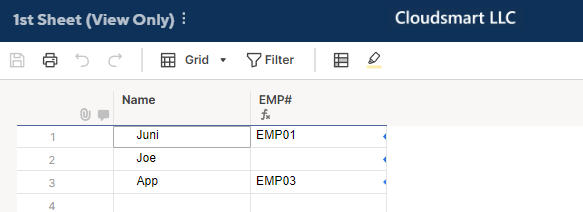
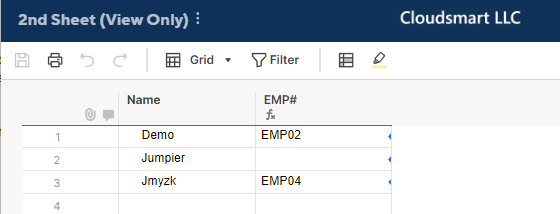
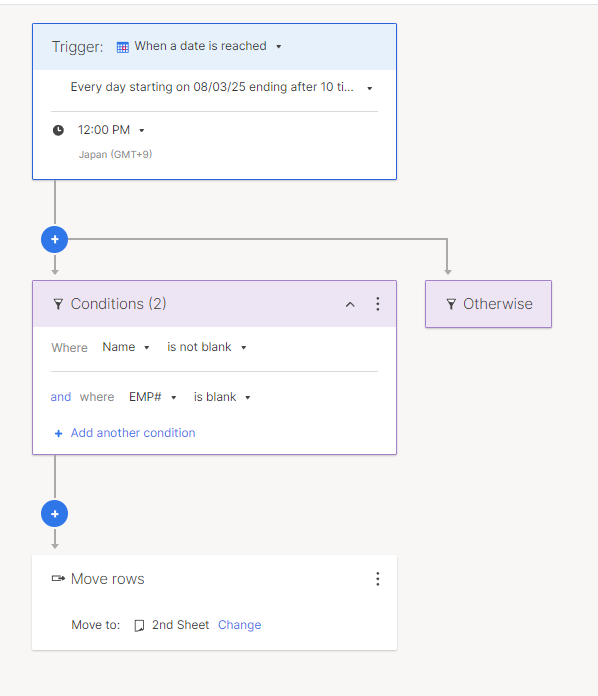
I used Run now, on the 2nd Sheet, and here is what the 1st Sheet gets.
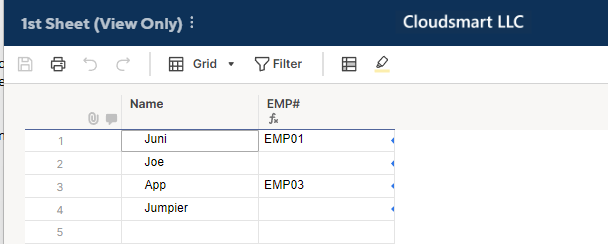
Then, at noon, rows 2 and 4 were moved to the 2nd Sheet.
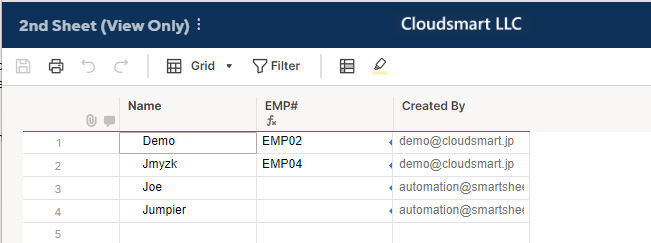
It may be a good idea to change the trigger time on the 2nd Sheet.
By these setups, every day at noon, EMP# blank rows on the 1st sheet move to the 2nd Sheet.
Then, at 1:00 PM, from the 2nd Sheet, all the EMP# blank rows, including the one moved from the 1st Sheet, move to the 1st Sheet.
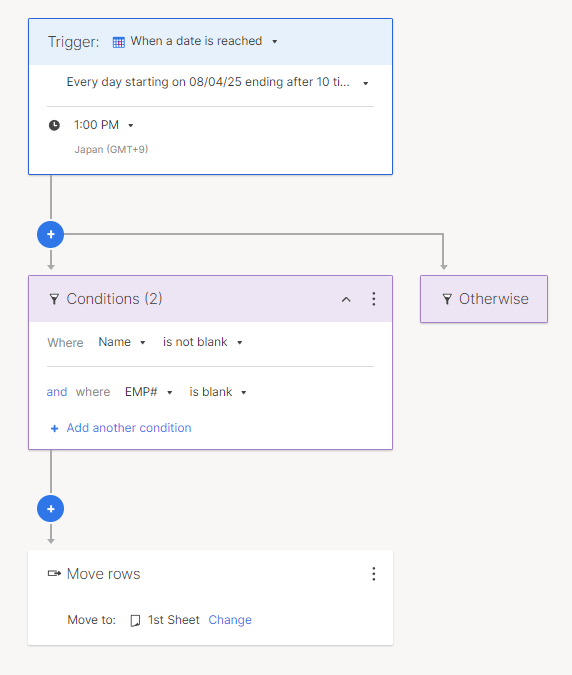
Alternatively, as the updated 2nd Sheet's image shows, if you add the "Created By" column, the rows moved or created by the Smartsheet automation have 'automation@smartsheet.com', we can change the automation to exclude them.
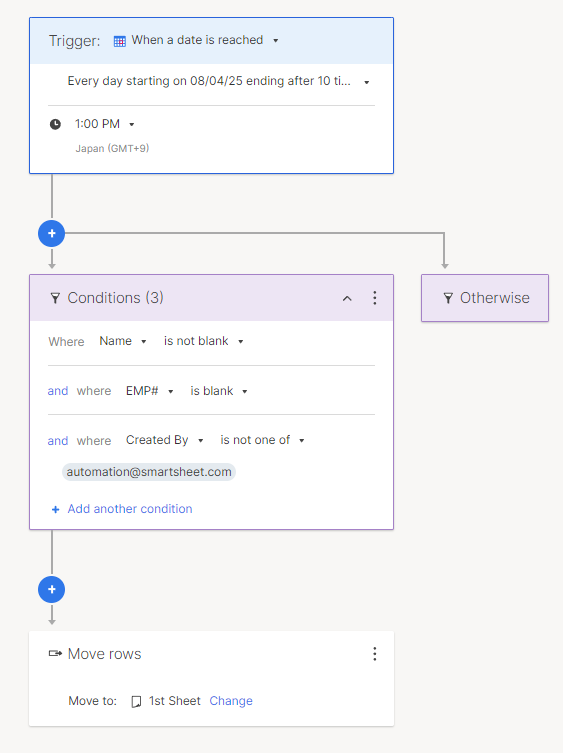
But my question is, why do you want to move the rows back and forth in the first place?
One possible scenario would be that each Sheet has a different reference, so on another sheet, the name may get the EMP#.
P/S
I added a name, Yoshi, in the 5th row of the 2nd Sheet to see what happens at 1:00 PM.
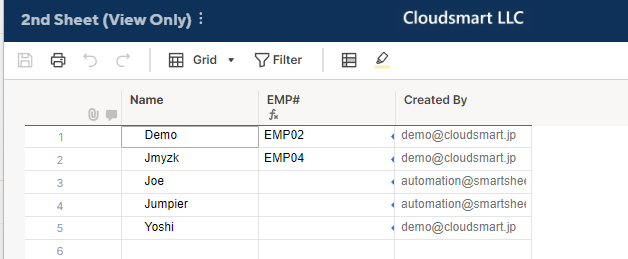
The result
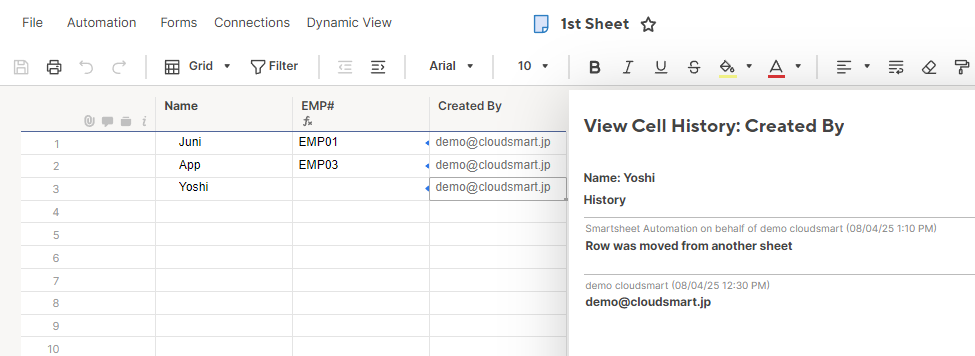
As expected, only the 5th row was moved, but the Created By is not automation@smartsheet.com.
So, the 3rd condition in the above workflow may not be so reliable.

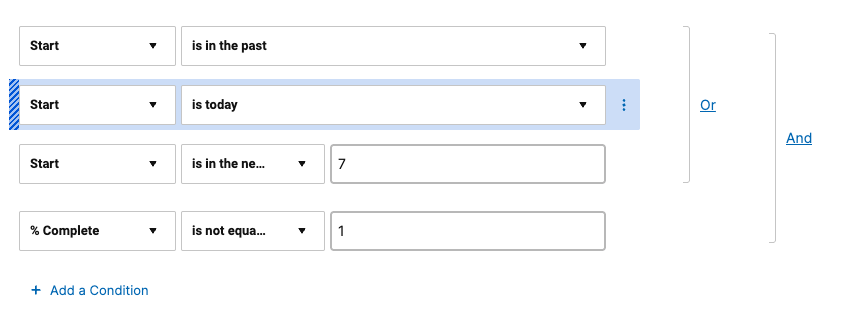
Re: Show tasks that are happening today in a report
You could skip the extra column and set your report filters like so:
 Paul Newcome
Re: Created Date column - Switched to text/number. Can it be switched back?
You should be able to switch it back with no issues.
Paul Newcome
Re: How to control user access by record level
Hi,
I hope you're well and safe!
A solution that would be perfect for this use case is the premium add-on, Dynamic View.
Is that an option?
More info:
I hope that helps!
Be safe, and have a fantastic day!
Best,
Andrée Starå | Smartsheet Expert Consultant & Partner / CEO @ WORK BOLD
✅ Did I help answer your question/solve the problem? Please support with💡 ⬆️ ❤️, and/or ✅ Answer. This will make it easier for others to find a solution or help answer. I appreciate it, thank you! 🙏
 Andrée Starå
Re: Increasing Cell Limits
For Enterprise plans, table view allows users to create large-scale sheets that support up to 1,000,000 cells with up to 50,000 rows or 400 columns.
✅ Remember! Did I help answer your questions or solve the problem? Please support with💡 ⬆️ ❤️, and/or ✅ Answer. It will make it easier for others to find a solution or help answer. I appreciate it, thank you! 🙏
Andrée Starå
Smartsheet WorkApp
Hello Smartsheet Community!
I wanted to share how we are using WorkApps our Company to drive efficiency and simplify project execution across our Group Transformation Model.
What is WorkApps - WorkApps is a no-code platform within Smartsheet that allows you to build custom, role-based applications using the sheets, dashboards, reports, and forms you already have — with zero coding required.
Why We Love WorkApps:
- Centralized Experience – Combine dashboards, project plans, forms, and reports into a single, streamlined app. No more tab-hopping!
- Role-Based Access – Provide tailored views to each stakeholder. PMs can monitor timelines while team members focus on their assigned tasks.
- No Coding Needed – Drag-and-drop functionality makes app creation simple for business users — no IT help required.
- Improved Collaboration – Everyone stays aligned with all project essentials in one place.
- Mobile Ready – Optimized for on-the-go users and field teams to stay connected and productive.
WorkApps helps us bring structure, clarity, and speed to project execution.
Whether you are in project management, operations, or business transformation, WorkApps is a game changer turning strategy into action, fast.
Would love to hear how others are using WorkApps in your organizations!!
 LijuGeorge
Re: August Question of the Month - Join the conversation and receive a badge
@Paul.Woodward I'm genuinely so happy that you feel that sense of communal and familial spirit here. You're all helping us make this Community what it is, and seeing you support and celebrate each other is such a joy.
@Will Duplex We love celebrating those achievements that represent all your effort and hard work. And that Core Product Certification badge looks great in your (very impressive) badge collection. 😁
 Rebeca S.