Best Of
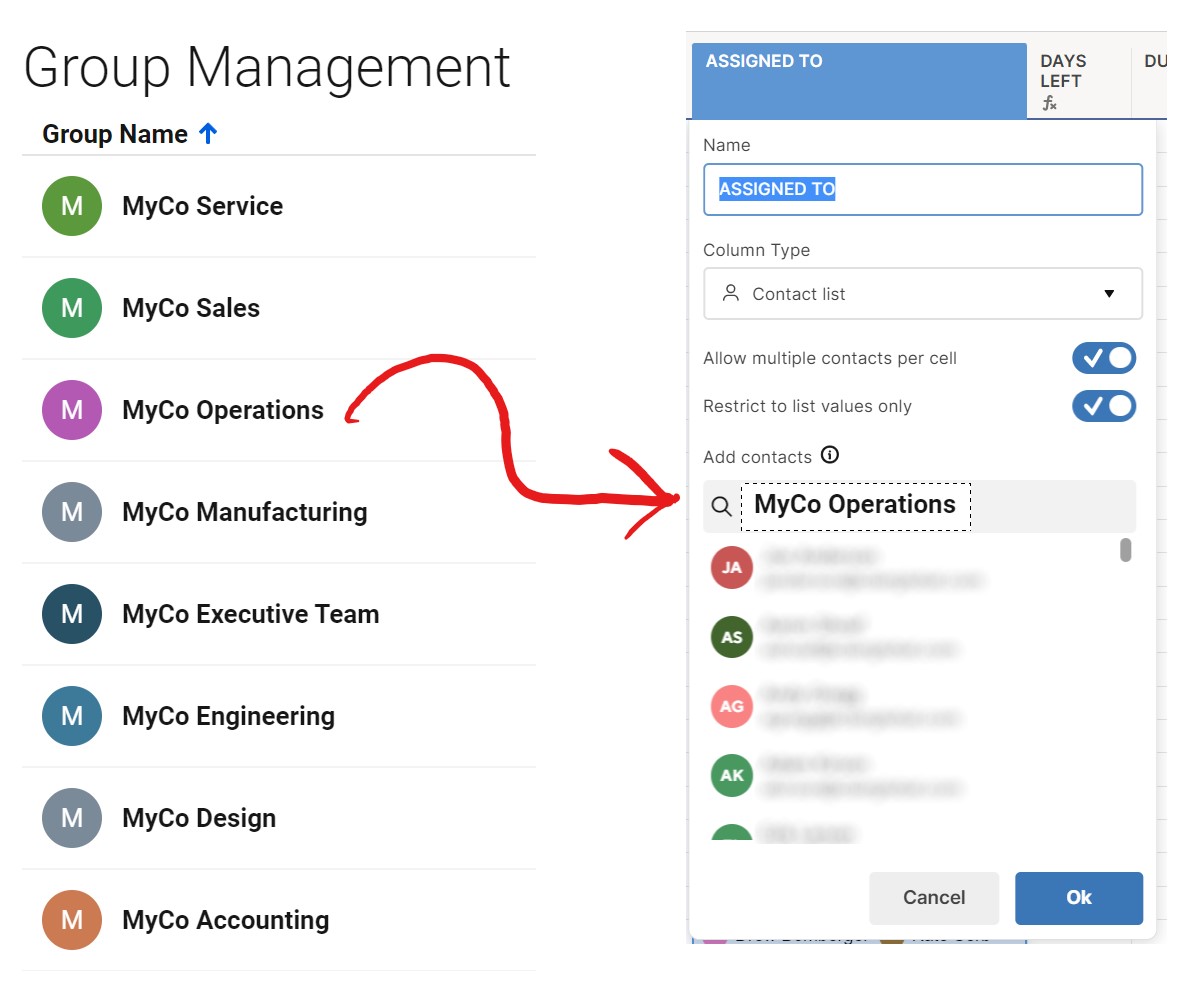
Please enhance Column Contacts and Form Contacts by allowing Groups to be used!
I could go on about it, but there are some basic “table-stakes” sorts of features that need to be incorporated into how column contact lists are handled within Smartsheet. First and foremost, please, for the 37th time, allow us to drag a group in and create items contacts within a column contact list.
ALSO, please make it so that we can COPY a column with Contacts loaded and use it again in the same sheet!
Neither should be a premium feature or require an API buildup! This would have saved me hours so far this year, and could easily save me more! ...Do the same thing for Forms please!
 Seth Morth
Ability to hide attachments and comments on published reports
I have the need to share published reports with customers, but i don't want them to see the conversations that exist on the line or the attachments we use either. It would be great to be able to hide those for published reports.
 torishriver
Request: Report summaries should count checked = 1 and unchecked = 0 for Checkbox columns
Love the reporting column summaries feature for most column types. However, the Count summary option isn't very useful for Checkbox fields. I want to see how many "violations" there are which we denote with flags being checked or unchecked. I'd expect the following scenario to return "3" and not "5".
Or am I missing a way to configure this to make it return the number of checked flags?
 CMathews
Disable/Enable all sheet automation with one button
I have sheet s with 10 or more flows, would be nice to enable/disable them all at once for data migration or fixes needed.
tholdener
Expand Comments Capabilities (Universal Emojis, Rich Text, Read Receipts)
- Universal Emoji Reactions
- Enable emoji reactions on comments across all views (Grid, Card, Table, Board).
- Benefit: Allows quick, lightweight responses without requiring a full comment, improving engagement and reducing clutter.
- Rich Text Formatting in Comments
- Add support for basic formatting options such as:
- Bulleted and numbered lists
- Bold, italic, underline text
- Clickable hyperlinks
- Benefit: Makes updates easier to read and organize, especially for detailed project notes or instructions.
- Add support for basic formatting options such as:
- Read Receipts for Comments
- Introduce a “Seen by” indicator showing which users have viewed a comment.
- Benefit: Improves accountability and ensures critical updates are acknowledged without requiring explicit replies.
Derick Gerloff
Allow Freeze Columns in Dynamic View & better visibility to the row you're selected
When working with a dynamic view that has conditionally formatted rows, it becomes difficult to see what row you are clicked on when making updates in the details pane. Also not being able to freeze columns is a major disadvantage.
Nachito
Re: Import data directly into existing sheets in table view
This "Importing into an existing sheet" is a feature that should have been Smartsheets Topmost Priority released long ago due to it being a vital necessity within your standard / basic software tools when asking people to leave Excel or other softwares for Smartsheets (yours).
When you say "next phase" is that years out? Not trying to be rude/mean about this, but when Smartsheets states "this will be in our next phase / rollout / release / etc.." in other past forum topics, take so long to release, that those of us who follow those specific topics (like this topic - Importing into an existing sheet) forget why we followed it to begin with.

So @Galina Jordanowa do you happen to have a definitive release date (or a rough date) for that next release or should i look forward to this in 2027?

 Julie Becker
Re: Import data directly into existing sheets in table view
Hi CarlaB,
Importing into an existing sheet, that already has data in it, is coming in the next phase. You will be able to grow a data set over time using the import function, once that feature releases.
Stay informed by Subscribing to receive product release updates.
 Galina Jordanowa
Tracking automations
I have project with automations sending emails based on specific criteria in the row. These automations are sent via email with a form to acknowledge receipt of the automated email. It would be fantastic if there was a way to track/ensure the email was sent without the need to send a copy of the automated email to my inbox.
TCATC
Contact field list management (data shuttle or groups)
Managing contact field lists for numerous sheets is time-consuming and subject to error. The ability to manage this by using Data Shuttle to update the contact field options OR being able to select a "group" for contact field options allows this field to dynamically update from a central location.
 Jeremy Singleton