Best Of
2026 Overachievers applications are now open! 📣

Once a year, we open the doors to one of our most exclusive customer programs. That moment is now!
Quick questionnaire:
- Are you the go-to Smartsheet expert on your team or at your company?
- Do you have a passion for pulling off the seemingly impossible?
- And most importantly, do you love helping others succeed?
If you answered "Yes" to all three questions, this is your sign to apply to the Smartsheet Overachievers.
➡️ Apply now
The Overachievers are not just customer product experts. They are innovators, change makers, and trailblazers. When these folks come together, anything is possible.
Program benefits include:
- Meet regularly with other advanced customers from around the world and be inspired by their builds.
- Become directly connected to the Smartsheet team and influence the product with your unique point of view.
- Shine on the Smartsheet website, Community, social media, and at ENGAGE - just to start!
"This Overachiever community that we have is amazing. I would never have been able to connect or network with this group of people if I didn't have this program. Because of them, I'm more confident, and they are great motivators."
- Darla Brown, Overachievers Class of 2025

We can't wait to hear your Smartsheet story. Applications close Friday, June 26, so get yours in today! If you have questions, visit the Overachievers program page, or leave a comment below. You can also get to know the current class here.
 Alison C.
Locked Filters for Dynamic View
From the Dynamic View FAQ: "Dynamic View currently doesn't retain filters through subsequent visits to Views."
It would be extremely helpful to our workflow to be able to keep filters locked on in dynamic views!
 DrewAlfieri
Re: May Question of the Month - Join the conversation and receive a badge
Imagine your Community friends are visiting. What is the single, must-try local dish you'd serve them and why?
I may not live in West Virginia today, but I'm still making pepperoni rolls for people wherever I go! Do you know the whole story behind WV's state food? - Almost Heaven - West Virginia

 S.Stone
Enable Multiple Admins/Collaborators for Data Mesh Ownership
Right now, Data Mesh and Data Shuttle configurations are tied to a single owner. If that person is on leave or leaves the company, no one else can troubleshoot or update the workflow. I propose allowing 'Co-Admin' or 'Editor' permissions on individual Mesh configurations. This ensures that the team can maintain critical data syncs—like those used for Project Manager contact columns—regardless of individual availability.
Amark
Enhanced Governance Controls for Native Smartsheet Access Requests
Problem Statement
Currently, Smartsheet’s native “Request Access” functionality provides very limited governance and administrative control for enterprise environments.
When users request access to a sheet, report, or dashboard:
- The permission level is automatically predetermined (commonly Editor)
- Users cannot specify the level of access needed
- Business justification fields are optional and cannot be enforced
- Admins cannot customize or standardize the request workflow
- Event Reporting lacks sufficient contextual data to support governance auditing and security reviews
This creates operational and compliance challenges for organizations attempting to manage access at scale.
Requested Enhancements
1. Allow Users to Select Requested Permission Level
Provide configurable access-level selection within the native request dialog, such as:
- Viewer
- Commenter
- Editor
- Admin
Admins should also be able to configure which permission levels are requestable.
2. Allow Admins to Require Business Justification
Provide the ability to make the “Reason for Access” field mandatory.
Additional enhancements could include:
- Minimum character requirements
- Custom prompt text
- Conditional requirements based on permission level requested
Example:
- Viewer access → optional reason
- Admin access → mandatory business justification
3. Add Customizable Access Request Forms
Allow System Admins to customize the request workflow with:
- Custom fields
- Dropdowns
- Approval routing
- Manager approval requirements
- Expiration/duration requests
This would significantly improve governance capabilities without requiring external workaround solutions.
Event Reporting / Audit Improvements
While Smartsheet Event Reporting currently captures many sharing and permission-related events, there are still important governance gaps for enterprise access reviews and auditing.
Specifically, administrators currently cannot reliably report on:
- The business justification/reason submitted when requesting access
- The actual individual who approved or granted the access request
Additional governance-focused metadata in Event Reporting would significantly improve auditability and access management transparency.
Requested enhancements:
- Include the user-submitted access request justification in Event Reporting
- Record the actual approver/grantor of access requests (not only the asset owner when applicable)
- Improve visibility into the end-to-end access approval workflow
These improvements would help organizations strengthen:
- Security auditing
- Compliance reporting
- SOX/internal controls
- Access certification reviews
- Incident investigations
- Enterprise governance processes
Currently, organizations often need to rely on email notifications or external workflows to retain this governance information, which limits centralized reporting and audit capabilities.
Business Impact
Many enterprise customers are building custom workflows outside of Smartsheet using:
- Forms
- Power Automate
- Bridge
- APIs
simply to compensate for limitations in the native access request process.
Providing stronger built-in governance controls would:
- Reduce administrative overhead
- Improve security posture
- Increase enterprise adoption
- Improve audit readiness
- Reduce dependency on external tooling
Why This Matters
As Smartsheet continues expanding enterprise capabilities, governance and auditability become increasingly critical.
Native access requests should support:
- least privilege access
- approval transparency
- enterprise compliance standards
- configurable governance policies
instead of relying on fixed, lightweight collaboration workflows.
This enhancement would make Event Reporting significantly more actionable and valuable for enterprise administrators.
 Chizu Hieida
Meet Sarah Stone, our May Member Spotlight! 🎉
Some people find their calling by accident, and our May Member Spotlight @S.Stone is proof of that. She joined her current company before she knew what Smartsheet was, and today, she's the in-house subject matter expert. Additionally, she’s such an engaged Community Ambassador that she was nominated for this spotlight by you, her peers! If you need a dose of motivation, read on and get to know her Smartsheet story.

Sarah is a Land Specialist - Operations and Data Systems at SunEnergy1, and lives in South Carolina, US. Smartsheet came into her world fast when she was handed a large project during her very first week on the job, tasked with organizing notes and records for all projects into one database. Rather than shy away from the challenge, she dove straight in, working through every self-paced program in Smartsheet University, attending webinars, and leaning on the Community. That combination of hands-on learning and engagement set the foundation for success.
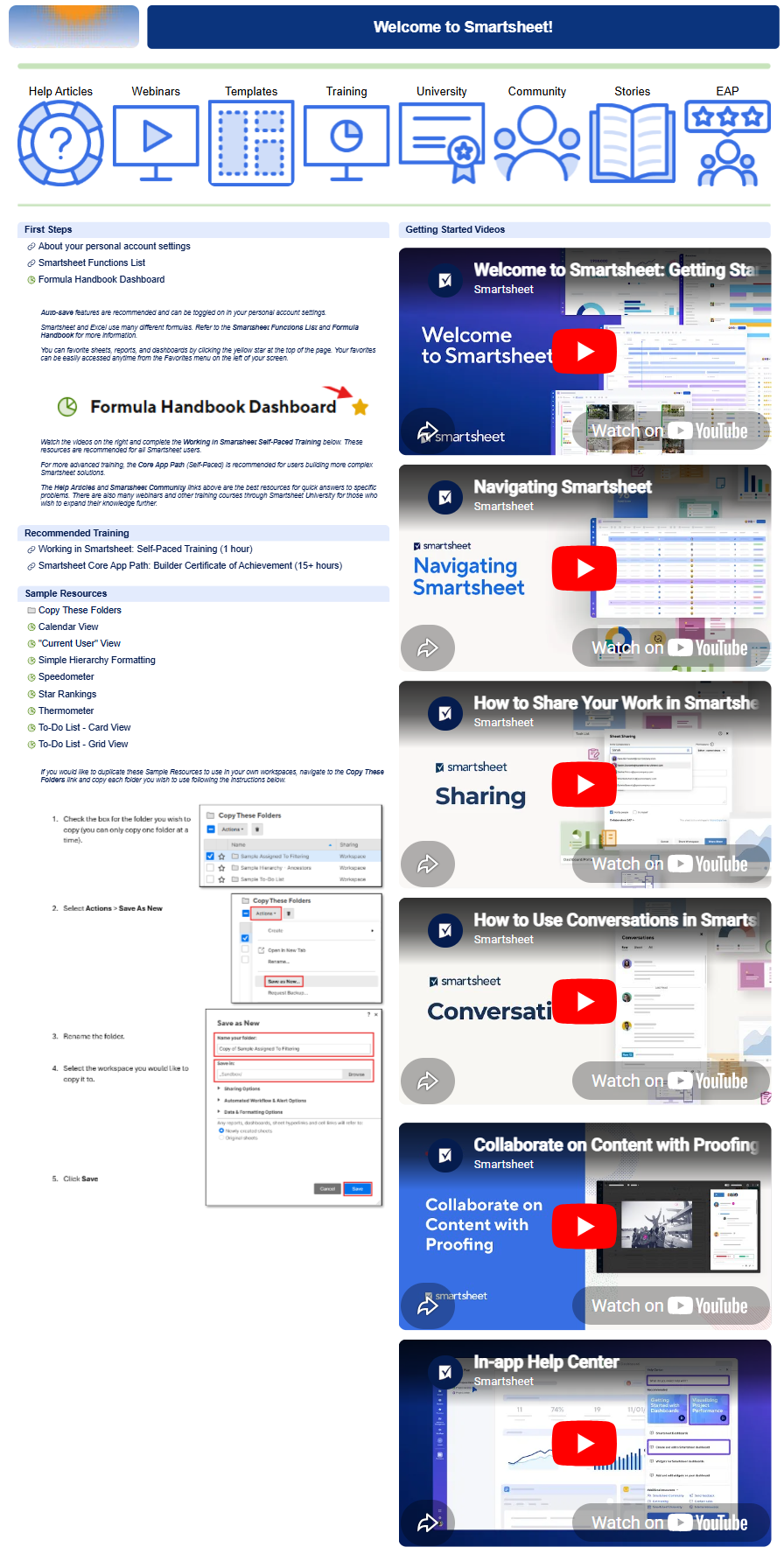
Ask Sarah about a recent win and she'll point to her revamped "Welcome to Smartsheet" internal training workspace (see above), a dashboard packed with videos, resources, and templates of her own solutions. “It’s been really rewarding to see how it helps new hires learn, gain confidence, and feel inspired to build their own solutions or connect with me to brainstorm new ideas,” she says.
The Community has also played a big role in her growth. While piloting a new proofing solution for one of her teams, she tapped into solutions shared by fellow members — including @Paul Newcome's Speedometer Chart and @Neil Egsgard's Automatic Reminders for Proof Reviewers — and incorporated them directly into her final Smartsheet build. It's that kind of collaborative, global energy that keeps her experimenting and sharing.
"Looking back, it's pretty amazing to see how far I've come with Smartsheet and how it's connected me with so many people along the way. What started as something completely new has become a passion and a way for me to support others."
Sarah is now quietly developing a new Smartsheet idea she's excited about. Though it's still in testing, she's hoping to present it at a company meeting in the near future and eventually bring it to the broader Community.


When she's not collaborating and building, Sarah and her husband Patrick are exploring their home state of West Virginia, especially Blackwater Falls State Park, often with their three dogs Kaylee, Duo, and Trowa in tow. (Yes, the pups have been spotted in Mountaineer jerseys.)
Thank you Sarah for everything you bring to this Community! 🎉
👉🏻 Do you know someone in the Community who should be next month's Member Spotlight? Nominate them here. (NOTE: Any Community member can nominate someone else in the Community).
Alison C.
Collapse Lanes in Card View
There currently isn't a way to automatically collapse lanes based on criteria (such as "no cards") or to use one click to collapse all. Currently I have to click each column to collapse individually, to show/hide what I want.
brettmil
Formula to pull multiple contacts cells into a single cell
Need a way to concatenate multiple contact list cells into one sell for automation
Sara Pfeifer
Expand Font Options in Smartsheet to Support Modern Branding, Accessibility & Readability
I use Smartsheet daily for project tracking, documentation, and cross-functional communication. One of the biggest limitations I run into is the very small set of available fonts within grid sheets.
Across organizations around the world, teams have moved away from legacy fonts like Arial and Times in favor of modern, accessible typefaces such as Inter, Aptos, Roboto, Source Sans, Open Sans, and Noto Sans. These fonts are now standard in enterprise design systems, accessibility guidelines, and global brand frameworks.
But inside Smartsheet, everything still has to be… Arial, Tahoma, Times, or Verdana.
Why this matters:
- Sheets look visually out of sync with modern tools and brand systems.
- Modern fonts improve readability, especially for neurodiverse users.
- Teams can't match internal style guidelines or global brand standards.
- Headers and key information are harder to distinguish.
- Visual hierarchy is limited without extra columns or formatting workarounds.
My use case:
I often build sheets that are shared widely across teams and Leadership. Having more font options would help differentiate headers, improve readability, and create a clearer visual hierarchy, without needing helper columns or conditional formatting tricks.
The ideal solution:
- A broader library of modern, accessible fonts (e.g., Inter, Aptos, Roboto, Source Sans, Open Sans, and Noto Sans).
- Stronger typographic hierarchy options for headers and subheaders.
- Consistent rendering across browsers and devices.
- Ability to align sheets with organizational brand standards around the world.
This enhancement would make Smartsheet feel more polished, more flexible, and more aligned with modern design expectations.
My grids and my eyes would be very grateful. 😊
itsjustrisa
Dynamic View - Search CTRL F doesn't work
Dynamic View does not have an easy fast way to search. We normally use CTRL+F to find what we are looking for. This does not work unless it's currently loaded on the page.
The filter option works but it takes too much time to set up new filters every time you need to look for something.
I would like CTRL+F to work and if this can't work then a Search bar would be great.
 Joe Goetschel