Best Of
Re: Change Status based on Checkbox
Hey @Caitlin Goodman
If I understand you correctly, we'll only have to use Nested IFs for this formula vs also incorporating the AND/ORs.
When thinking about Nested IFs, we first look for any conditions that, no matter what, will drive the outcome. This is because IF statements progress through the formulas until they reach the first True. The formula stops executing at that point. Therefore the sequencing of the IFs become important.
=IF([Done checkbox]@row =1, "Complete", IF([Start checkbox]=1, "In Progress", "Not Started"))
 Kelly Moore
Building a sheet to best populate dashboards
Do you have any training material you can share on “best practices” for building a project plan/timeline to populate Dashboards correctly (e.g. metrics and tables).
Examples of things I want to do: Present the overall project health as red, yellow, green; sum of late tasks; sum of tasks in progress and on-track; sum of tasks remaining; sum of open issues, etc.
 Amanda Crawford
Re: Automatically copy cells from one sheet to another
Hey @Rick Byers
I would recommend using an INDEX(MATCH combination here instead of a VLOOKUP. This reduces the number of cells that are referenced in a formula (making it faster to load) and also references each column individually so you can adjust column locations without breaking the formula.
Here's the structure:
=INDEX({Column to return}, MATCH("Matching Value", {Column with value to match}, 0))
So in your case, something like this:
=INDEX({Comments Column}, MATCH([Project Name]@row, {Project Name Column}, 0))
Here's more information: Formula combinations for cross sheet references
Let me know if that worked for you!
Cheers,
Genevieve
 Genevieve P.
Re: Summary Fields in Automation
It is currently not possible to reference a Summary Sheet field in an automation the way a column is referenced.
Adding a column with the Project Manager's name (repeated by formula from the Summary Sheet field) will allow you to do this.
Are you concerned about sheet size? If not, the column can be hidden if you don't want to see it.
Hope this helps!
ker9
Re: Summary Fields in Automation
You wouldn't create a column named {{Project Manager}}. The double braces denote a reference in the automation context.
So your automation would reference the [Project Manager] cell on each affected row like this:
"if you have any further questions, please contact {{Project Manager}}"
Give it a whirl.
John C Murray
Re: Oldest date in a column
You need to give the function a column range to work with, not just the column name.
=MIN([Date Entered]:[Date Entered])
Make sure your "Date Entered" column is formatted as a date-type column. If there's a date value in it, it needs to be a date-type column to use the MIN/MAX functions on it.
 Jeff Reisman
Dashboard Data Filtering
Hello,
I have created a dashboard that collects results from a scorecard that is designed to be filled out by periods (12months), quarters (1, 2, 3,4) and year to date. Is it possible to create a filter on the dashboard where you can select to view information being displayed by either the period or quarter? If yes how does one go about doing this? Any assistance would be much appreciated.
Thank you.
MONICA BUENDIA
Re: Syncing Smartsheet calender with Outlook
Hello John - While in the calendar view, click on the Publish Calendar to iCal (on the toolbar to the left). At the bottom of the Publish Options menu, click the button for iCal (Calendar) to enable. From here, you can select “Add to my calendar” which will add the calendar to your computers default calendar application (such as Outlook) or you can copy the .ics link into Outlook or any other calendar application that supports .ics links.
Here’s more information on publishing calendars: http://help.smartsheet.com/customer/portal/articles/775707-publishing-a-smartsheet-calendar-to-ical
 Travis
Re: Count & Sum Distinct Values based on Criteria | COUNT(DISTINCT(COLLECT(...) | Returning 1 ???
The problem is the mix of data types in the serial number column. You will need to add a helper column (can be hidden after setting up) that converts every row within that column into text and then reference this in your formula.
=[Serial #]@row + ""
=[Column Name]@row plus quote quote
 Paul Newcome
Re: Repeated reminders for no response to update request
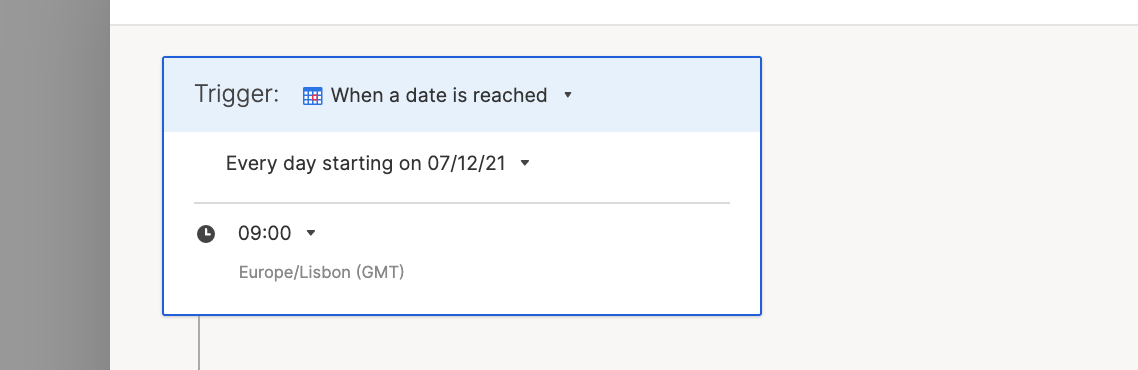
Yes! You could set up an automation that's triggered by a date (ex. every day)...
Then use Condition Blocks in your workflow to filter what to send.
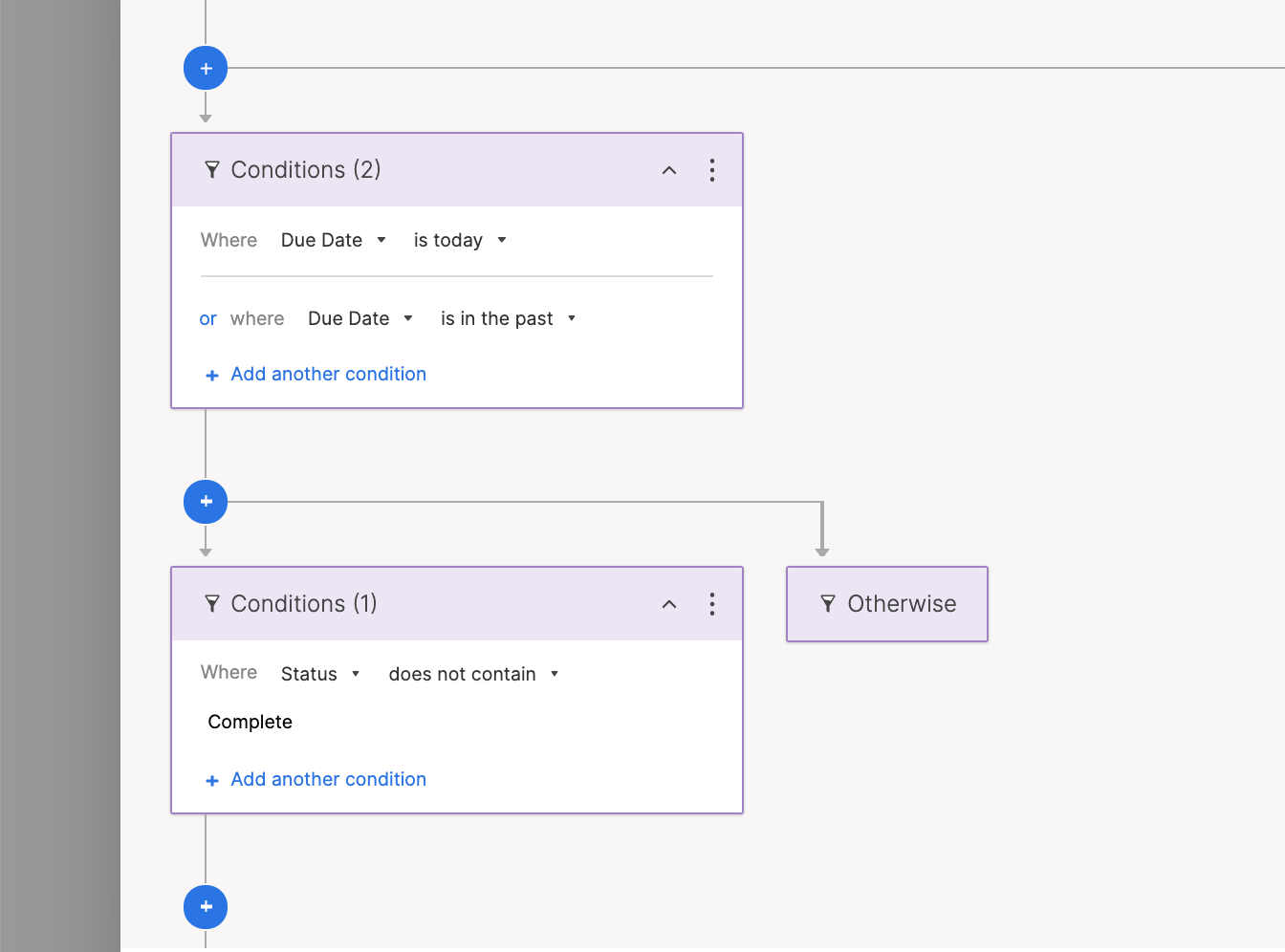
Then every day the workflow will check to see if the Due Date column either has a Due Date that's Today or in the Past, but the Status is not Complete. This way your users will either need to push the date forward or change the Status to Complete.
Let me know if this makes sense and will work for you!
Cheers,
Genevieve
Genevieve P.