Best Of
Re: Summary Fields in Automation
It is currently not possible to reference a Summary Sheet field in an automation the way a column is referenced.
Adding a column with the Project Manager's name (repeated by formula from the Summary Sheet field) will allow you to do this.
Are you concerned about sheet size? If not, the column can be hidden if you don't want to see it.
Hope this helps!
 ker9
ker9
Re: Summary Fields in Automation
You wouldn't create a column named {{Project Manager}}. The double braces denote a reference in the automation context.
So your automation would reference the [Project Manager] cell on each affected row like this:
"if you have any further questions, please contact {{Project Manager}}"
Give it a whirl.
John C Murray
Re: Oldest date in a column
You need to give the function a column range to work with, not just the column name.
=MIN([Date Entered]:[Date Entered])
Make sure your "Date Entered" column is formatted as a date-type column. If there's a date value in it, it needs to be a date-type column to use the MIN/MAX functions on it.
 Jeff Reisman
Dashboard Data Filtering
Hello,
I have created a dashboard that collects results from a scorecard that is designed to be filled out by periods (12months), quarters (1, 2, 3,4) and year to date. Is it possible to create a filter on the dashboard where you can select to view information being displayed by either the period or quarter? If yes how does one go about doing this? Any assistance would be much appreciated.
Thank you.
MONICA BUENDIA
Re: Syncing Smartsheet calender with Outlook
Hello John - While in the calendar view, click on the Publish Calendar to iCal (on the toolbar to the left). At the bottom of the Publish Options menu, click the button for iCal (Calendar) to enable. From here, you can select “Add to my calendar” which will add the calendar to your computers default calendar application (such as Outlook) or you can copy the .ics link into Outlook or any other calendar application that supports .ics links.
Here’s more information on publishing calendars: http://help.smartsheet.com/customer/portal/articles/775707-publishing-a-smartsheet-calendar-to-ical
 Travis
Re: Count & Sum Distinct Values based on Criteria | COUNT(DISTINCT(COLLECT(...) | Returning 1 ???
The problem is the mix of data types in the serial number column. You will need to add a helper column (can be hidden after setting up) that converts every row within that column into text and then reference this in your formula.
=[Serial #]@row + ""
=[Column Name]@row plus quote quote
 Paul Newcome
Re: Repeated reminders for no response to update request
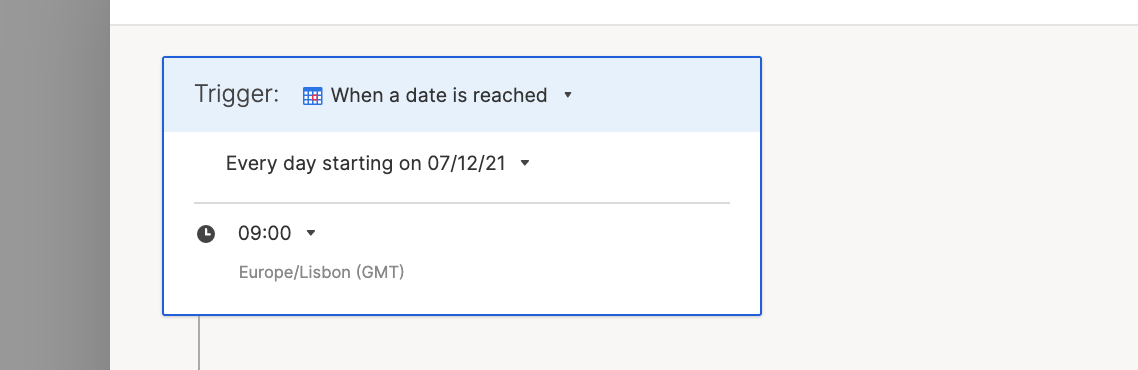
Yes! You could set up an automation that's triggered by a date (ex. every day)...
Then use Condition Blocks in your workflow to filter what to send.
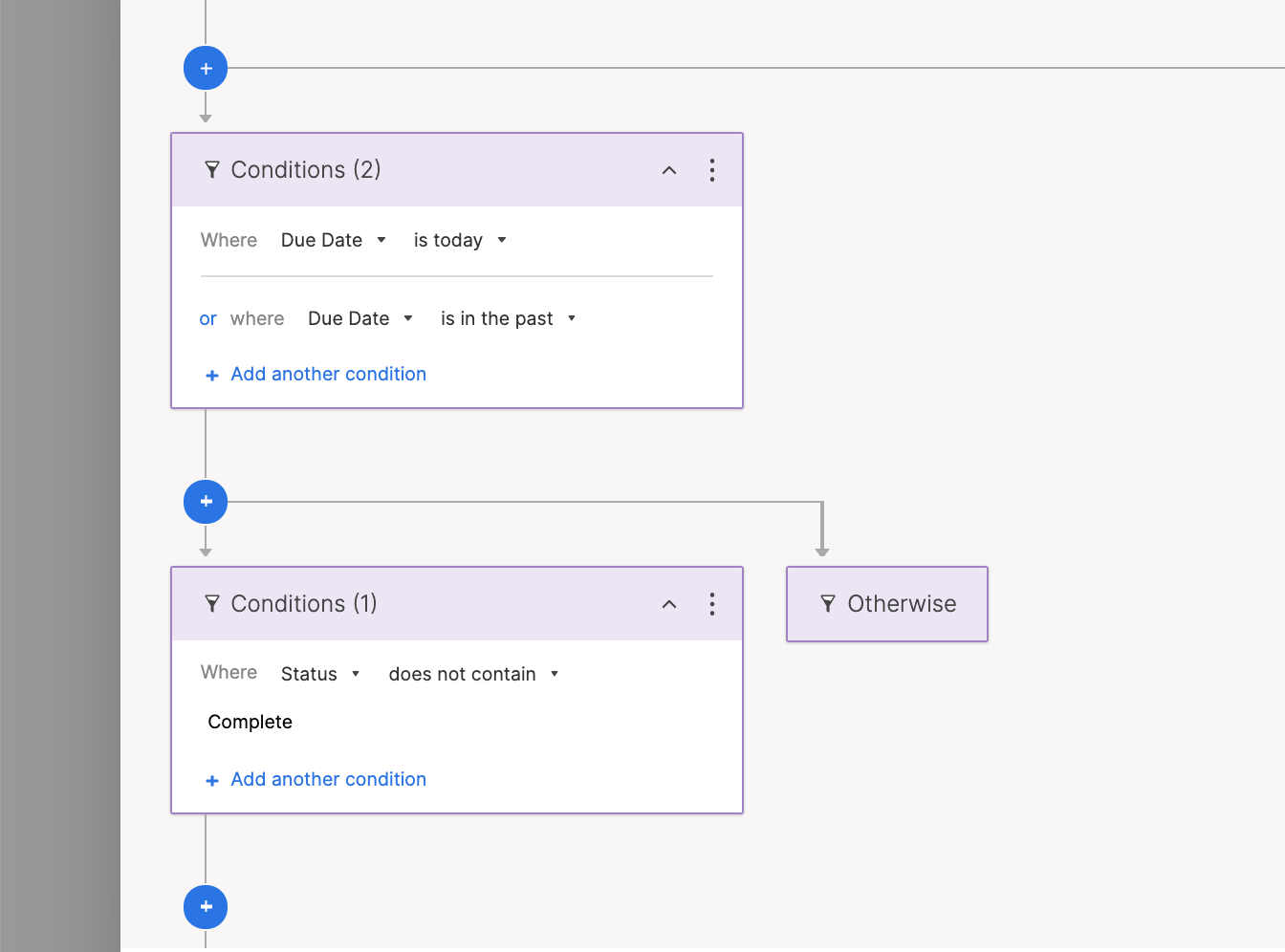
Then every day the workflow will check to see if the Due Date column either has a Due Date that's Today or in the Past, but the Status is not Complete. This way your users will either need to push the date forward or change the Status to Complete.
Let me know if this makes sense and will work for you!
Cheers,
Genevieve
 Genevieve P.
Re: Is there a way that we can get kids signed in?
Hey @fennerb
What I would do in this situation is actually use a completely separate sheet.
- Have one column with all the names listed (copy/pasted from your original sheet with all the data).
- Have another column that houses the checkbox
Then you can use a formula from your source sheet to look into this checkbox sheet and return either a value (e.g. "Checked in") or another checked box in this sheet, too.
=IF(COUNTIFS({Name Column}, Name@row, {Checkbox Column}, 1) >0, "Checked In")
Cheers,
Genevieve
Genevieve P.
Re: Date within Next 5 Business Days
@KRH_SFO You need to incorporate a WORKDAY function.
=IF(AND([Due date]@row <= WORKDAY(TODAY(), 5), [Due date]@row >=TODAY()), 1)
Paul Newcome
Re: How to combine two rows of non-numerical Data?
Have you tried adding in a space when adding the two names together?
=First@row + " " + Last@row
Paul Newcome