Best Of
Re: Forcing cells to be completed
@Ray Lindstrom I was thinking (forms and DV both) of leveraging both the required field setting as well as logic to hide fields until others have been filled out.
 Paul Newcome
Re: Parent and Child optional selections
Hello @Marvin Mudahy,
Based on your request, you might want to add an extra column in your sheet that can be used to identify which tasks you would like to assign to your resources and use a formula to automate the actual Task column based on the yes or no selection.
I was able to recreate the recommendation with the following column types:
Task - Primary Column - Text/Number
Assigned To - Contact Column
Accept - Drop Down (Values - Yes, No)
Task Name - Text/Number or Single Select Drop-Down
I used a column formula to automate the Task column using the following:
=IF(ISBLANK(Accept@row), [Task Name]@row, IF(Accept@row = "Yes", [Task Name]@row, ""))
I then entered the tasks in the Task Name column. If the value in Accept is blank or "No" then the value in the Task column will be blank, if the value in Accept is "Yes", then the value in the Task Name column will be returned in the Task column.
Keep in mind that if you have enabled dependencies on your sheet, then the Parent Rollup functionality may not reflect expected data if you've created a hierarchy with these rows. It might be better for your project sheet to just have a drop-down value for your tasks that allow you to assign tasks to your resources or for your resources to accept tasks they want to work on.
I hope this information helps with your request!
Kindly,
Leslie
 Leslie R
Re: Include Attachments in Automated Emails?
Hi,
I hope you're well and safe!
You could send an Update Request, and all attachments would be included.
Does that make sense?
Would that work/help?
I hope that helps!
Be safe, and have a fantastic day!
Best,
Andrée Starå | Smartsheet Expert Consultant & Partner / CEO @ WORK BOLD
✅ Did I help answer your question/solve the problem? Please support with 💡 ⬆️ ❤️ and/or ✅ Answer. This will make it easier for others to find a solution or help answer. I appreciate it, thank you! 🙏
 Andrée Starå
Re: Schedule/Automate "Export Project List" functionality in Resource Management
To piggy back on Nick's idea it would also be extremely helpful for Resource Manager admins to have an automated way to export People Data from RM. Currently the only option available it to "Export People List" which downloads a .csv file that has to be loaded manually into downstream/dependent systems.
DelJones66
Re: Target range in graphs
Adding a static reference in smartsheet widget is not built in property. But you can add additional data to the table by adding a new column for minimum and maximum fixed value and manage it with lable and color to identify as target range. This is common workaround everyone uses.
Shaz
Re: Smartsheet Form File Uploads
You’ve run into one of Smartsheet’s current form limitations: each form can only include one file upload field. There isn’t a native way to add multiple upload links after each question.
That said, there are a few practical workarounds you can use depending on how flexible your project setup is:
- Create separate forms for each section/question that requires a file upload.
- Each form can have its own upload field.
- Responses will still feed into the same sheet, so you can track everything in one place.
- You can share the different form links with users or embed them sequentially in instructions.
 Naeem Ejaz
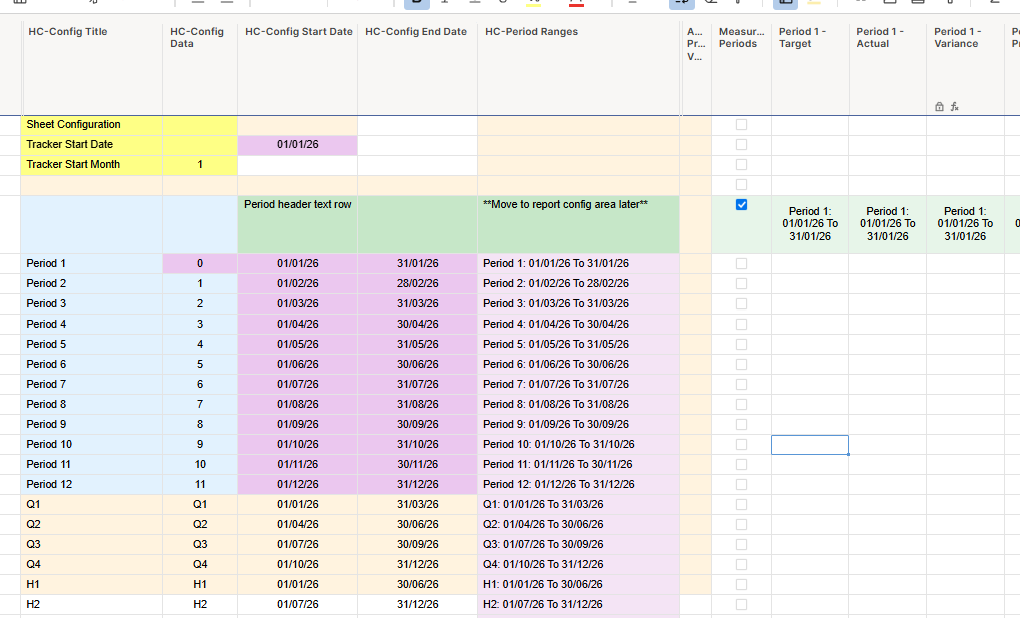
Re: Calculating start and end dates of periods into dates into the next year
It works, great stuff Paul.
Thanks again,
A
 A_C
A_C
Re: Include Attachments in Automated Emails?
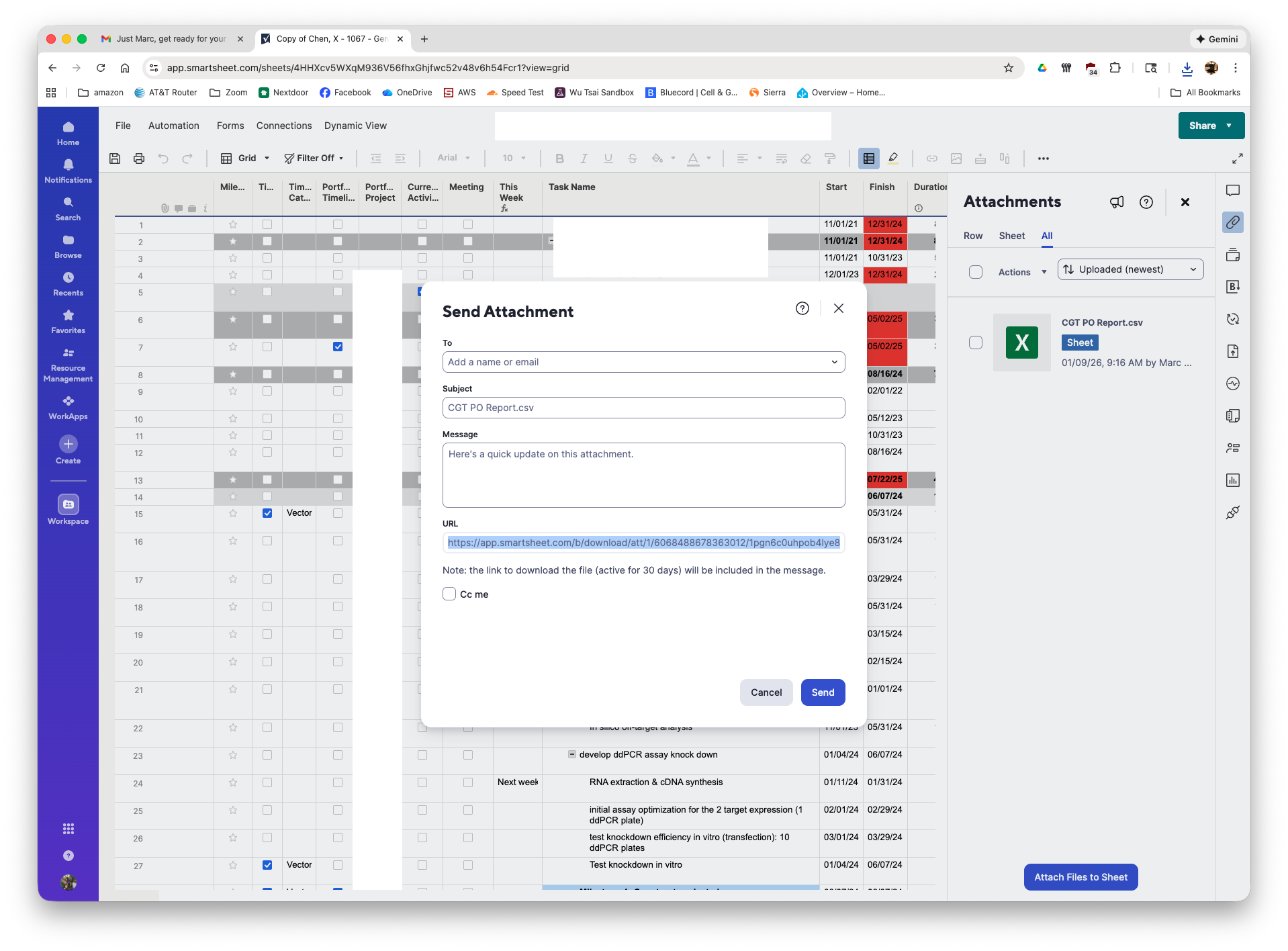
A tedious method is to open the attachments sidebar and for each attachment click on the 3 dots and pick "Send File". this will open a Send Attachment window and you can copy the url to the attachment and paste it into a cell.
/marc
 marc4
marc4
Re: Get Email from Contact Name
I've actually been using a workaround from this discussion post from a while back. It also mentions your solution but I don't like the idea of having to constantly download the contacts list etc. so I used the solution where you change the contact list column to text/number & use a formula to extract the email. Then I just copy & paste the values (to replace the formulas) & switch the column type back to contact list. I'll quote it below:
Step 1a: Create a save as copy of existing sheet that you wish to download
or
Step 1b: Convert the sheet contact list column to a text/numeric column; bingo!
(Note: Don't forget to convert it back to Contact List type]
Step 2: If Step 1a is followed then convert the "Contact List" column to a text/numeric column; bingo!
Step 3a: If Step 1a is followed then download the Smartsheet file and use excel based formulae to extract email address, within [abc <abc@abcxyzefg.com>]
Formulae: [=MID(A1, FIND("<", A1) + 1, FIND(">", A1) - FIND("<", A1) - 1) ]
or
Step 3b: If Step 1b is followed then use below Smartsheet formulae to extract email address on Smartsheet another column (type text/numeric):
[=MID(ContactList@row, FIND("<", ContactList@row) + 1, FIND(">", ContactList@row) - FIND("<", ContactList@row) - 1) ]
Step 4: Job done!
 ro.fei
Re: Health and Wellness Solution
Oooh, haven't done this but I love the idea. I would recommend scrolling your phone's app store to get inspiration from what health apps are tracking and how some of their analytics look!
