Best Of
WorkApp Suggestions - Expand on Visibility of Page Permissions
Hello, I use WorkApps frequently, and I am trying to introduce it for use throughout our entire organization.
An item I wish it included/expanded on:
Expand the Page Permissions View for the document descriptions. It is tough when you have a bunch of pages and have to hover over each because the spacing of the section is not wide enough to view more information on the title.
Thanks.
Thanks.
 BGroussman
WorkApp Suggestions - Expanding the number of pages
Hello, I use WorkApps frequently, and I am trying to introduce it for use throughout our entire organization.
An item I wish it included/expanded on:
Expand to more than the 50-document limit for a specific WorkApp. We are implementing in phases, and the limit requires us to create additional WorkApps for a client, as we have multiple locations within a single phase.
Thanks.
BGroussman
AI widget needed for dashboard
We would like to be able to put a widget on a dashboard that would allow users to ask questions about the data in a sheet.
For example, we have a sheet that we call "How do I?" where we are recording instructions on how to do things, e.g., how to submit a travel request. Right now, the user has to open the sheet, choose Analyze Data and then ask the question. We want a shortcut that can be posted on the dashboard allows the user to ask the question there.
wooddw
Re: Extract the 2nd name from 3 names when delimeted by ,
@Naeem Ejaz That will only work if the second name always starts a the 14th character and is always 11 characters long.
@Bruce Johnson Give this a try for something more dynamic:
=MID("," + [Column Name]@row + ",", FIND("~", SUBSTITUTE("," + [Column Name]@row + ",", ",", "~", 2) + 2, FIND("~", SUBSTITUTE("," + [Column Name]@row + ",", ",", "~", 3) - (FIND("~", SUBSTITUTE("," + [Column Name]@row + ",", ",", "~", 2) + 2))
While the above is a little overworked for your exact request, it does provide the ability to easily adjust this formula to pull the first, third, 25th, etc. based on the "comma" delimiter.
To adjust the above, you would adjust three pieces. The first and third piece indicate the entry number you want to pull out, and the second piece is basically the entry number plus one.
=MID(…………………….., "~", 2) + ……………………………………., "~", 3) - ……………………………………, "~", 2) + ……..))
To pull the first you would adjust these three numbers to be 1, 2, 1. To pull the third: 3, 4, 3. To pull the 25th: 25, 26, 25. So on and so forth.
 Paul Newcome
Enable Auto provisioning with a default of 'Viewer' access
Enable auto provisioning to default to viewer access instead of provisional member, until/unless users get added to a sheet or workspace with higher access.
Until the new licensing model we had everyone in our company added to an 'ALL Active Directory' group. This group had viewer access to all reporting and dashboard content (unless we intentionally removed their access for confidentiality reasons). With the new licensing model, we had to DELETE that group because it forced every new user to be added as a 'Provisional Member'. The maintenance nightmare of this can't be overstated!
We went from everyone being able to see how great the Smartsheet platform (and our content) was, to very few seeing it. Clearly, this does nothing to increase user interest in Smartsheet. We had so many people who started advocating for Smartsheet simply because they were able to see the cool things it could do. Now it is locked away to prevent unbudgeted spending by unauthorized people adding new users.
Thank You
tzaczyk
Downloadable Automation List with Selective Upload
Sometimes, after setting up a sheet, I realize I need automation from another one. It would be helpful to download a list of automations from that sheet and upload only the ones I need, instead of importing everything
 Christina09
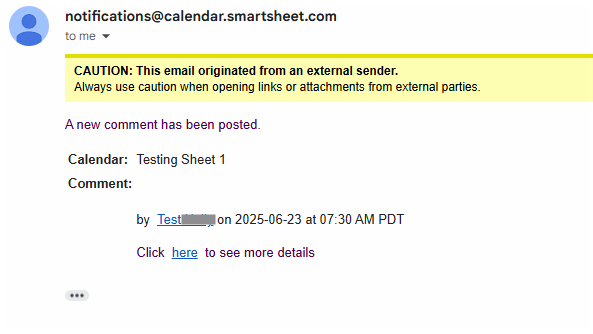
Calendar Comment Notification
When adding a comment on the calendar the emailed notification does not provide any relevant infomration.
 David Reyes
Re: Critical Path - Remove a set of tasks from the CP
Alternative work-around:
Add a line that has a long duration and make the final pre-launch item a predecessor to it. As long as your new fake line has an end date past any other, you will see the critical path you want.
Vince T
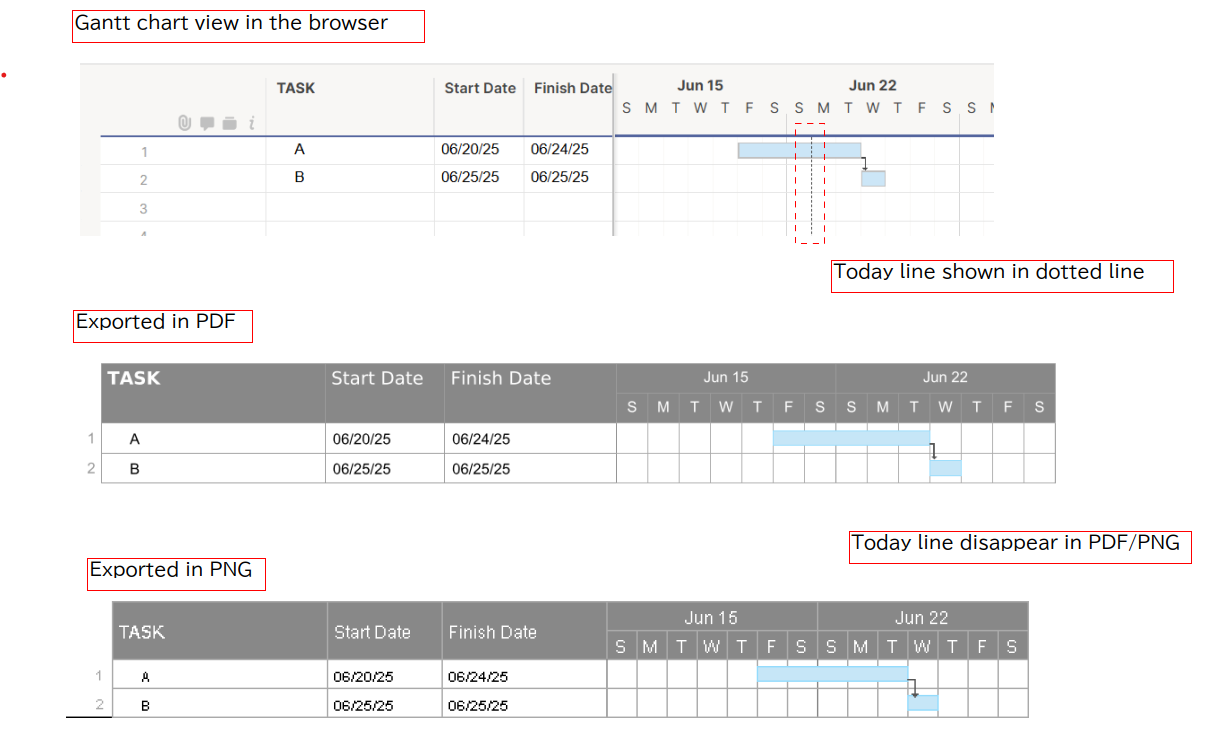
Adding Today Line in Gantt View to exported PDF/PNG file
Currently, there isn't a way to include the "Today Line" (current date line) in Smartsheet Gantt chart exports (PDF/PNG).
Frankly, this is baffling. Showing the current date on a Gantt chart isn't a luxury; it's a fundamental, basic feature that every project management software should offer. It's truly puzzling why this issue has persisted for years without a resolution. The absence of this simple visual marker significantly hampers our ability to share clear, actionable project status updates with stakeholders, forcing us into inconvenient workarounds.
This isn't just a minor inconvenience; it's a significant oversight for a tool designed for project management. I strongly urge the Smartsheet team to prioritize and implement this feature as
soon as possible. It's long overdue.
Please leave your comments and upvote this post if you agree. Let's make sure Smartsheet hears us and fixes this critical gap without further delay.
 Yoshi_JPN
Re: Showing today's date in gantt view
How do we have the TODAY'S date dotted line "Print" in a pdf. In Gantt view it does not show in the print.
Is there a setting?
D_Arch