Best Of
Re: Welcome to the Education Community!
Hello from Idaho State University. I work in the Academic Affairs umbrella and have used Smartsheet for many years. I have built systems with sheets, automation, and dashboards to track tutoring usage, peer mentoring contacts, and created a system to track adjunct pay for dual-enrollment instructors and send a letter to them using the document creation feature. I nerd out over designing solutions to labor-intensive tasks by implementing automation, writing complex formulas, and building dashboards to deliver the info in a clean, usable manner.
 broctawn
Dynamic Views Listed Out in Mobile Application
It is not possible find dynamic views that have been shared with you via the mobile app. The only way I can find to access them is by finding the original link that was shared and selecting that.
We need a section within the mobile app that allows us to open any dynamic view that has been shared with the user similar to how we access sheets. For guests and users alike.
 DougT
DougT
Re: NEW! Modern forms submission experience with accessibility enhancements
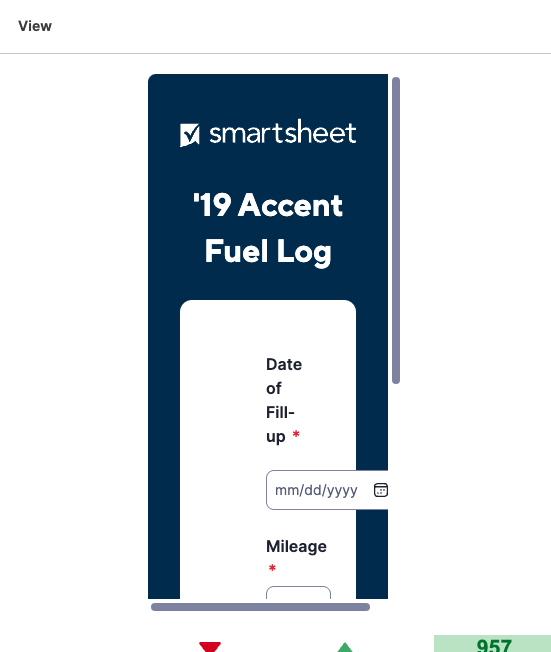
Some of my forms no longer fit how they were in a dashboard. For example, this form used to fit perfectly within the widget size. There were on scroll bars to move left/right or up/down. I understand resizing the widget will take care of this issue, but there are many places where resizing my widget requires quite a bit of restructuring of my entire dashboard in general.
Is there an option to revert to the original style so that I don't have to go through and re-design dashboards?
 Paul Newcome
Make notification links open in desktop app?
When email notifications are triggered, is there a way to click the link to the sheet and have it open in the Desktop App instead of a tab in the browser? I'm using Gmail and Chrome. Thanks in advance!
Amy Baker
Re: How to embed power bi dashboard to smartsheet?
Hello,
I develop in Power BI, and I've experienced the same problem. I previously commented above, but have learned more since then.
Unfortunately, Power BI requires a license in order to view their dashboards/reports.
That's why it's requiring you to login when your dashboard/report is embedded on a Smartsheet dashboard.
Below is a snippet of an explanation from a website I found. I feel this sums it up pretty well and also provides links for further information:
With sharing, whether you share content inside or outside your organization, you need a Power BI Pro or Premium Per User (PPU) license.
Your recipients also need Power BI Pro or Premium Per User (PPU) licenses, unless the content is in a Premium capacity.
You can refer to the following methods to share your reports and dashboards:
1. First, you can put the contents of the workspace into premium capacity:
Purchase Power Bl Premium:
Assign a workspace to a capacity: https://docs.microsoft.com/power-bi/admin/service-admin-premium-manage#assign-a-workspace-to-a-capac...
 Ray Lindstrom
Ability to see a detailed log including date an time , for users downgraded users.
Ability to see, report , get a detailed log including date an time , for users who wnet from provisional member to viewers
nlo
Re: Filter By Cell Color
Filtering by cell color would be very useful. Please add this feature. It's about the only thing I miss from Excel :)
HHern
Re: Identify Workflow from ID?
@Paul Newcome yeah that's what I was looking at too, but I don't know what sheet it came from and we have over 10000 sheets it would take a long time to loop through them.
Was hoping I was missing something and there would be a call like Get Workflow and have it tell me what sheet it came from 😂.
 Samuel Mueller
Re: Identify Workflow from ID?
Yeah. That does sound like it could take awhile. Haha. And if you knew the sheet I'd, you'd be able to just jump to it in SS instead of needing the api.
Maybe a product enhancement request to expand the workflow portion of the api to include the sheet id is in order.
Paul Newcome
Re: Bridge: Stuck! GET /users/{{inputs.userId}} Child Flow not running
What does the run log look like for the child workflow?
Paul Newcome