Best Of
Re: Can I have just one cell automatically copy over from 1 sheet to others when a new row is added
I'm not quite sure how the VLOOKUP or INDEX/MATCH cross-sheet formula would work, since I assume something needs to exist first for it to MATCH to. Or is there a Column formula that can be written that is something along the line of "make sure the first column on training sheet matches the first column on the names sheet", and would then update in the training sheet if a new name is added to the names sheet?
It's easy enough to pull the information I need over once there is something for it to MATCH against, like the UserID or email, but getting a new User ID to copy without having anything to reference it against seems like MATCH couldn't work with it?
 Di Mueller
Re: Select which columns to copy or move from one sheet to another
I love the automation to move over rows automatically, but being able to choose which columns data is moved from would be ideal.
We use a sheet to track our recruitment efforts (with interview dates and other information) but when we hire someone, we don't need all the misc. dates and information to come into our current employee sheet.
JRudd
Re: Dark Mode for Desktop App
Is there or could there be a dark mode? My eyes are killing me with the super bright white screen.
DWilliams
Amendment to Contractor/Project Editor Permissions within Resource Management
One of the limitations of the Contractor security permissions within Smartsheet is that a user is unable to "split" their allocation as they do not have access to Schedule view.
However, to give them access they would need to be upgraded to Project Editor, but this then means they have full visibility of capacity for everyone within the organisation.
There should be an option to upgrade a user to similar permissions, but so that they can only see their data, or the data of individuals in the same Discipline (their own team).
This potentially limits the use of Resource Management for us, and possibly other organisations for whom data security and the principle of lowest permissions first are key.
jamieclarksdx


Preserve Email Format When PopulatingMulti-Contact Columns
Description:
In Smartsheet, when a Contact column (that allows multiple contacts per cell) is populated using a cell reference containing an email address, the value displayed in the target cell is automatically converted into a display name.
Problem: This behavior causes a disparity between the input and output data when ingesting this data in a dataflow:
- The source column contains a clean email address (e.g., user@example.com).
- The target column, when allowing multiple contacts, converts this to a display name, not preserving the original email address.
- As a result, it's not possible to reliably extract or reference the actual email addresses for reporting, automation, or integrations.
Feature Request:
Please provide an option or formula that allows users to preserve and extract the official email address from Contact columns, especially when:
- The destination Contact column allows multiple values.
- The source is a single email address entered or referenced dynamically.
This would ensure data consistency and greatly improve usability in automation and reporting workflows.
Thank you for considering this improvement! Please do it ASAP and let us know.
CamiloLozada
Re: Change Formatting in Reports
Hello, I completely agree with everyone here. We need a better way to format the reports and graphs in the Dashboard's widget. I have my graphs based on a report, and it just looks awful with the long decimals.
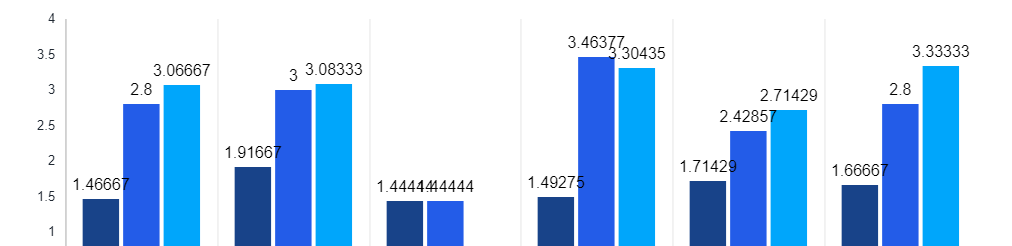
This has been requested since over three years ago, can we get some consideration to get this reformatting enabled in Smartsheet?
I need to have these graphs and reports to be automatically updated without creating various additional sheets and formulas when I already have to create a lot of reports in the first place to make various graphs in the dashboard.
Thank you for your understanding.
Catherine F.
Re: Dashboard - Page Break Line/Preview in Edit Mode
I share the requirement as well, I am printing off a .pdf file of the several portfolio dashboards after review with management to have a snapshot in time file. Maybe there is a way to snapshot a dashboard someone knows, but this is what I do today, and the printing format is limited.
As well it would be nice if the actual dashboard width could be expanded, or maybe I miss that feature as well.
lgearhart
Re: Dashboard - Page Break Line/Preview in Edit Mode
Huge fan of this idea. Dashboards are great, but reality is we often have to print the information to send to others. Page breaks would help a lot to keep the information looking clean and formatted.
May need to be posted as a separate idea, but another addition to this... if a dashboard has a report displayed, and the report is longer than the window in the dashboard, having the ability to print the entire report length would be great as well.
 Tim Starkey
Actual FOLDER permissions in a workspace
We have a workspace for our Director and his direct reports. They each need to have their own folder within the workspace where only they see the information. I know we have permissions for specific sheets but they need access to the workspace and when we do that they then have access to all the other folders and sheets because they have the workspace permission. We really need to be able to add people to the workspace, but add additional permissions on the folders within the workspace.
JenMC