Best Of
Re: Fever Chart and CCPM
That's pretty much it. You have a column for each color with the appropriate numbers in there as well as a column for the "Actual". Then you would create a line chart from the sheet using all of those columns. The RYG series would get "filled" when setting up the widget.


 Paul Newcome
Re: What happened to Default View?
Smartsheet needs to restore the option for Default View with default filter.
I used the instructions above to set a default filter and now my sheet is opening to Table view even though the default is set to Grid.
 Linda Linton
Sorting Dropdown Columns
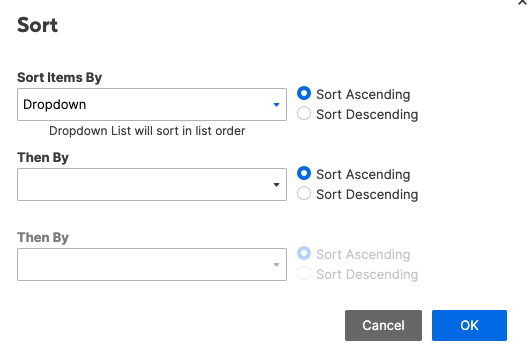
I feel like at some point, sorting a dropdown column ignored the column properties. This was nice because I could add and remove options as needed, but when I sorted my rows based on this column, they would sort properly.
Now when sorting a dropdown column, it is based on the column properties. Now we have to manually sort our column properties whenever a new option needs added or removed. We can't just add the new option to the bottom of the list then sort on the column anymore.
Can we get this reverted back to how it was before?
 Paul Newcome
Can you proof a website using the Smartsheet proofing tool?
We have interactive websites that we need to proof. We've been using a separate tool, but our company prefers the Smartsheet functionality. Does anyone know if its possible to proof a website using the Smartsheet proofing tool?
 Sarah.S
Re: Is there a way to create automation workflows from Proofs?
Hi @Crabe!
Yes, this is possible! You can add columns to your sheet to track proofing details, such as Status, Version, Dates, and Contacts, making it easier to automate actions based on proof activity.
To create proof info columns:
- On the right feature bar, select Proofs.
- At the top of the Proofs pane, select More (three-dot icon) > Create Proof Info Column.
- You can also create a proof, and then before uploading the proof, select More > Create Proof Info Column from the top right corner of the proof window.
- Choose the information you want to track from the Select a proof info type... dropdown.
- Select the plus (+) icon to add additional columns.
Once you’ve added these columns, you can set up automation workflows based on proof status changes. For example, when a proof moves to "In Review" or "Approved," you can trigger notifications or update other fields accordingly.
You can find more details on how to track proofing data here:
Track the status of a proof.
I hope this helps! Let me know if you have any questions.
Cheers,
Isaac.
 Isaac A.

Using two different colors of font in a column cell
It would be super useful if there was a update where we can use two different colored fonts in a single column cell.
 Justine List
Re: Attachments for Non-Subscribers
Hi,
I hope you're well and safe!
You could send an Update Request, and all attachments would be included. They can be sent to anyone as long as your permissions are set to allow it.
Does that make sense?
Would that work/help?
I hope that helps!
Be safe, and have a fantastic day!
Best,
Andrée Starå | Smartsheet Expert Consultant & Partner / CEO @ WORK BOLD
✅ Did I help answer your question/solve the problem? Please support with 💡 ⬆️ ❤️ and/or ✅ Answer. This will make it easier for others to find a solution or help answer. I appreciate it, thank you! 🙏
 Andrée Starå
Re: Early adopter - New Portfolios feature
Features that are part of the Early Adopter's Program are under NDA, so I can't share details or content in the public Community forum.
However documentation and information is regularly shared and discussed in the private EAP Group! This group requires manual approval so it can take a few weeks to be accepted after requesting to join.
All emails from the EAP program also include a private URL/link to a Dashboard Hub with information on the program and what features are currently active, along with their documentation.
Cheers,
Genevieve
 Genevieve P.
Third party extensions
Good morning fellow SmartSheetians!
I just have an off-the-wall question I guess. How is it we can't get some basic features we need in Smartsheet (like being able to sort a filtered list and such), yet if we pay for an extension we can get those features???? Why do we have to consider paying for something that should be readily available anyways???
Just asking. Not trying to poke the bear, but I have been bombarded lately about paying for extensions that should already be basic features. Just curious on y'alls thoughts on it.