Best Of
Re: July Question of the Month - Join the conversation and receive a badge
I set a goal to stay in contact with those in my life (family and friends) because life is so precious. I was finding plenty of time to do stupid stuff, but have made a major change to pick up the phone, send an Email/Text, grab coffee/lunch/dinner —> just to stay connected.
I'm glad I've done this as I have lost 3 coworkers over the past few months and I'm humbled to the fact I was in contact with each of them just prior to their untimely passing.
🙏
 Bruce Case
"Don't ask me again" option for duplicate file names
Hello,
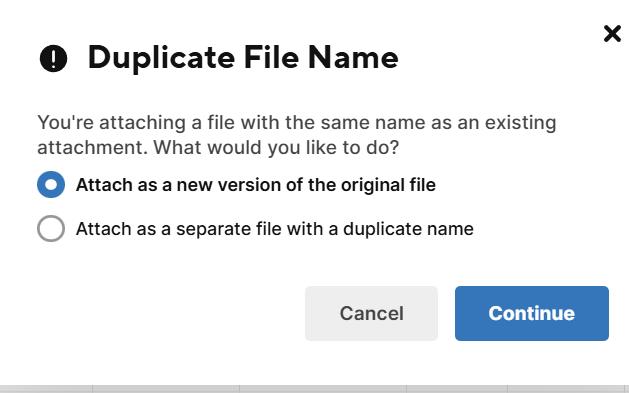
I use SS in my daily work flow and upload hundreds to thousands photos a day. It would be amazing to have a feature that say "don't ask me again" so I won't have to click "continue" every time.
 eiverson
Re: Contact list display/format as email address not name
Has this been fixed/updated yet? This really ought to be a formula, getting the emails in a format where it's easy to copy/paste is invaluable.
 ro.fei
Thumbnail of current Brand in the Account Logo update
When an organization uses the Logo feature, the current logo in place is not immediately apparent in the settings.
It would be helpful to have a thumbnail or even the file name of the current logo in place.

 TracyTurley
Re: Ability to add analyze data charts to dashboards now generally available!
1. Source Sheet or Report Access Changed
If:
- The chart is pulling from a report or sheet that had permissions changed or was deleted/moved,
- Or your access to that sheet/report was modified,
➡️ Then the chart widget can lose connection and appear as a broken link.
2. Sheet or Report Was Renamed or Moved
Even though Smartsheet should maintain links internally, moving a report/sheet to another workspace or folder can sometimes break the linkage in widgets.
3. Dashboard Saved While Source Was Still Loading
Sometimes, if you add the chart widget while the source report or sheet is still loading or hasn't fully rendered, it may save the widget with a broken or empty reference.
4. Report Filters Changed or Data Removed
If your chart is powered by a report and the data in the report no longer meets the filter criteria (e.g., empty dataset), the chart might disappear or show as broken.
 Naeem Ejaz
Re: Does Smartsheet publish a roadmap, in particular for Forms support?
Hi,
I hope you're well and safe!
Unfortunately, Smartsheet removed the public roadmap a couple of years ago.
I hope that helps!
Be safe, and have a fantastic day!
Best,
Andrée Starå | Smartsheet Expert Consultant & Partner / CEO @ WORK BOLD
✅ Did I help answer your question/solve the problem? Please support with💡 ⬆️ ❤️, and/or ✅ Answer. This will make it easier for others to find a solution or help answer! I appreciate it, thank you! 🙏
 Andrée Starå
Re: Help with ROI Calc
Hi Paul,
You could try adding some error-handling to catch those scenarios. Something like:
=IF(OR(ISBLANK([Expected Cost Savings in 1st 12 months]@row ), ISBLANK([Total Project Costs]@row )), "", ([Expected Cost Savings in 1st 12 months]@row - [Total Project Costs]@row ) / [Total Project Costs]@row )
This checks if either of the two columns is blank then return blank, otherwise use your RoI calc.
Note: depending on how you capture no cost or no savings in those columns, this formula may not work. If no cost or no savings are captured as 0 (zero) instead of blank, then this formula will work in both scenarios:
=IF(AND(ISNUMBER([Expected cost savings in 1st 12 months]@row ), ISNUMBER([Total project costs]@row ), [Total project costs]@row <> 0),
([Expected cost savings in 1st 12 months]@row - [Total project costs]@row ) / [Total project costs]@row ,"")
This checks that both columns have a number in order to run the RoI calc, otherwise display blank.
Hope that helps! Let me know if that does the trick for you.
Thanks,
Sing
 Sing C
Re: Dynamic View: Change Source Sheet
In full agreement with everyone in this thread. The absence of the ability to change sources following "Save as New" is woeful, particularly given the cost of Dynamic View as a premium product. This includes the steep price increase per the recent shift to a consumption-based pricing model.
For a timeline check, Dynamic View was announced at the 2018 Engage Keynote on October 2nd, 2018. The initial community submission asking about this feature (+ the first result in a search engine) was from January 4th, 2022. This product enhancement request was submitted February 7th, 2023. Today is July 1st, 2025.
My use case: I have a Dynamic View fully configured, based off a universal report that references all workspaces and schedules across our org. I need to set up three separate views pulling from three separate reports that feature slight user-specific alterations, which themselves are "Saved as New" from my core universal report. Because this source adjustment feature is absent, I will have to go through the steps to configure all three views, one after the other. "Saving as New" from a report, then updating the source for the end user's need, is a fundamental action in Smartsheet.
I do not understand how products are left to stagnate when there is ground-level friction present for years. It would be great to receive a response from someone on the Product side that can share either the vision or limitations of eliminating friction when configuring Dynamic Views.
I am happy to jump on a call and review opportunities, if helpful. Thank you.
—-
An update: It took me about as much time to rebuild the three Views as it did to research and draft this message (Shared Filters were the most tedious). It’s quick to configure in Dynamic View, particularly if column order is in place for the display and detail views settings.
For anyone reading this, I got hot not just for this specific instance; I feel like I encounter this regularly in Smartsheet. There’s a point of friction in the tool, the community makes a request / proposal to eliminate the friction, and years pass with no guarantee of resolution.
 Kyle Chipman
Synthesia.io
Hi Smartsheet Community,
I’d like to request the addition of Synthesia.io as an approved site for embedded content within Smartsheet dashboards. Synthesia is a secure, widely used platform for creating short, professional training and communication videos using AI avatars and voiceover.
We’re currently using Synthesia to roll out safety and operations training across multiple teams and would benefit from the ability to embed videos directly into dashboards to streamline communication and increase engagement.
Here is a sample link for reference:
Thanks in advance for considering this request — it would greatly enhance how we deliver visual content to our teams.
Best,
Julian
Julian Graham