Best Of
New Form update is buggy!
I have multiple forms that have been in use for months that after the change to the new form in smartsheet this week has become buggy and will lock up and not allow people to make selections. Is anyone else having this issue?
 ArianaRiera
Re: SLOW everything runs very SLOW
Hi All
We are experiencing extremely slow speeds on Smartsheet the last 2-3 weeks in South Africa. I have had our IT systems investigate, and the network speed issues sits on Smartsheet side.
Can this please be investigated. We are a big team working on a slow system in a critical time which is not productive. Please assist
Lloyd Schwegmann
Re: NEW! Copy folder automation enhancements
Been waiting for years for this! So happy to see it! Would love mapped documents in the document generator to follow this as well! :)
MHalvey55
Re: Community Corner Newsletter [July 2025]
@Rebeca S. We need to set up a virtual BTS reunion celebration/dance party soon! 🎉🎵
 Alison C.
Re: Users Shared to Workspace Show as Needs Access
I want to close the conversation here, if this happens to you, open a ticket. I worked with Smartsheet reps today and they got it fixed quickly. They said it happens sometimes and they can fix it when it does. Open a support ticket and have them help you!
Re: Need to remove decimals from my Dashboard pie Charts. Please help.
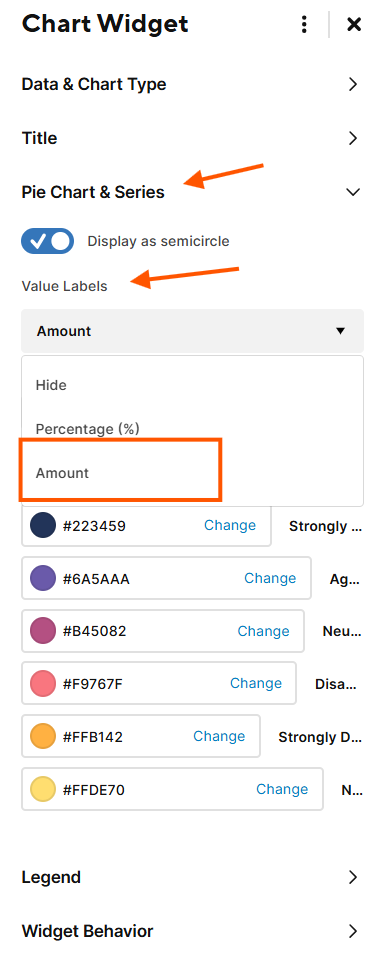
I figured it out… select "amount" instead of Percentage. I assume this is because my data was already in percentage format? but it worked like a charm. Now if only you can adjust multiple charts at once… :( Had to update 20+ charts individually.
 Deonizia Egan
Re: How can I edit a formula reference across all projects using Global Update?
Hi @carlycrisp
There currently isn't a way to push out a global update on a cross-sheet formula reference. Depending on what your previous formula looks like, you could potentially edit this one reference in that sheet to include the two new columns.
If your original formulas identify column 2 and column 3, etc, then tacking on more columns to the end of the reference shouldn't affect them. Using "Edit Reference" to update the one reference will push out this update across your whole sheet.
The alternative would be to manually delete the reference from the formula and input a new one.
Cheers,
Genevieve
 Genevieve P.
Re: July Question of the Month - Join the conversation and receive a badge
I set a goal to stay in contact with those in my life (family and friends) because life is so precious. I was finding plenty of time to do stupid stuff, but have made a major change to pick up the phone, send an Email/Text, grab coffee/lunch/dinner —> just to stay connected.
I'm glad I've done this as I have lost 3 coworkers over the past few months and I'm humbled to the fact I was in contact with each of them just prior to their untimely passing.
🙏
 Bruce Case
"Don't ask me again" option for duplicate file names
Hello,
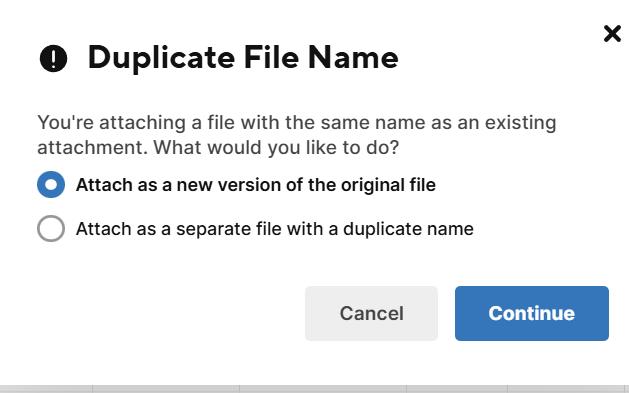
I use SS in my daily work flow and upload hundreds to thousands photos a day. It would be amazing to have a feature that say "don't ask me again" so I won't have to click "continue" every time.
 eiverson
Re: Contact list display/format as email address not name
Has this been fixed/updated yet? This really ought to be a formula, getting the emails in a format where it's easy to copy/paste is invaluable.
 ro.fei