Best Of
Re: Licenses and True-up confusion
@Loann McGee - My company is on Enterprise and Advance Gold until the end of the year. We don't have any limits to our premium applications or standard systems. We have 20 licenses with 80+ internal non-licensed and 400+ external users. Under the new subscription model, we would need 100 subscription users to ensure everyone can still do their daily jobs using this software. We are also stuck between a rock and hard place.
After many conversations with our account rep. If we wanted to keep just the 20, now called subscription users, the other 80+ could stay as Viewers in the main Smartsheet system with these workarounds.
- Create Update or Approval request alerts to Viewers to allow them to edit sheet level information through the emailed 'Forms' without needing a subscription.
- Create Dynamic Views of the sheet(s) they used to edit in and share the Dynamic Views with them. They can edit the sheet data, comments, attachments, through the Dynamic Views. It would also be recommended to use WorkApps or Collections to keep all their Dynamic Views in a easy to find spot.
I'm honestly not sure which direction my company will go at the end of the year. I am proactively looking at all options now before our contract is up at the end of the year and a direction has to be made.
We also have Department User Groups in Smartsheet, if that user group is shared to anything Commenter or greater, any user who isn't a Member will be bumped up to the Provisional Member status through the true-up program. To try to mitigate this, as the SystemAdmin I am, I am now going to make two separate groups per department and have to reshare all my thousands of assets/workspaces under this new system. Now training the company to use these two groups and the differences, that will be another challenge.
- Finance - Members
- Finance - Viewers
All of this just doesn't sit well with us and the hours, weeks, months it will take to get realigned with whatever my executive team decides to do. My company has had Smartsheet since 2016 and I've personally been using it since 2011 with other companies. It's very disheartening.
 MHalvey55
Re: NEW! Modern forms submission experience with accessibility enhancements
Why is modernizing making everything larger? Doesn't fit cleanly - as mentioned many times here. Would have been good to go through the EAP to catch these first.
Kayla
Re: NEW! Modern forms submission experience with accessibility enhancements
Updates!
- Dashboard widget: Can you please file a support escalation request.
- Dropdown contacts: Team is working on a fix asap.
- Side-by-side formatting: Team is working on a fix asap.
- File uploader email attachment: Team is working on a fix.
- Re-use data: Team is working on a fix.
- Mobile: I will reach out in an individual message for repro steps and images.
I will update here as fixes are rolled out.
Selin Esener
Re: NEW! Modern forms submission experience with accessibility enhancements
Prior to the latest update, form users doing a large number of similar entries were able to "reuse" data when they used the back button in their browser window after form submission. Now the form data is no longer retained.
Karen Beaston
Re: Licenses and True-up confusion
@Loann McGee I don't think their suggestion is going to help at all. If you look at Smartsheet Pricing | Smartsheet even on the most comprehensive plan there's still Provisional Members, Guests and Viewers. The Premium apps that they're suggesting don't seem to do what would be required of a collaborator.
Sounds like it's cooked and there's no way round it. . 😞
KatieDi
Re: NEW! Modern forms submission experience with accessibility enhancements
Hi @Paul Newcome,
This may have already been answered but if not, I also had the same problem and discovered when I went into edit it that there is now a "Expand the Grid" option to widen the canvas your dashboard is on. Still not a great option but it automatically fixed the scrunched form labels and boxes.
 Kristen Cummings
Re: Has URL-Encoding for automatic Date Entry in SS Forms changed?
Hi,
I hope you're well and safe!
This is due to a recent release of more modern forms.
The Smartsheet team is aware of the issue and is working on a solution.
I hope that helps!
Be safe, and have a fantastic day!
Best,
Andrée Starå | Smartsheet Expert Consultant & Partner / CEO @ WORK BOLD
✅ Did I help answer your question/solve the problem? Please support with💡 ⬆️ ❤️, and/or ✅ Answer. This will make it easier for others to find a solution or help answer! I appreciate it, thank you! 🙏
 Andrée Starå
Re: Bridge: Stuck! GET /users/{{inputs.userId}} Child Flow not running
@NeilKY Glad you got it sorted. And yes… When you want it to run a variable number of times, you simply enter a reference to the array output. I usually hardcode 2 during testing and have at times forgotten to update it when ready to move into production. Haha.
 Paul Newcome
Re: Bridge: Stuck! GET /users/{{inputs.userId}} Child Flow not running
I was trying to say to check the call limit, as if your organization has a large number of users, you can hit it. (Smartsheet API rate limit ~300 calls/min). Since each user triggers both GET /users and PUT /rows, we can batch the row updates in groups of 300 and add a 60-second sleep before the subsequent calls.

Re: Has URL-Encoding for automatic Date Entry in SS Forms changed?
You are right. It appears that what used to work, i.e., "&Date=6/24/2025", no longer works, and as you wrote, "&Date=2025-06-24" does work.
I used the [yyyy-mm-dd] helper column with the following formula;
=YEAR(Date@row) + "-" + MONTH(Date@row) + "-" + DAY(Date@row)
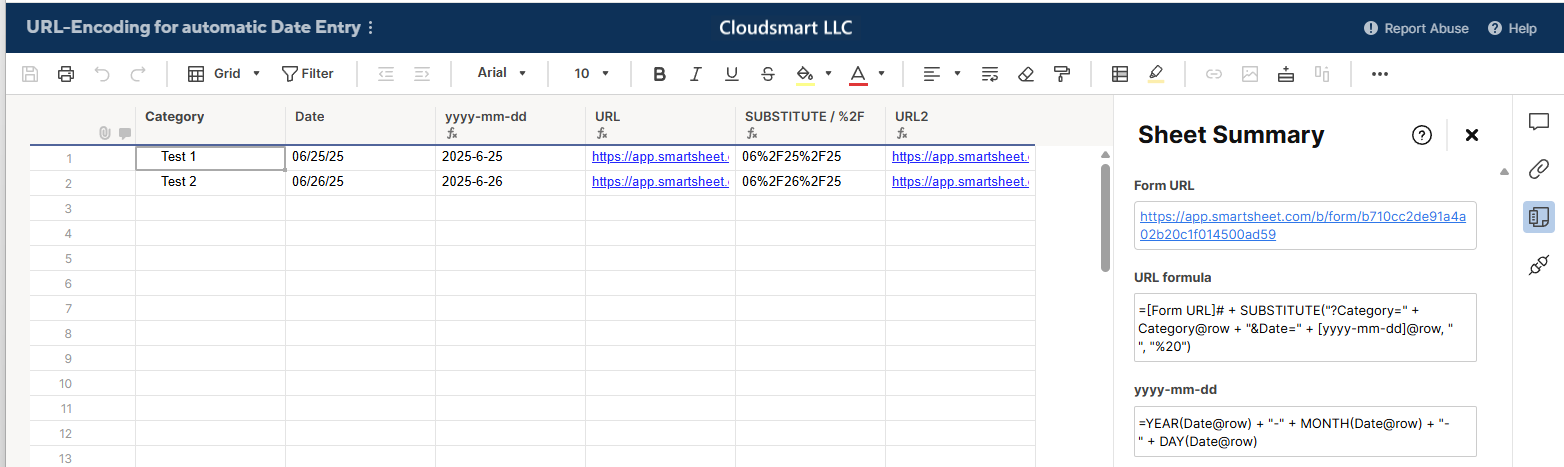
I also tested changing "/" to "%2F", but that did not work.
If this change is permanent, Smartsheet should update the help article.