Best Of
Re: Quick Sort Card View (Sheets and Reports)
Please add sorting card view by dates… please please please…
 VJPD
VJPD
Re: Request for Rollback - create sheets in Sheets folder
Please roll back this non improvement or at least make it optional
Virtual Pro
Roadmap Infographic Widget for Dashboards
Roadmaps are a great way of communicating important milestones on a project. While Gantt charts and calendars are great, they frequently can be overwhelming, cluttered, and difficult to parse. This can be frustrating for a stakeholder.
When it comes to designing a perfect dashboard, one rule of thumb is that a viewer should gain valuable and useful information within 5 seconds of visiting. A Gantt chart and calendar fall way short of providing valuable info in a short amount of time.
In my organization we like to use a roadmap infographic (see attached image). It's a simple image of a road with points called out along the length of it. Markers are also color coded to reflect the status of the work. It's a quick and easy way to see where exactly we are on the project, and is loved by many of our executive stakeholders.
It would be nice to have a sheet that contains the title, phase number, start/end dates, status and have that populate into a predesigned infographic. That way, I can simply update the sheet and the widget would automatically update.
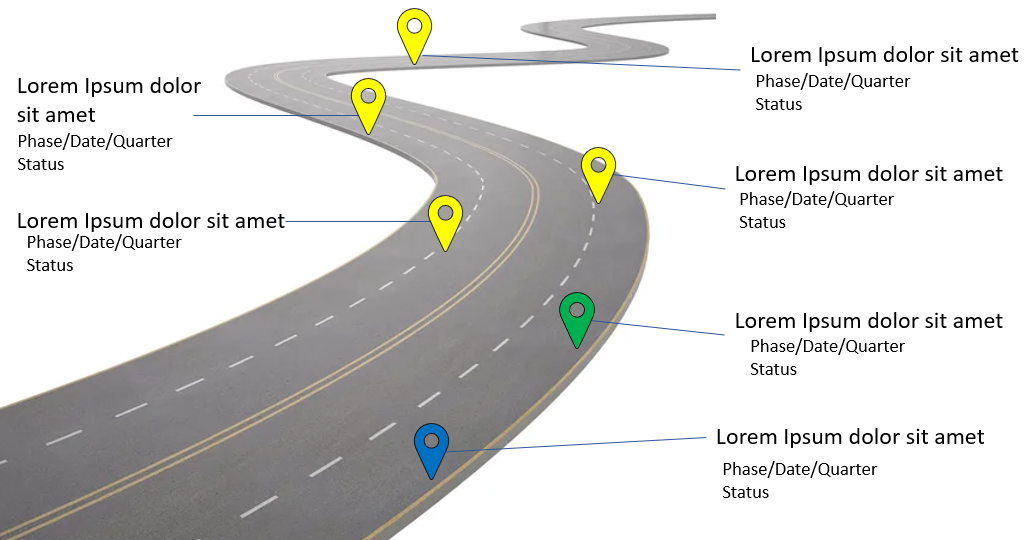 JCon
JCon
Re: New streamlined creation experience
Like many of you, I was extremely frustrated by this change and also confused how this will play out. After reading up on the of how the system would create a Workspace and move our sheets, I wanted to be proactive. So I created a "Sheets" Workspace to keep my sheets in the same foldering structure. Well, I managed to break my Account-more to come on that below and what NOT to do. I worked with several different tiers of Technical Support Specialists to resolve my issue. While in meetings with a Tier 2 Escalations Specialist, I was questioning the logic behind the deprecation of the Sheets folder. They let me know that by moving all items into Workspace, the development team will be able to implement more product features and enhancements that they have received via Product Ideas from users such as ourselves! There is light at the end of the tunnel, as users we need to remain patient and trust the process. 😎
As far as breaking my Account, yea… Whatever you do, DO NOT drag entire folders to a Workspace from your Sheets Folder. IF there are any items in those folders that were shared with you, you will NOT be able to find them in the Workspace you moved them to OR your Sheets folder. They can be located by using the Search function, but not under Browse. After several calls and a quick adventure into API, the Engineering Team had to temporarily reactivate my personal Sheets Folder so that I could drag the folders BACK to my Sheets Folder from the "Sheets Workspace" I had created. The properties of the Sheets had shown they were in the Workspace, but turns out the connection was broken since they were shared and they were chilling out in space somewhere. By moving them back to my Sheets folder, it forced that reconnect/mapping.
What you DO would want to do, is create a Sheet's Workspace but not using the naming conventions mentioned in the Deprecation FAQ that I mentioned above as that could cause confusion when Smartsheet automatically creates a Workspace to move shared sheets to. I simply named my Workspace "00-Kayla's Sheets." I then mirrored the Folder Structure from the Sheets folder and did the drag/drop of my owned Sheets into the new folders.
If you are good at breaking systems like I am, at least users know what to NOT do and Tech Support knows how to fix it! 🤓
KaylaJ
Re: New streamlined creation experience
Shocked to see this kind of an update. This does not make any sense and organizing sheets under folder is completely gone.
Suresh_Premiere
Re: New streamlined creation experience
This has been a huge setback for our team as many workspaces are not shared but the sheets within them. We have team members and even myself where sheets are piling up in numbers but no organization is to be done with them. While I appreciate @Sean Carty the streamline of workspace, I think Smartsheet has missed the mark when it comes to "how our customers naturally get work done." If you're going to streamline the workspace then how the workspaces are shared needs to change (e.g. allow sharing of a folder in the workspace vs. the entire workspace).
 hfreeman
Re: New streamlined creation experience
Hi @Genevieve P.,
I hope that someone inside the Smartsheet Product Dev team is hearing all this angst (by senior Community leaders) about these types of 'un-roadmapped' changes. Who ever asked for this? Who ever asked for the system icons and colors to change? Where is the EAP roadmap/pipeline of changes? It is just a 'watch-this-space' section, that somewhat randomly spits out a change and announces it as if it's the next best thing!
The premature GA of Table View is another example of poorly managed change (for change's sake).
There are many many 'quirks' in Smartsheet, that many many patient users/solution providers have complained about and suggested fixes to many many times, over many many years. Let's please fix these too (or first even)!

Re: New streamlined creation experience
This "new streamlined functionality" IS THE WORST! Of all the good and helpful things Smartsheets COULD HAVE done (based on thousands of ignored feedback requests) they create this mess instead. Pair this up with their very interesting "permissions" system (Workspace permissions vs sheets permissions) and they have now DOUBLED the amount of monitoring of folders and searching I need to do when someone shares a sheet/report/dashboard. Thanks for making my job harder and not easier! PowerBI is looking better all the time!
LDP
Re: Creating new Sheets in "Sheets" folder
Same here. I just want to browse, create a folder, and create a grid in the new folder. The options aren't there anymore. Hopefully this is a temporary glitch.
vb1
Re: Creating new Sheets in "Sheets" folder
Thanks David - I tried this but the "Save as New" function does not allow you to select the Sheets folder, only workspaces. I also tried drag-and-drop, this works for Workspaces but not for the Sheets folder.
Scott Wadland