Good afternoon,
I am trying to utilize Linked Dropdown Columns for a manual process we have. We have many sheets that use a "Client Name" column with a dropdown list. Whenever a new client comes on or exits, we have to manually update every sheet that has a Client Name column and update the dropdown list. We do not have Data Shuttle, although when using it on a trial, we were able to automate this. So I am trying to use Linked Dropdown Columns.
I have created a source sheet "Master Client List", which has a Client Name Column, with a dropdown list which includes all of our clients as of today. The sheet is in table view. Also in the source sheet, I have a Date Updated column and an empty Primary Column.
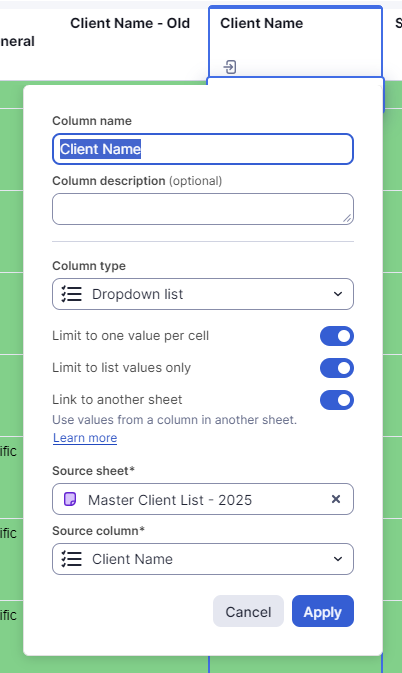
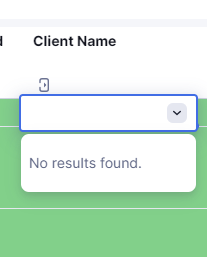
I have a Target Sheet that has a Client Name column already. I renamed that Column, "Client Name - Old" and created a new column next to it and named it Client Name. I selected Dropdown List, toggled Link to another sheet, selected the Source Sheet and column. But when I click the dropdown list, it says "No Results Found".
Just for fun, in my Source Sheet, I selected the first value in the dropdown list and saved. On the Target sheet, when I clicked on the dropdown list, it showed just that value. But that defeats the purpose, we want the Client Name column dropdown list in Target Sheet to mirror the Source Sheet and when we make any changes, have the Target Sheets dropdown lists updated with the accurate Client list.
Perhaps I am missing a step or set up incorrectly, but I'm scratching my head on this one. Any insight would be appreciated. Thanks in advance!
Chris