We currently build a hyperlink to a prefilled form using a formula and the row ID. But the biggest limitation on this is they do not function in Dynamic View. The end user has to copy/past to get to the form.
Sign in to see the current vote count, add your own vote, or leave a comment.
Still no solution for this?
@Sara Campbell @adrian.rodriguez
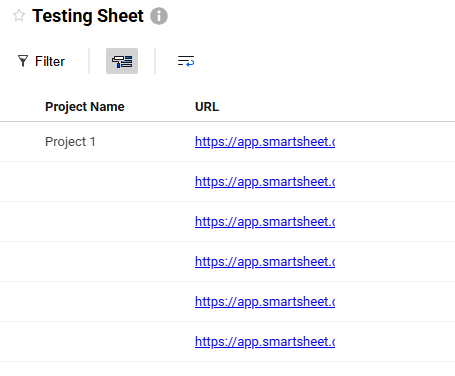
I'm not sure if you've received any answer on this, but you can see and click on the link within the main view display as shown in the image below. For the details panel, it will always be grayed out as read only since it has a formula in the source sheet cell.
I'm not sure if you've received any answer on this, but you can see and click on the link within the main view display as shown in the image below. For the details panel, it will always be grayed out as read only since it has a formula in the source sheet cell. The formula I use for this column is ="EntireURL"
@Sandy Drew Thanks very much, this helps.
@Sandy Drew thank you!
Problem Smartsheet environments quickly become cluttered with inactive Sheets, Reports, and Dashboards that are no longer viewed or updated. This creates confusion for users and significant overhead for admins, especially in large or regulated environments. There is currently no native way to automatically identify, notify…
Most customer's metadata houses their profile data, some from intake sheet and some either cell linked in or brought into metadata using formulas. Needs change after design and often the new data point needed comes from non-metadata templates, which can cause a blocker if methods used are those above. If it were possible…
Having the ability to auto-resize the Calendar App view based on the widget size is needed. We have a "Due in 7 Days' calendar for our dashboards and would like it to be anchored at the top right. Unfortunately, as currently designed, the calendar takes up a significant amount of space and must be moved to the bottom.