Best Of
Re: Pulling data from another sheet based on two criteria
@Soumitra Bhowmick I strongly recommend against creating a special key and then using the VLOOKUP function. The VLOOKUP is very rigid and easy to break. If you really want to use the combined key in a helper column method for a lookup, I suggest an INDEX/MATCH instead of the VLOOKUP.
But in this case, INDEX/COLLECT allows for a lookup using multiple matches so long as you use the "row #" portion of the INDEX function and does not require a helper column.
 Paul Newcome
Re: Maintain delimiters in a join() column when exporting to excel.
You need to wrap your join in a substitute and replace CHAR(10) with " ;"
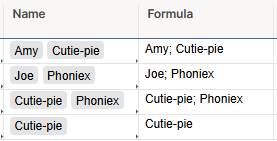
Formula:
=SUBSTITUTE(JOIN(Name1, ""), CHAR(10), "; ")
 jjg279
Help Article updates July 2025
Hello Community,
We’ve published the following new content.
New videos on these topics:
- Smartsheet Permissions and Sharing in Sharing permission levels and tasks
- How to create a Sheet Summary Report in Create a sheet summary report
- How to create a Row Report in Build a row report
And these new best practices:
To view the entire catalog of help articles, visit the Help and Learning Center.
Were the articles helpful?
Let us know by providing feedback for each article.
 Trelawney
Re: Issue with Cell Linking Automations
@John_Foster I have a ticketing system that needed to record the date the ticket was completed so I am sharing my process.
We wanted the date to be specific to the Status column so a modified system column wouldn't work and we didn't want anyone to be able to edit the date so a automated "record a date" wouldn't work either.
We settled on automation to copy the row to another sheet each time the status changed. In that change log sheet we have a date created system column, so that date will be the date/time when the automation ran and copied the row, which is also when the status changed.
Then we INDEX/MATCH these dates back into the ticketing sheet. We also use them to feed into metrics sheets for dashboards and such.
If you have access to Datamesh, that could also help tie your sheets together w/o using functions.
Hopefully this gives your some ideas for your use case.
Corey W.
Re: Lookup a date based on matching name from another sheet
Actually I think I just figured it out. I believe it was the extra "{" in ({{Sheet - Maintenance Tracker Range 1}}
Thanks for your help.
mclyburn5
Boletín de la Comunidad - Edición de Verano
¡Feliz julio, Comunidad!
Espero que todos estén teniendo un gran inicio de verano (o invierno, o temporada de lluvias como yo). Basándome en la fantástica edición de la primavera pasada de @Isaac A. , estoy lista para brindarles un nuevo lote de actualizaciones, con un par de nuevos videos. También estaré compartiendo un poco más sobre mí al final de esta edición. 😄 Siga leyendo para conocer todas las últimas noticias.
Lo más destacado de la Comunidad
Nos complace anunciar una nueva función: la posibilidad de silenciar publicaciones.
Silenciar publicaciones le brinda un mayor control sobre susnotificaciones y la interacción general con el contenido de la Comunidad. Entendemos que hay momentos en los que podría desear no recibir notificacionesde una publicación o hilo específico temporal o permanentemente, sin necesidad de dejar de seguir todo el tema. ¡Ahora puede silenciar esa publicación directamente!
Cómo silenciar una publicación:
- Diríjase a la publicación que desea silenciar.
- Haga clic en el ícono "..." (más opciones) ubicado en la esquina superior derecha de la publicación.
- Seleccione mute en el menú desplegable.
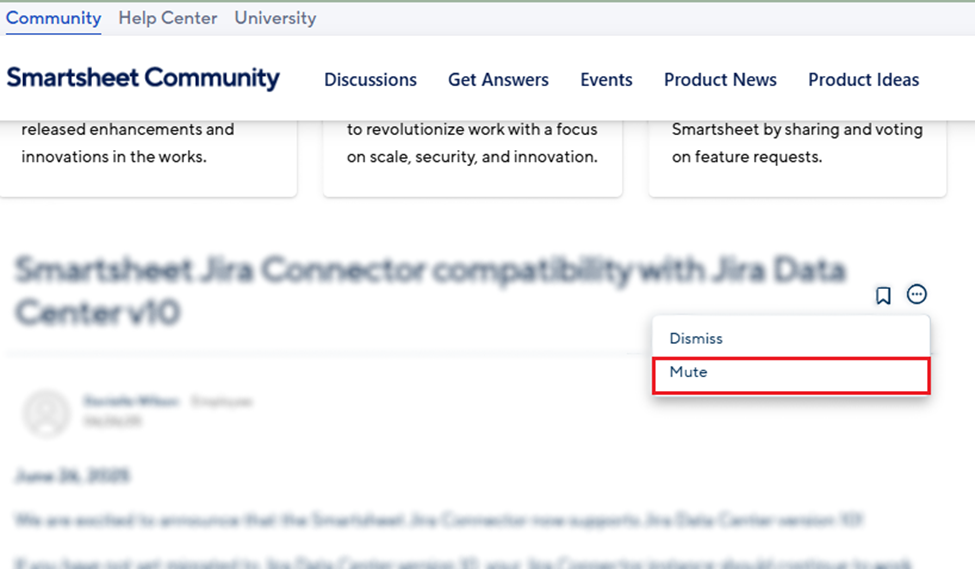
Una vez silenciada, ya no recibirá notificaciones de nuevos comentarios en esa publicación específica. Nota: Esto incluye también las @menciones que puedan hacerle a usted.
---
Lo más destacado del lanzamiento del producto
Nueva vista: ¡Se ha lanzado la vista de tabla! Introducción a la vista de tabla
Principales características de la vista de tabla:
- Colaboración en tiempo real: los cambios se guardan y actualizan mientras edita
- Selección de color para los valores de la columna desplegable
- La clasificación de columnas se aplica a usuarios individuales en lugar de a todos los espectadores
- Eliminación de columnas por lote
- Pegado de hasta 1000 filas
Otras actualizaciones: ¡Ya están disponibles!:
- Agregue gráficos de análisis de datos a los paneles de control
- Al restaurar elementos de la carpeta de elementos eliminados, estos ahora volverán al espacio de trabajo original
- Reacciones a los comentarios
- Edite directamente los campos de las tarjetas en la vista de tablero
---
POR SI SE LO PERDIERON

¡Smartsheet ENGAGE 2025 está a la vuelta de la esquina! Aprenda más e inscríbase aquí

¿Va a asistir a una Cumbre de Smartsheet?
No olvide estar atento a su insignia de asistente en breve

Nuevas ofertas de SmartU en inglés
¡Aprenda sobre Smartsheet Builder Path y más!

¡Las regiones de Smartsheet de Australia ya están disponibles!
Aprenda más sobre las regiones de Smartsheet.
---
SmartStories

Vea cómo respondieron los demás miembros de la Comunidad
Vea cómo respondieron los demás miembros de la Comunidad
Escuche las excelentes historias de los miembros de la Comunidad
---
Publicación más útil:
¡Queremos celebrar esas preguntas que ayudaron no solo al usuario que las publicó originalmente, sino también al resto de la Comunidad, así como a los miembros que respondieron a las consultas!
¿Cómo tomar el último registro en una base de datos? Respondido por: @jmyzk_cloudsmart_jp
Clasificación de los miembros de verano:
---
Pasa el micrófono 🎤 Campeones de la Comunidad
Los Campeones de la Comunidad son miembros que demuestran experiencia en el producto y generosidad al compartir las mejores prácticas y brindar asistencia a otros en la plataforma.

“He aprendido mucho de esta comunidad, especialmente nuevas y creativas formas de usar fórmulas que no había considerado antes. La diversidad de pensamiento aquí desafía y expande constantemente la forma en que abordo la resolución de problemas en Smartsheet”.
- @AKnight , Especialista en Operaciones Comerciales en LEVATA Human Performance y nuestro Miembro Destacado del mes de junio de 2025
¿Conoce a alguien en la Comunidad que debería ser el Miembro Destacado del próximo mes? Puede nominarlo aquí. *Formulario solo en inglés
---
Mezcla de motivación para triunfadores
BTS, “ON”
¡Si no sabía que soy fanático de BTS, ahora lo sabe! Esta canción es esencialmente un himno motivador, con letras poderosas, un sonido contundente y percusivo y una gran energía. Elegí específicamente este video musical para destacar la increíble coreografía que es tan central en su trabajo. Puede ver a BTS brillar junto a la banda de marcha Blue Devils, los bailarines de THE LAB y la bailarina y coreógrafa Sienna Lalau.
PD: Si la ubicación te resulta familiar, se trata del Sepulveda Dam en Los Ángeles ¡un lugar de filmación popular! (Tengo más datos curiosos, pero esto sería demasiado largo 😆)..
---
Más información sobre Rebeca:

En enero, algunos de ustedes me pidieron que revisara sus objetivos más adelanteen el año, y eso es exactamente lo que estamos haciendo con la pregunta del mes de julio. Disponible solo en inglés.Siéntase libre de usar un traductor e intervenir.
Pensé que, si les estoy preguntando a ustedes, debería responderme a mí mismo,¿verdad? Si estuvieron en las reuniones virtuales de Líderes o Embajadores, yasaben esto, pero ¡recientemente comencé a hacer yoga! Durante mucho tiempo, fue una de esas metas de "sería bueno" que seguía posponiendo.
Al acercarnos al punto medio de 2025, revisé mi lista de objetivos y ahí estaba:aún pospuesto para ese "momento adecuado" que nunca parecía llegar. Así que decidí encontrar finalmente un buen estudio y reservar una clase sinpensarlo demasiado. Terminó siendo una de esas cosas en las que uno empieza yde inmediato se pregunta, "¿Por qué no hice esto antes?"
Resulta que, aunque es desafiante, también es divertido, relajante y me da la energíapara comenzar bien mi semana.
Entonces, ¿cómo van sus objetivos? ¡Me encantaría leer sus respuestas en la pregunta del mes! Comparta en qué está trabajando y ¡yo le estaré animando!
---
Envíenos sus comentarios.
¿Tienen ideas para la próxima edición del Community Corner? ¡Dejen su opinión en los comentarios!
 Rebeca S.
Re: Multiple IF formula over 2 columns
Always evaluate from most restrictive to least restrictive:
=if(and(column1@row = "", column2@row=""),"C",if(column1@row="","A",if(column2@row="","B","no blanks")))
Check for both (most restrictive), then check for blanks in each individually (order doesn't matter), then handle it if both aren't blank.
The reason you go most restrictive to least is that if both are blank and you are testing for either individually FIRST, that will flag as true before you get to your "what about both?" test. Obviously, there are other ways to handle this also, but it is in general the best way to address it in my opinion.
 Jgorsich
Re: Access to Forms
Hi,
I hope you're well and safe!
Excellent! I'm glad you figured it out and got it working again.
I hope that helps!
Be safe, and have a fantastic day!
Best,
Andrée Starå | Smartsheet Expert Consultant & Partner / CEO @ WORK BOLD
✅ Please support the Community by marking your comment as ✅ Answer. This will make it easier for others to find a solution or help answer. I appreciate it, thank you! 🙏
 Andrée Starå
Re: Translating Formula to Smartsheet
Hi @Mross0878
I have made a start here to give you an idea of the syntax and structure:
=IF(ISBLANK([Due Date]@row ), "No Due Date",
IF(Status@row = "On Hold", "",
IF(Status@row = "Complete", "",
IF(AND(OR(Status@row = "In Progress", Status@row = "Not Started"), [Due Date]@row - TODAY() < 0), "At Risk",
"Keep going here"
))))
You will need to continue in the same format, replacing "Keep going here" (including the quotation marks) with the next IF statement (which is the 4th elseif in your formula).
The formula above covers:

I recommend trying that part, testing it, then trying the next part, then merging them together. It will make it easier to troubleshoot.
The next part (three elseifs) I would simplify to just:
=IF(Status@row = "In Progress",
IF([Due Date]@row - TODAY() > 14, "No Risk",
IF([% Complete]@row >= 0.5, "No Risk", "At Risk")))
The first IF checks the status, if that is true it looks at Due Date, if that is more than 14 days out it returns "No Risk", if not it looks at % Completed, if that is more than or equal to 50% it returns "No Risk", Otherwise it returns "At Risk".
Combining that with the formula above gives:
=IF(ISBLANK([Due Date]@row ), "No Due Date", IF(Status@row = "On Hold", "", IF(Status@row = "Complete", "", IF(AND(OR(Status@row = "In Progress", Status@row = "Not Started"), [Due Date]@row - TODAY() < 0), "At Risk", IF(Status@row = "In Progress", IF([Due Date]@row - TODAY() > 14, "No Risk", IF([% Complete]@row >= 0.5, "No Risk", "At Risk")), "next part here - this will be is the Status is not In Progress")))))
That just leaves this bit which will replace the "next part here…" in the formula above:

Hope this helps.
 KPH
KPH
Re: 🚨 [Feedback Requested] Would commenting directly on Dashboards help your team? 🚨
Hi Vatsal,
I hope you're well and safe!
Here's my feedback!
1️⃣ I would love to have the ability to have conversations in Dashboards, but I don't see a use case for it on a widget level. With that said, I think it could be excellent to have other options. (see below)
2️⃣ I love the idea of being able to annotate. I think it would be fantastic to have the proofing features (Comment with pin/area/arrow/emoji) in conversations in Dashboards, and, come to think of it, it would be amazing to have them in Sheets and similar too (Being able to comment and selecting a column/cell/area, and more). I would love it for when I develop client solutions, but more importantly, I know that my clients would love it too.
3️⃣ I also love the idea of having approvals in the Dashboards, and I think it would make sense to use the same Proofing structure as mentioned above.
4️⃣ I agree with others that being able to filter and send are the most requested features, together with being able to "Jump" to different sections that I've heard from my clients and the community.
🔢 My suggested prioritization would be. (In this order because of the work efforts)
1️⃣ Jump
2️⃣ Send
3️⃣ Conversations
4️⃣ Annotations/Proofing
5️⃣ Filters
I hope that helps!
Be safe, and have a fantastic day!
Best,
Andrée Starå | Smartsheet Expert Consultant & Partner / CEO @ WORK BOLD
✅ Did I help answer your question/solve the problem? Please support with💡 ⬆️ ❤️, and/or ✅ Answer. This will make it easier for others to find a solution or help answer! I appreciate it, thank you! 🙏
Andrée Starå