Best Of
NEW! Timeline view widget in dashboards
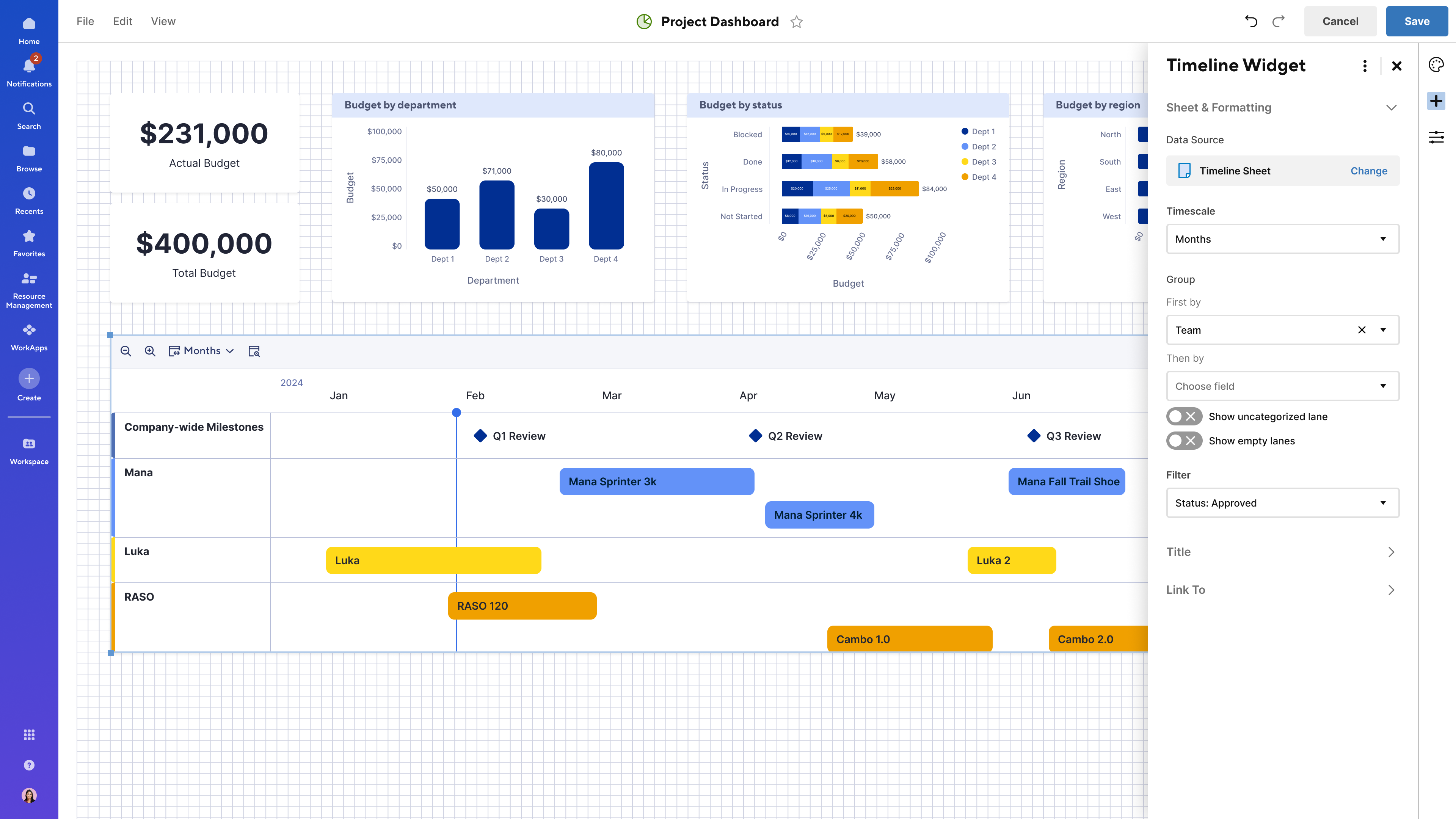
We’re excited to announce that the highly requested timeline view widget in dashboards is now generally available! With this new widget, you can easily bring timelines from large-scale projects into a single, centralized dashboard, giving stakeholders a clear, at-a-glance view of key initiatives and milestones.
When adding a timeline widget to your dashboard, you can choose from any sheet that contains at least one date column and where you have Viewer or higher permissions. Learn More
This feature helps teams, managers, and stakeholders:
- Visualize project phases and critical milestones in real time
- Track progress alongside other relevant metrics on the same dashboard
- Quickly surface insights and drill into details to stay aligned
- Make faster, more informed decisions with improved portfolio visibility
Note: The timeline view widget fully supports dashboard themes, and users can choose whether bars and milestones reflect the dashboard theme or retain colors from conditional formatting or manual settings in the sheet. This release does not include support for timeline view reports in dashboards.
Environments availability: Commercial US, Commercial EU
Plan availability: Business, Enterprise, Advanced Work Management
Subscription Model Availability: Legacy Collaborator Model, User Subscription Model
Stay informed by subscribing to receive product release updates for curated news of recently released product capabilities and enhancements for the platform of your choosing, delivered to your inbox. As new releases occur, you will receive a weekly email with news of what's released every Tuesday.
 Jason DelValle
Re: Forms logic for single (pro users)
Great idea. As a single shop, the business account is not feasible. I have the Pro plan and being limited by the permissions is very frustrating.
 Meg Y
Meg Y
Re: Formula within cell
HI Paul,
I just managed to figure it out.
It seems that SS does not like the auto number fucntion within a cell, so I had to do a a HELPER column with auto numbering, and then the formula calls the the numbering from the HELPER column.
The formula looks like this:
=UPPER(LEFT([Stand type]@row , 3)) + "_" + RIGHT("0" + DAY([Date Requested]@row ), 2) + RIGHT("0" + MONTH([Date Requested]@row ), 2) + YEAR([Date Requested]@row ) + "_" + [Auto ID]@row
 ICJ2025
Re: Working with Project Management Office
@Pete Spin You were absolutely correct that I was in the wrong template space. Thanks again! This time I made no changes/updates to the intake form and it all went as planned. But I am still afraid to make any changes so that I don't break any links! But at least I'm a step further thanks to you :)
tracey eppes
Re: Why can't I add a new user to my account as a guest or viewer?
I agree. This process is absolutely counterproductive to anyone except Smartsheet and seems to be all about revenue as I don't see how this helps the user base at all. We are forced to add new users as members and then complete further steps when we know they should be viewers to begin with. This is wasting my time, not saving it. Smartsheet is making user management cumbersome and more complex, rather than helping make anything easier. Isn't the point of a tool like this to help cut down on the time you have to use doing mundane tasks? This has caused me to spend more time exponentially in Smartsheet. It's frustrating to say the very least.
HSabin
Why can't I add a new user to my account as a guest or viewer?
I do not want to add all new users to the account as 'Members'. I see no justification for Smartsheet making the new user default 'member' other than greed. To make this even more frustrating, I am unable to change the user-level until AFTER THEY HAVE ACCEPTED THE SMARTSHEET invitation email! Please stop frustrating your dedicated users.
tzaczyk
Re: How to Add and Equate for an Empty Field?
Does it work if you plug this in?
=IF(OR([Helper 1]@row = "1", [Helper 2]@row = "1", [Helper 3]@row = "1", [Hr 1]@row = "1"), "Fail", "Pass")
 Paul Newcome
Re: How to add card and calendar view on Dashboard
Any update on this? It doesn't make sense to me that there's no calendar-view widget for the dashboard to begin with, but not having any options to customize the published/embedded calendar doesn't make sense either. I just want to display the calendar on my dashboard, and not give people the option to flip through different views of my sheet.
Laura Chow
Re: Does a workflow in a Data Shuttle have the ability to pull an updated report in a SharePoint Folder?
Data Shuttle looks for a file by name in OneDrive. What I would do is use Power Automate to stage the file for Smartsheet to pick up, and then either delete it or overwrite it with the new file the next week. As long as Data Shuttle runs once a week, and the file is there and has the same name each time, Data Shuttle will pick it up.
James Keuning
Re: Index formula help with a global update when referencing template metadata sheet
Hi @Jef Forward
Unfortunately, Global Updates in the Control Center doesn't currently support updating/modifying formulas with cross-sheet references. The INDEX formula needs manual adjustments for already provisioned projects.
There is a product feature request discussion on this.
To automate this, you can use the Smartsheet API to create cross-sheet references that dynamically adjust formulas based on the project context. This would require custom scripting. If you are unfamiliar with programming, Bridge is an alternative solution to help automate some of these processes without deep technical expertise.
