Best Of
SmartStories - Smartsheet コミュニティ10周年記念
コミュニティの皆さま、こんにちは。
2月にコミュニティの10周年をお祝いしたことを覚えていらっしゃいますか?皆さまからとても素敵なコメントをいただきましたので、SmartStories の最新エピソードで、お気に入りのコメントをいくつか紹介させていただくことにしました。
今回の特集で登場されたコミュニティメンバー: @JLC 、@Shaffi Mithwani 、@jmyzk_cloudsmart_jp 、@Yvonne Smythe 、@Tabitha Hunter 、
@Loann McGee (この中には初期メンバーも含まれています)に、大きな拍手を送りたいと思います。🤩
10周年のお祝いに参加してくださった皆さま、ここにお名前がある方もない方も、皆さまの貢献がコミュニティを素晴らしい場所にしているのです!
その他のSmartStories
👀次はどんなストーリーを特集してほしいですか?以下のコメント欄でお聞かせください!
 Rebeca S.
SmartStories: Celebriamo i 10 anni della Community di Smartsheet
Salve Community,
vi ricordate lo scorso febbraio, quando abbiamo celebrato i 10 anni della nostra Community? Avete condiviso commenti così belli che abbiamo deciso di dedicare il nostro ultimo episodio di SmartStories a metterne in risalto alcuni tra i nostri preferiti.
Un sentito ringraziamento ai membri della Community presenti in questa edizione, inclusi alcuni che ci accompagnano fin dall’inizio: @JLC, @Shaffi Mithwani, @jmyzk_cloudsmart_jp, @Yvonne Smythe, @Tabitha Hunter, e @Loann McGee 🤩
A tutti coloro che hanno partecipato alla celebrazione dei 10 anni, che il vostro nome compaia qui o meno, i vostri contributi sono ciò che rende questa Community un luogo straordinario.
Altre SmartStories
👀 Quali storie vi piacerebbe che mettessimo in risalto nel prossimo episodio? Fatecelo sapere nei commenti qui sotto.
Rebeca S.
Re: Formula help to convert from total days to business days
@Chris Palmer This worked perfectly. I really appreciate your help!
 jgenove
Re: Select multiple records to fill in a document
Please can we get this soon! I've been searching for workarounds for hours and all I keep finding are threads talking about the need for this feature for years with no solution.
MMaydel
Re: Select multiple records to fill in a document
It would be very much interesting to have an automation that would generate a PDF, collecting all rows that would met a certain criteria.
For example a list of articles that would met the same order nr. So, the user would have to enter one order nr and include below several articles. Like if you filter a column
 Murilo Masson
Re: Select multiple records to fill in a document
Good idea. I've previously requested this feature @Ian Cooper via the old Request Form.
We generate Payment Certificates that take data from various sheets, and run some calculations in the background to present on a Dashboard that is formatted to look like an A4 sheet of paper that can be PDF'd. It's a little fiddly.
Ideally, we would use Document Builder to upload our Payment Certificate template and have Smartsheet run the calculations from the various sheets and deposit the values in the pre-determined fields. Given the recent update to Document Builder where Automation would allow a user to check a Check-box that then kicks into gear the Document Builder process, this would help immensely.
 Richard Heath
Re: Project Management Office Template Updates
Can you see the sheet in the main workspace - outside the template folder?
Another way to find a sheet:
- Click on a cell in your Project Metadata Sheet that’s already linked to the Portfolio Summary. look for a small grey outward arrow in the corner this means the data is being sent out. A blue inward arrow means data is coming in
- A popup will appear showing the sheet data it’s going to like "Used in formula on Portfolio Summary" this is a hyper link
- Click the link then in the bottom left corner you'll see an option Go to Sheet to open the Portfolio Summary sheet - problem solved (hopefully)
Once you’ve found the sheet
- Add your new columns. (make sure they exactly match the new ones you added to the Metadata Sheet)
- Update any crosssheet formulas so they reference your new columns correctly.
If you find a Sheet Summary Report don’t add columns to the Portfolio Summary sheet add your new fields to the Sheet Summary section of the Project Metadata Sheet and include those in the report.
 Jason P
Re: Connecting multiple PMO templates
Great question! Customer Onboarding and Client Implementation often represent two phases of the same journey—onboarding typically comes first, covering account setup, introductions, and initial training. In contrast, implementation focuses on actual delivery, like configuration, integration, and go-live. Integrating the two can create a seamless experience for both teams and customers.
Though I am not so familiar with those templates, here are a few integration ideas that can be applied to any kind of templates:
- Combined Gantt Report
I created a report pulling rows from both templates. To unify the view:- I standardized column names (e.g., changed “At Risk?” in the Implementation Timeline sheet to “At Risk”, and “Internal Owner” in the Onboarding sheet to “Assigned To”).
- I aligned cell formatting to ensure similar fields appear consistently.
- I added a “Parent” checkbox column with the formula
=COUNT(CHILDREN()) > 0to show only parent rows for a cleaner overview. - I added a “Breadcrumbs” column with
=JOIN(ANCESTORS([Task Name]@row), "> ")to display task hierarchy. - In the report, I filtered by Parent = checked and grouped by sheet name, changing the Onboarding sheet's name to add "_" in front to come to the top.
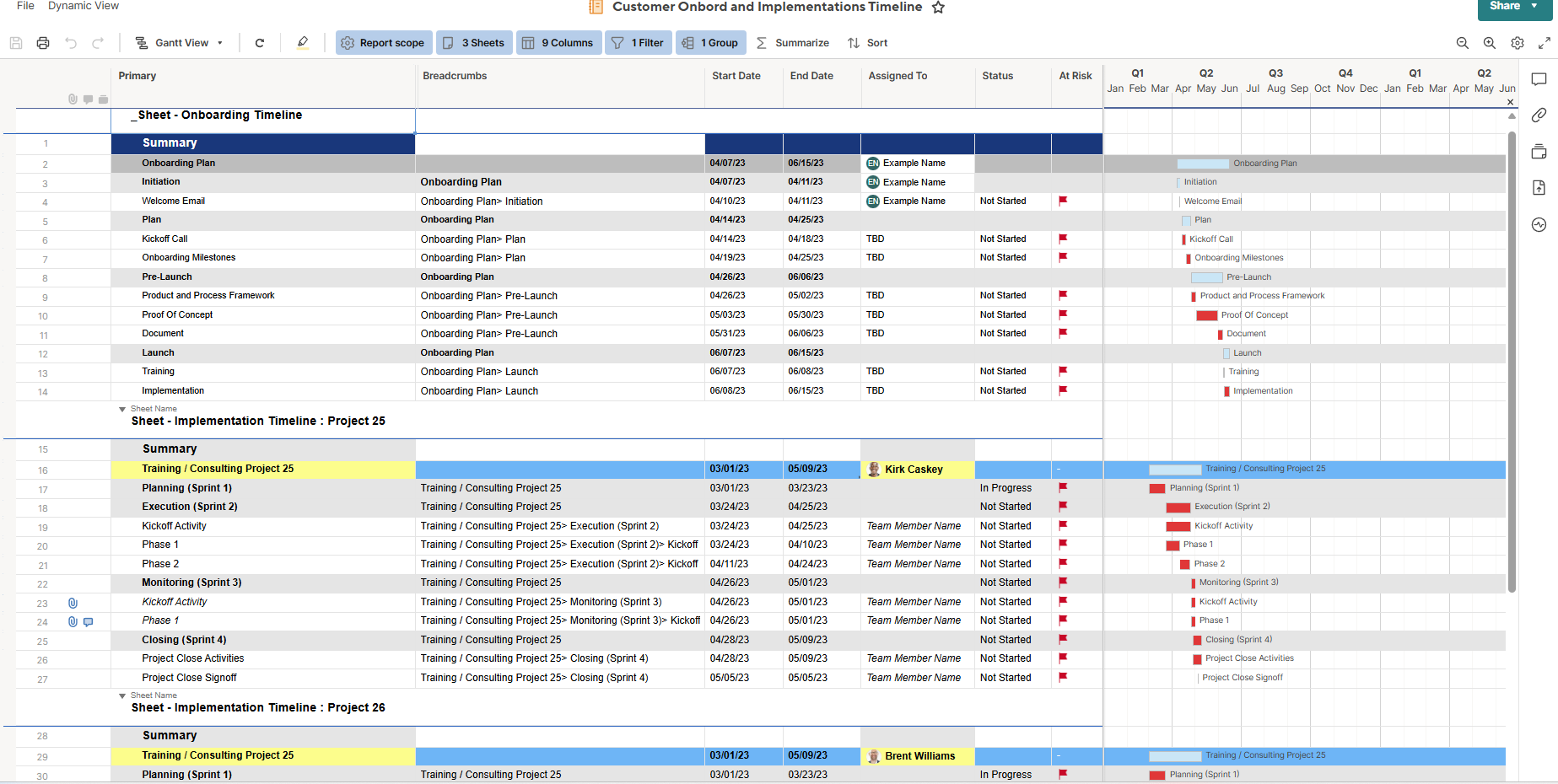
- Combined Dashboard Navigation
I built a summary dashboard with:- Shortcut widgets at the top for quick access to each dashboard.
- Web Content widgets using the published embed code of each individual dashboard (for demo purposes).
- On each individual dashboard, I also added shortcuts back to the combined view to ensure smooth navigation.
(In actual use, it’s better to use the real dashboard links rather than public embed codes.)
This setup helped stakeholders get both a high-level and detailed view of onboarding and implementation progress—without toggling between unrelated sheets.


Re: Datasources for Dropdown Menus
A lot of SSFeatures have requested this feature, so I've done a bit of research into the solutions for this.
Here are the list of solutions that I've found:
DataShuttle by Smartsheet - You can achieve this in Data Shuttle if you have that addon, but it requires a configuration for each data source/destination.
Dropdown Update for Smartsheet - Probably the simplest of all of the options.
SmartLink by @Gia Thinh - This one uses Webhooks to keep your data in sync in real time, which is really nice. Some of the other ones only update your data every few minutes, whereas this one updates the data right when it happens.
Solution Manager by SoftwareX - The dropdown updater is bundled with their solution manager, so it comes with a bunch of other useful tools besides just the dropdown updater. I believe that this one works with Control Center builds. Maybe someone from the SoftwareX team can confirm.
Smarter Dropdown List Manager by Smarter Business Processes - You configure the dropdown data sources in a Smartsheet sheet. Which is really nice! The configuration lives in Smartsheet, rather than needing to configure everything in a custom web app.
I'm sure there are others out there as well!
 SSFeatures
Re: Send Dashboard via email - manually and automated workflow
Yea from a technical perspective this is a challenging feature to implement, and it's something that I've been playing around with adding into SSFeatures. But I'm hesitant to work on it if the Smartsheet team is actively working on this feature.
There are so many widgets, with lots of different customization options, and each of those would need to be explicitly rendered properly while sending out the email. Definitely a lot of work!
Thanks @TomG for keeping this thread updated!
SSFeatures