Best Of
Re: Can you uses forms to populate fields in existing rows instead of creating an entirely new row?
Hi,
I hope you're well and safe!
It's possible, but I'd recommend this instead.
1️⃣. Start with the form
2️⃣. Continue with either an Update Request or use the Premium App, Dynamic View
Make sense?
Would that work/help?
I hope that helps!
Be safe, and have a fantastic day!
Best,
Andrée Starå | Smartsheet Expert Consultant & Partner / CEO @ WORK BOLD
✅ Did I help answer your question/solve the problem? Please support with💡 ⬆️ ❤️, and/or ✅ Answer. This will make it easier for others to find a solution or help answer! I appreciate it, thank you! 🙏
 Andrée Starå
Re: Automate a sql query of public information to merge with Smartsheet
You're not alone—I also started from scratch with no prior experience using the PostgreSQL connector in Power Automate or accessing the AACT database. But I was able to get everything working to automatically retrieve clinical trial data and output it to Excel, which I can later merge into Smartsheet via Data Shuttle or API.
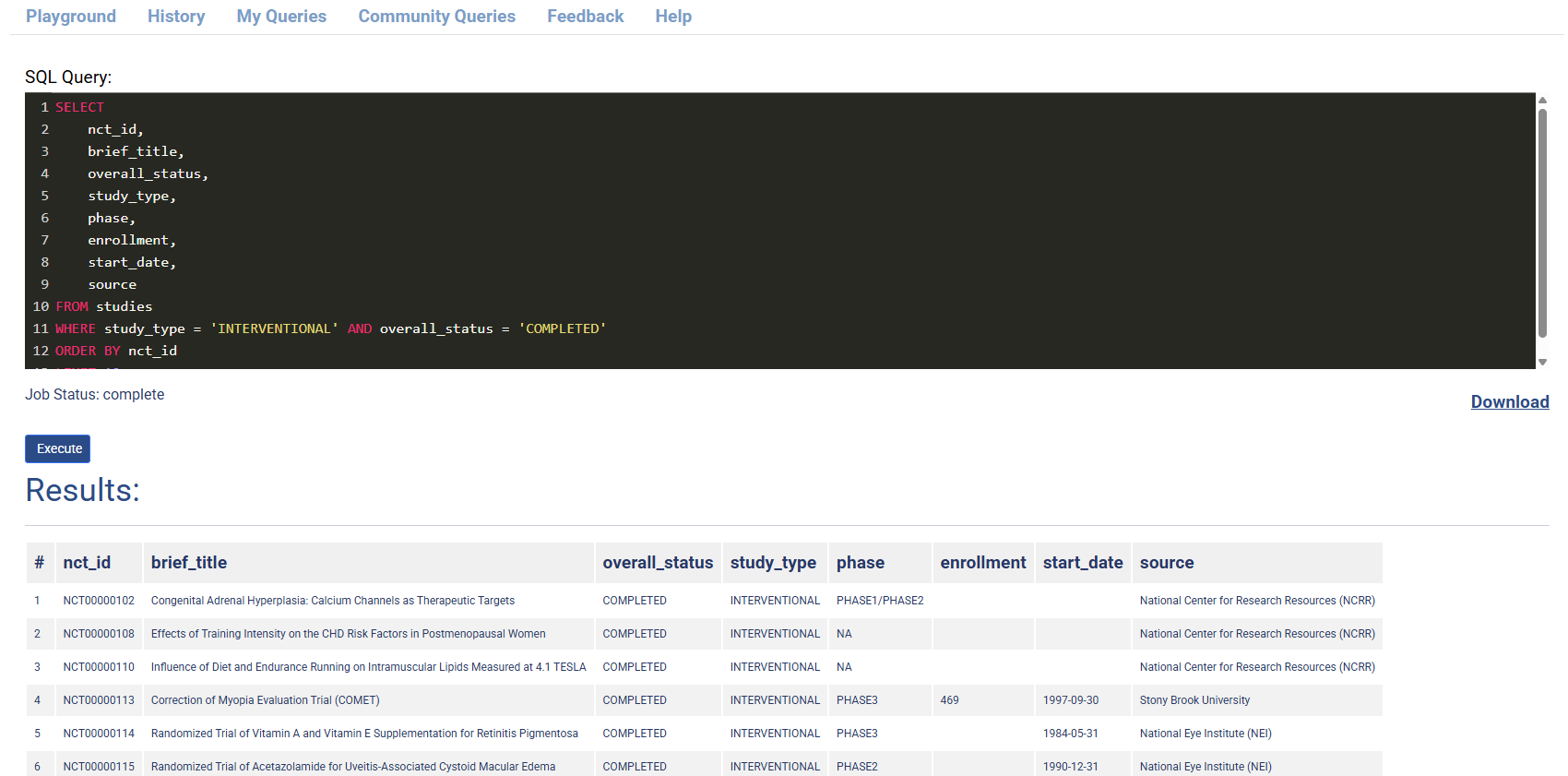
The image below is the SQL Query in the Playground, which I automated using Power Automate.
What I Did — Step-by-Step:
1. Scheduled Flow (Testing at 10:00, 11:00 AM JST)
I used the "Recurrence" trigger in Power Automate to test the flow daily at 10:00 and 11:00 AM Japan Standard Time.
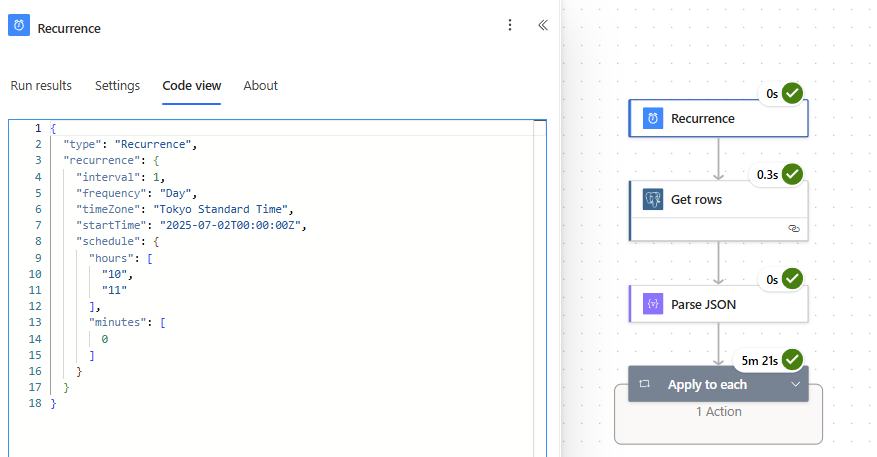
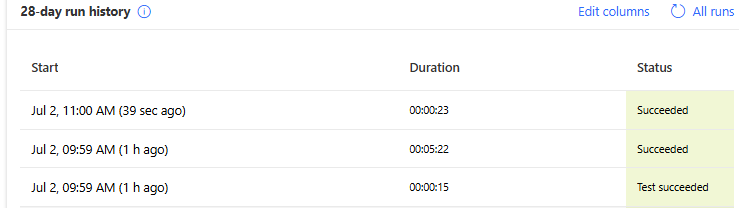
The image shows that the 10:00 AM and 11:00 AM schedule triggers are working, as expected.
2. Query AACT Public Database (PostgreSQL)
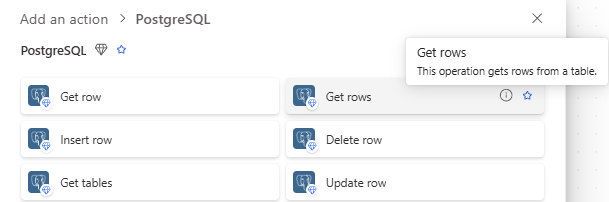
I used Power Automate’s PostgreSQL "Get rows" action.
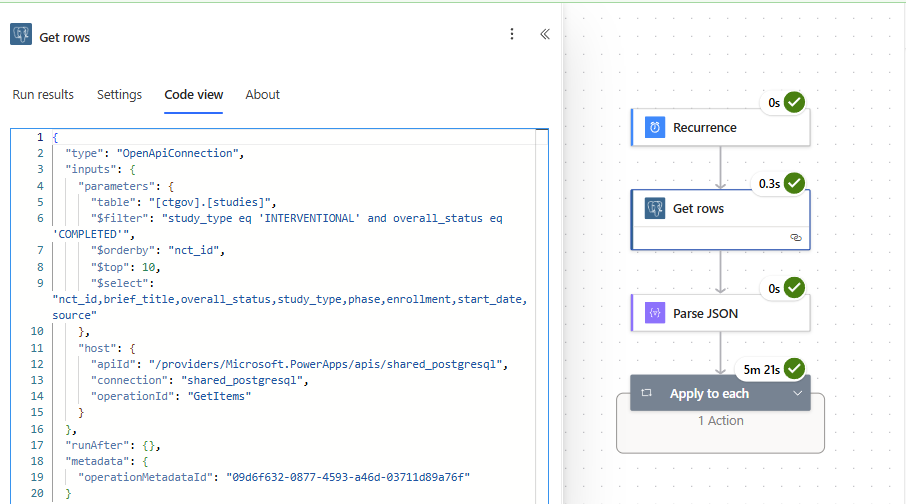
- Connection setup:
- Server:
aact-db.ctti-clinicaltrials.org - Database:
aact - Authentication: Basic (username & password from your AACT account)
- Server:
- Table name:
studies - Select Query: nct_id, brief_title, overall_status, study_type, phase, enrollment, start_date, source
- Filter Query: study_type eq 'INTERVENTIONAL' and overall_status eq 'COMPLETED'
- Order By:
nct_id - Top Count:
10
3. Parse the Results (Parse JSON)
Once the data is pulled, I used the "Parse JSON" action. I used a schema that matches the study fields I care about (e.g., nct_id, brief_title, start_date, etc.).
As for the schema, you can use the example output from the PostgreSQL "Get rows" action.to create one.
{

  "type": "ParseJson",

  "inputs": {

    "content": "@body('Get_rows')",

    "schema": {

      "type": "object",

      "properties": {

        "value": {

          "type": "array",

          "items": {

            "type": "object",

            "properties": {

              "nct_id": {

                "type": "string"

              },

              "brief_title": {

                "type": "string"

              },

              "official_title": {

                "type": "string"

              },

              "overall_status": {

                "type": "string"

              },

              "phase": {

                "type": "string"

              },

              "study_type": {

                "type": "string"

              },

              "enrollment": {

                "type": "integer"

              },

              "enrollment_type": {

                "type": "string"

              },

              "source": {

                "type": "string"

              },

              "start_date": {

                "type": "string"

              },

              "completion_date": {

                "type": "string"

              },

              "completion_date_type": {

                "type": "string"

              },

              "primary_completion_date": {

                "type": "string"

              },

              "primary_completion_date_type": {

                "type": "string"

              },

              "verification_date": {

                "type": "string"

              }

            }

          }

        }

      }

    }

  },

  "runAfter": {

    "Get_rows": [

      "Succeeded"

    ]

  },

  "metadata": {

    "operationMetadataId": "eb875e21-1ed1-4ac1-92ed-2abfada6a319"

  }

}
4. Write Results to Excel
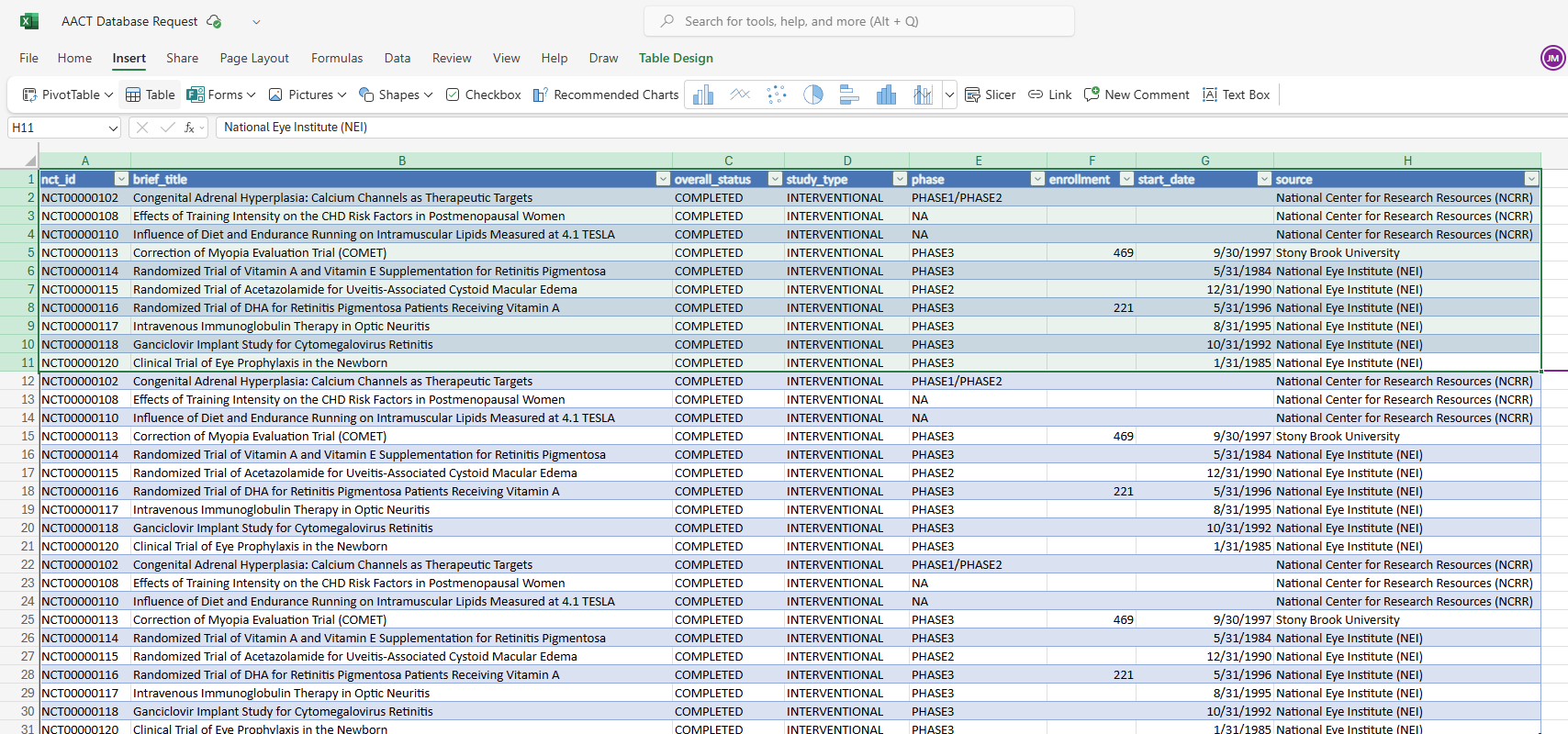
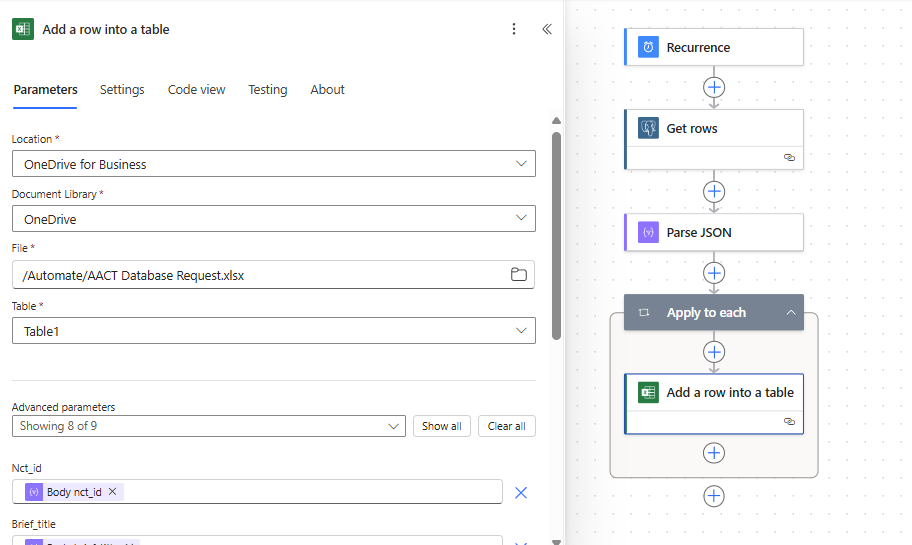
Next, I used "Add a row into a table" (Excel Online Business connector) to output the results to a structured Excel file hosted in OneDrive. I set up my Excel table with headers, as shown in the image below.
Ensure that you create a table by selecting the cells and then using the menu, Insert > Table. I created an original Excel file by downloading the results for the ACCT playground. (In the image, the first 10 rows are from the download, the next 10 are from the manual test, and the last 10 are from the schedule trigger, 10:00 AM JST)
Each row from the database is added to Excel through a loop (Apply to each).
{
  "type": "Foreach",

  "foreach": "@body('Parse_JSON')?['value']",

  "actions": {
    "Add_a_row_into_a_table": {

      "type": "OpenApiConnection",

      "inputs": {

        "parameters": {

          "source": "me",

          "drive": "b!A8yUIuweNEuY_8yivd1DDiUQpLg7Xq1EkEpaLAK0sMPaLbPhwt5cQKVGPKFlXBsQ",

          "file": "01GN4LQ2AK5M5UAES3SFELAMS4X4EVX3OA",

          "table": "{D043FC29-9579-477D-AA3F-F3D99095773A}",
          "item/nct_id": "@items('Apply_to_each')?['nct_id']",

          "item/brief_title": "@items('Apply_to_each')?['brief_title']",

          "item/overall_status": "@items('Apply_to_each')?['overall_status']",

          "item/study_type": "@items('Apply_to_each')?['study_type']",

          "item/phase": "@items('Apply_to_each')?['phase']",

          "item/enrollment": "@items('Apply_to_each')?['enrollment']",

          "item/start_date": "@items('Apply_to_each')?['start_date']",

          "item/source": "@items('Apply_to_each')?['source']"

        },

        "host": {

          "apiId": "/providers/Microsoft.PowerApps/apis/shared_excelonlinebusiness",

          "connection": "shared_excelonlinebusiness",

          "operationId": "AddRowV2"

        }

      },

      "metadata": {

        "01GN4LQ2DG37SUQ7S7T5F3KRRNR5FQMJKZ": "/Automate/AACT Database Query.xlsx",

        "operationMetadataId": "caf7705c-f5bb-434d-9b64-319dac8ff4b2",

        "tableId": "{D043FC29-9579-477D-AA3F-F3D99095773A}",

        "01GN4LQ2AK5M5UAES3SFELAMS4X4EVX3OA": "/Automate/AACT Database Request.xlsx"

      }

    }

  },

  "runAfter": {

    "Parse_JSON": [

      "Succeeded"

    ]

  },

  "metadata": {

    "operationMetadataId": "acd8880b-e2f2-4010-a5f6-0043ed557031"

  }

}
This approach:
- Keeps your trial data fresh and centralized
- Can be easily scheduled to run at any frequency (e.g., daily, weekly, etc.).
- Provides clean, structured data you can connect to Smartsheet via Data Shuttle.
- Can also be adapted to push directly to Smartsheet via API if needed
Let me know if you'd like me to share a sample flow export or JSON schema—I’d be happy to help others replicate this!

Re: July Question of the Month - Join the conversation and receive a badge
To finish building & move to my house in Lanckorona ETA September 2025

 kowal
kowal
Re: July Question of the Month - Join the conversation and receive a badge
One of my ongoing goals is to complete my PMP. I've been having a hard time finding time to lock in and study.
 Isis T
Re: Queries about new payment methods
@Naeem Ejaz we wouldn't be able to do it with our AD integration. I was just asking the general question and to point out yet another "flaw" to the USM.

Re: Looking to summarize data from multiple rows to multiple columns so I can generate a document.
How about something like this:
Step 1
Use a JOIN function to get all of the data you need per infraction into one cell, something like:
=JOIN(Date@row:[6 Month drop off date]@row, " | ")

This can be one hidden column in your existing sheet.
Step 2
Transpose each row into a column.
Use an INDEX function to return the value from the new column from row 1 in column 1, row 2 in column 2, row 3 in column 3….
=INDEX(Combo:Combo, 1)
=INDEX(Combo:Combo, 2)
=INDEX(Combo:Combo, 3)
You would do this in your new summary sheet and replace the column name with a cross sheet reference, so the formula would look more like this (depending on the name you use for your cross sheet reference).
=INDEX({Combo}, 1)
=INDEX({Combo}, 2)
=INDEX({Combo}, 3)
The summary sheet would look like this:

Would that do the trick? Or do we also need to look at the employee name?
If so, you can add the name to the first list:

And to the second summary. Then include a COLLECT function in the INDEX to include only the rows where the names match. (The IFERROR is there to return nothing if there is no match, rather than an error message).
=IFERROR(INDEX(COLLECT(Combo:Combo, [Employee Full Name]:[Employee Full Name], Name@row), 1), "")
Change the 1 to a 2, 3, 4 etc. for each column. The summary table would look like this:

Hope that helps.
 KPH
KPH
Re: Importing Data into existing sheet
@Tommi @Danielle Wilson @AnneSh We have a new option available now using a handy browser extension to solve this problem if you don't have access to DataShuttle or want to do an import without needing to create a DataShuttle configuration:
 Darren Mullen
Re: UserName and Smartsheet Community Profile Page Link
Hi,
I hope you're well and safe!
This is the link you can share.
https://community.smartsheet.com/profile/virgh
I hope that helps!
Be safe, and have a fantastic day!
Best,
Andrée Starå | Smartsheet Expert Consultant & Partner / CEO @ WORK BOLD
✅ Did I help answer your question/solve the problem? Please support with💡 ⬆️ ❤️, and/or ✅ Answer. This will make it easier for others to find a solution or help answer! I appreciate it, thank you! 🙏
Andrée Starå
Re: July Question of the Month - Join the conversation and receive a badge
What is a personal goal you've set for yourself this year, and how is it going?
This is a great question! One of my personal goals that I have set for myself this year is to begin documenting and recording everything about my role, duties, responsibilities, and position within our district. I am nearing my 40th year working for our local school district, and as I look forward to my eventual retirement, I was asked to not only begin documenting everything I do, but to begin recording all of the background knowledge that is contained within my brain and to begin to think toward how to transition someone new into my role while also passing along all of my historical knowledge. I am learning that this is a very daunting task, but so far, with the help of our Smartsheet tool, it is beginning to take shape. Being able to use Smartsheet to help me document all of my roles and responsibilities is essential, especially since my role was created as a new role in our district, all thanks to Smartsheet! In fact, I am also very excited that our district is truly embracing the Smartsheet tool, and our continued commitment to growing capacity within our district for using Smartsheet is also part of why my role exists. In fact, part of our commitment to growing capacity has led to our district allowing more than just me to attend Smartsheet ENGAGE! This year, I will be bringing 7 additional team members along with me in November. I am so excited for them.

Work with Flow - A Space Story
Hi Community,
The previous edition of our Work With Flow series was packed with smiles all around — it was truly inspiring to see how you’re using Smartsheet to bring joy to your workplace! Now get ready, because we've got another great story coming your way.
When individuals or teams Work With Flow, they work in a way that is efficient, intuitive and empowering. Rather than getting bogged down by complexities, they find rhythm. Being a Smartsheet customer means powering your flow with a simple, flexible platform, where even complex, high-stakes projects become clear, manageable, and surprisingly simple.
At the crossroads of vision and precision, a leading space agency transforms ambition into reality. Driven by the power of Smartsheet, by coordinating teams and tracking vital components, AI enabled workflows help every mission stay on course. Obstacles become streamlined pathways, empowering these pioneers to turn missions into milestones.

Now let's turn it back to you! In the comments below, share how Smartsheet helped you turn an ambitious vision into a reality, and you’ll earn the Work With Flow badge for your profile.
 Rebeca S.