Best Of
Re: Dynamic View Comments notifications for user without access to source sheet
@Thiara Perez - That user is able to @mention you because you are shared to the sheet. You cannot @mention her because she is NOT shared (at least Commenter access) to the underlying sheet.
To get around the design flaw of not showing any visual indicator of comments or attachments, I created checkmark column in the sheet and set it to check the box if there was an attachment added. Then I added that column to the main view on DV so that people could see if there was an attachment. You could do something similar whenever a comment is added to the row to check a box and add that column to your DV main view.
It's clunky and should be fixed in DV, but it's a work around.
 JSpears
Re: Dynamic View Comments notifications for user without access to source sheet
Love this idea! It would make collaboration easier with dynamic view to have.
 AngB789
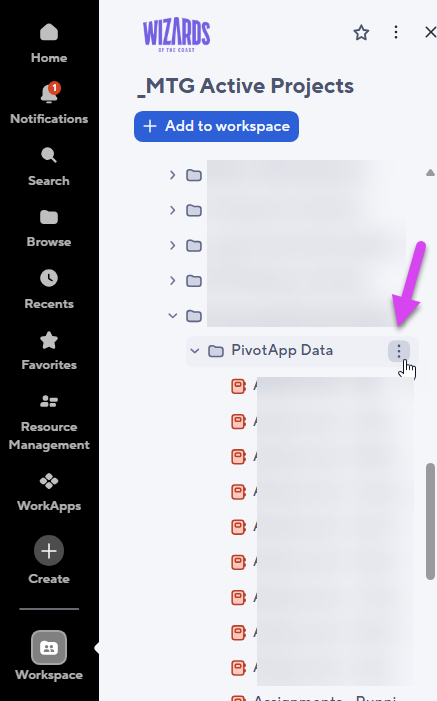
Capability to quickly grab Folder/Sheet Property Info from Workspace Panel
I often have to grab Folder URL when I'm working on projects. (It helps to not grab each reports/sheets URLs when I have lots to reference to several reports/sheets.
Since we have so many, I usually try to locate the sheet/report to find out where they exists, then I have to back track where they are in "Browse" mode.
If I can get Folder Property info from this menu, it'll make life so much easier and it'll be a great time saving!
This will also help when I submit Support ticket to add Sheet/Report IDs.
 Chizu Hieida
Re: Keyboard shortcut to delete a row
Has there been any movement on this? I'm a HUGE fan of this platform, but no keyboard shortcut to delete a row makes it clunky and often frustrating, and it's inconsistent with the all the other awesomeness of Smartsheet.
 Jace Richards
Automated report sent to Teams Channel is messy, difficult to understand/read, and incomplete
I've set an automated report sent to a channel post; however, the layout of the channel post is messy and difficult to follow, in comparison with the clear table received on the email notification.
- The report sent to the Teams channel is messy, difficult to understand/read, and incomplete because it does not show all rows but just a few, and the only way to see everything is going to the grid in Smartsheets.
- The report received on email Notification is super tidy in a clear table and easy to read/understand.
Answer from Smartsheets Customer Support: Apparently, the format of workflow notifications for a teams channel and Email notification from workflows will be different from each other currently by design.
As such the request to be able to change the format of workflow notifications being sent to a teams channel to match that of format being sento emails is currently unavailable in Smartsheet.
It would be great if someone in Design could fix this, so the report is readable and complete in TEAMS.
NataliaFM
Re: Need to remove decimals from my Dashboard pie Charts. Please help.
Smartsheets - needs to revert back - the decimals need to be removed. This has also ruined all my dashboards and views. And my executive leadership also does not like the decimals nor the new views. not sure why this was even implemented without talking with end users. This is very bad - please change back asap. I can't even go back to the old views now. We also do not like the new dashboard version. It is not good.
Amackay
Auto Save / Invalid Operations Error.
Hi All,
I have been searching community forum to this unsaved issue that I am having with my PMO but no luck so far and appreciate if someone could help me with this.
According to what I have observed, the tasks sheet is not getting saved due to which some of the columns on Portfolio / Project Tracking Dashboard (Schedule at Risk, Overdue tasks, start date) are throwing error #INVALID OPERATION.
This error disappear if I go to the task sheet and manually save and go back to dashboards and refresh them, both dashboard started showing correct info. However it happens again after some time in a day or two.
I thought users forgot to save sheet when they do change their task status. To resolve this, account settings for all the users have been updated to auto-save after one minute of inactivity, so that the sheet is saved and error is gone.
However, I am still having same error #INVALID OPERATION in some of the projects on both dashboards. To fix I have to open task sheet and manually save again and again.
Here's the screenshot from Portfolio dashboard as you can see Schedule At Risk, Overdue tasks, Start Date is showing #Invalid Operation.

Same thing happens at project tracking dashboard. See below screenshot.

Below is the screen shot of tasks sheet and as you can see there's no other error except this sheet is not saved. So If I just save this sheet now and then refresh portfolio / project tracking dashboard both will show correct info.

Start Date is [date column] not restricted to date and has formula [(WORKDAY([Due Date]@row, -Duration@row)]Due Date is [date column] not restricted to date and has formula [WORKDAY([Due Date]$41, -[Days before OCD]@row - [Holiday Adj]@row)].
Appreciate if someone throw some light where / what to look for or what seems to be an issue.
 Saj
Saj
Re: Seeking a remote full-time Smartsheet role
Hello Smartsheet Community!
I’m actively seeking a remote full-time role where I can apply my expertise in Smartsheet forms and dashboard design, automation, and visual workflow design to help teams operate more effectively and intelligently.
Here’s what I bring:
- Advanced skills using Timeline, Board, and Calendar views to create visually intuitive project environments
- A proven track record of using Smartsheet to manage high-impact initiatives where detail and coordination were key
- Strength in building automated workflows that eliminate guesswork and enhance consistency across tasks
- A creative eye for formatting and presenting data with authenticity and clarity
- Commitment to quality, efficiency, and continuous refinement—whether working with stakeholders or fine-tuning internal processes
I’m passionate about transforming messy workflows into clean, reliable systems that empower teams and highlight what matters most. If your organization values precision, creativity, and real results, I’d love to connect.
Open to opportunities, collaborations, and referrals where Smartsheet skills meet thoughtful execution.
 Jacob A
Multi-column forms
It would be so helpful to be able to be able to design forms with multiple columns.
Gawly
Re: How to change invitation email to new smartsheet users
I have a training soon with Smartsheet support and will ask this question during the call and will post the answer when I have it.
Jfreni