Best Of
Unable to click on individual cells
Hello. I am intermittently unable to click on individual cells within my sheet. Sometimes I am able to access a cell and edit the data, and sometimes when I go to click on the cell, I'm unable to without hitting refresh on my web browser. Has anyone else had a similar issue? Would love a fix because this is extremely frustrating!
 Kelly Fabiano
Why does my automation not include the attachment
Hi
I have an automation rule set up that if it has been approved, It needs to alret someone. I have selected the attachment, but when it sends it there is no attachment?
Thanking you in advance.
Warmest Regards
Dickson
DicksonK
Re: Company Logo Issues with SmartSheet / White & Black
Thanks for the response - it Doesn't directly solve it, but it does highlight an issue I think SmartSheet needs to address at some point. If the default color schedule of a Workspace panel is light, this forces me to use a dark logo. And if I can only use a dark logo, then I am forced to use light colors for workspace colors.
Looking for confirmation that this is how it is intended by design. I can change the color on any workspace, but there is only one company logo. If it is black, as in our case, then all workspace colors have to work around that.
 sharsch
Re: How Can I trigger an email notification sent on a date along with a contact entered on a form?
Hello @g2smsht ,
I created something very quick and simple as a proof of concept.
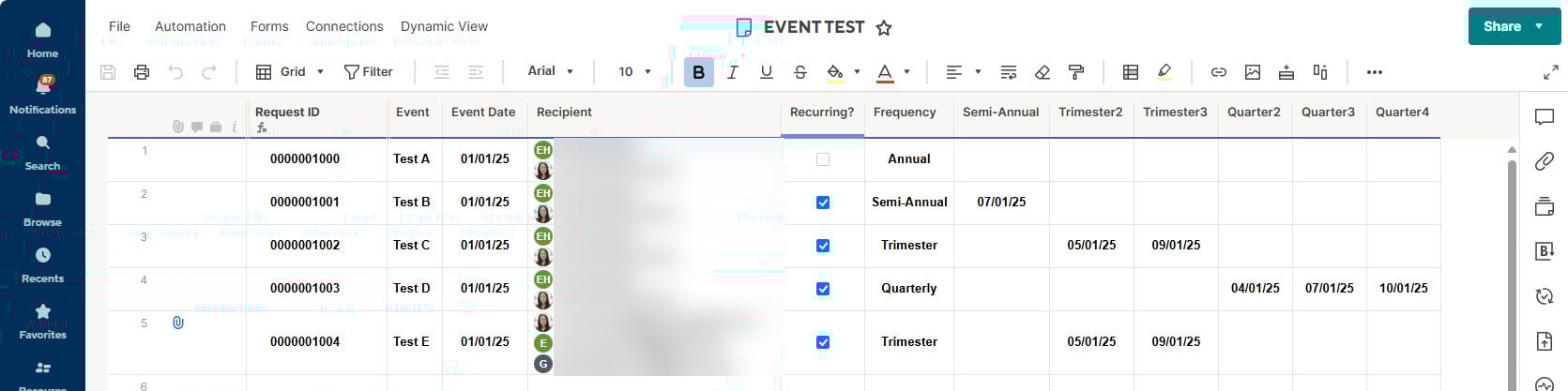
There are 2 hidden system columns "Created By" and Created Date".
There is a hidden Auto# column that the "Request ID" column is referencing via a column formula.
Form Logic
1) If Recurring is checked, then make Frequency drop-down column appear.
2) If Frequency drop-down has Semi-Annual selected, then make "Semi-Annual" appear.
3) If Frequency drop-down has Trimester selected, then make "Trimester2" and "Trimester3" appear. Front End User sees the rebranded label as "Select future 2nd Trimester date" and "Select future 3rd Trimester date".
4) and so on…
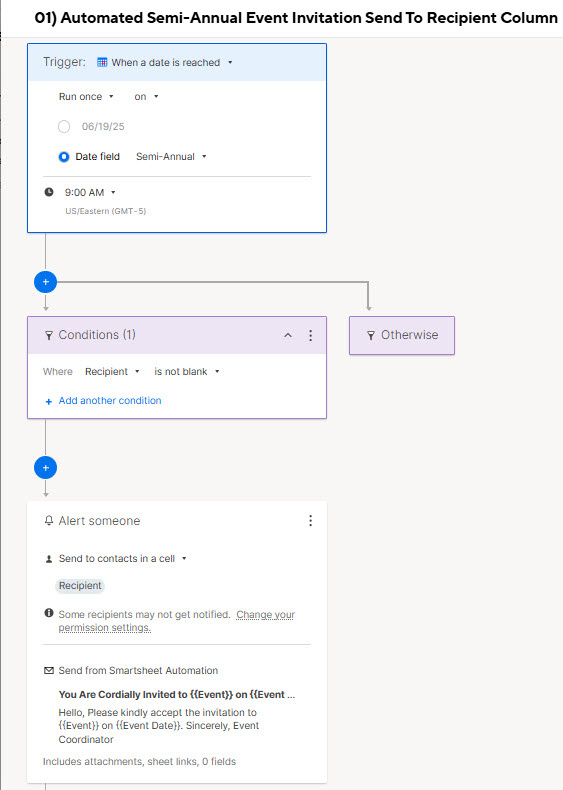
Recipient and Date columns are required for Alert Automation. Unless you setup permissions to post on a Teams or Slack channel which require the Admin to initialize.
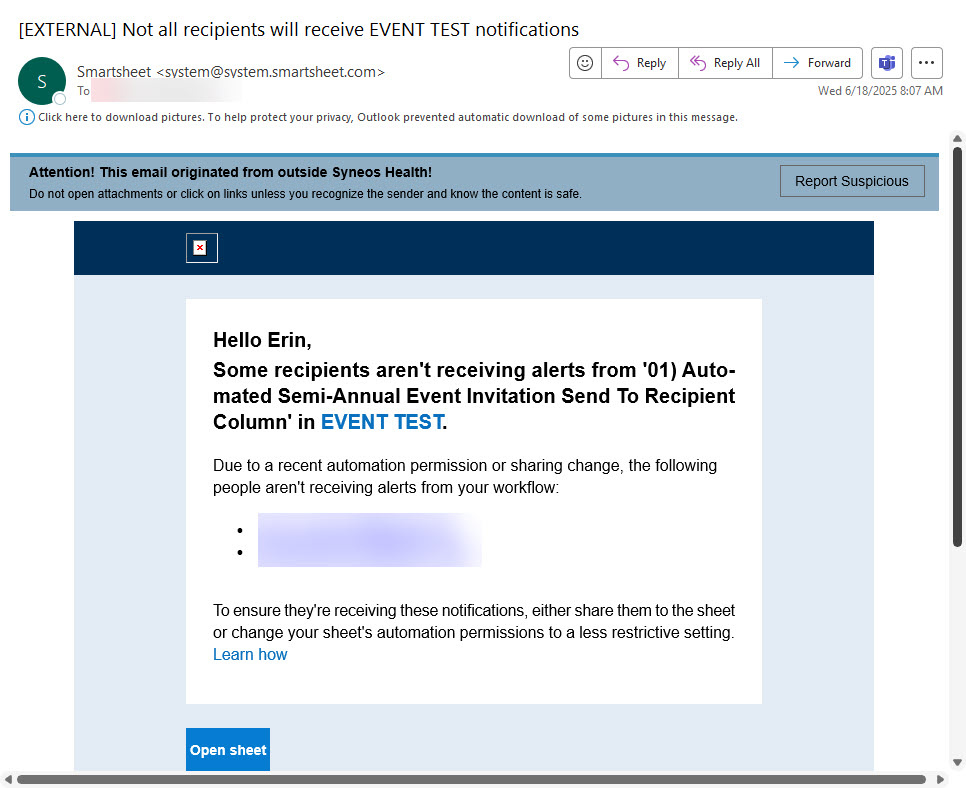
Please note the Alert Automation fails when the Smartsheet is not shared at all in any way to a registered Recipient.
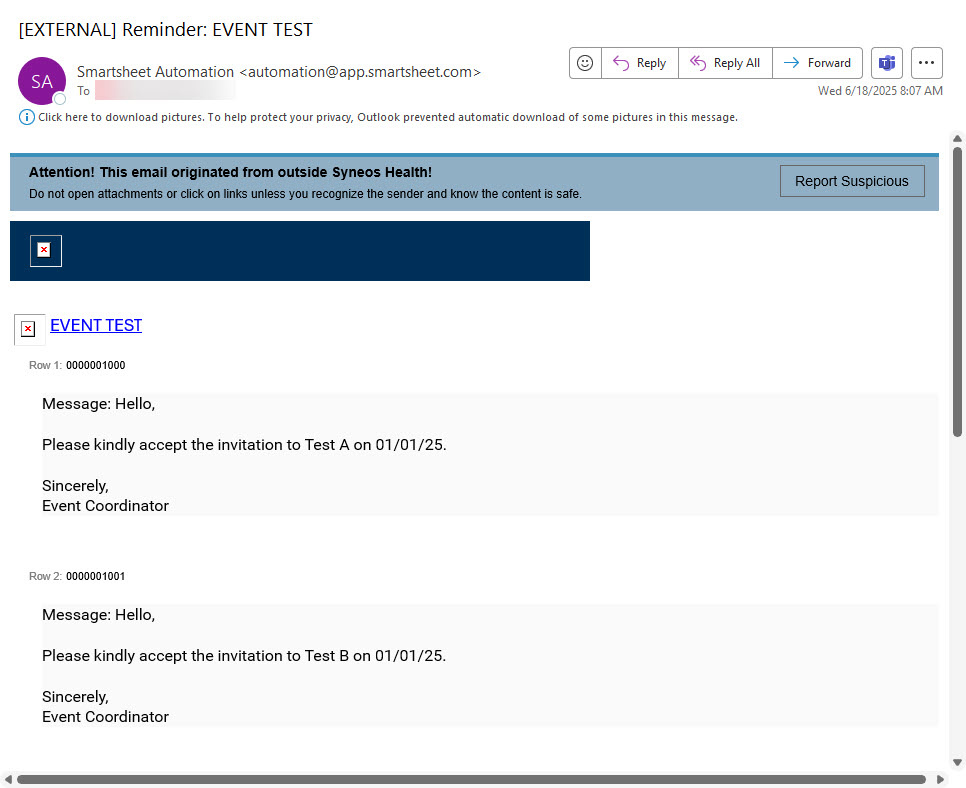
Below is the Alert Automation setup, failure notification to Smartsheet Owner and Successful Recipient notification.
If the Recipient is always singular, then you can embed the Approval Automation capabilities to electronically capture Accepted and Rejected invitations for reporting purposes.

Approval Workflow improvement - Keep the initial Value when request rejected
Status quo:
I create a workflow with a request to review and approve a certain value in a cell. The review as the option to approve or decline.
Issue:
In case of an approval, not issue. BUT in case the approver rejects the request, means he wants to express that the new / changed value is not correct, the wrong value remains changed. I only see in a separate column that it has been declined.
Example: I have a contact for a Client "Michael". Now, I want to change it to "Sebastian". This shall trigger an approval workflow to the project director to approve. In case he is of the opinion that this is not correct and rejects, it remains "Sebastian" but it should change back to "Michael".
In the actual situation, the new wrong name is still in the cell. If we have set up other workflow and automations which e.g. send updates to "Contact Client" in this cell, the wrong person which has been rejected will now receive these email and notifications.
kevin_g
Resource levelling / capacity-driven scheduling
I've had a number of discussions with clients about the ability to level resources, which is something MS Project has offered forever. In the context of RM, where the capacity view currently just reflects task assignments based on the project schedule logic, some clients would prefer to have their resource capacity considered as a ceiling and not allow over-allocation.
I appreciate that neither Smartsheet nor RM are architected to offer the flexibility to change how resource scheduling is driven at this time. However, as it's a recurring question, and I couldn't see any other ideas submitted on this topic, I thought I'd log it.
Essentially, I would expect there to be the ability of an admin (probably a resourcing admin in RM) to switch to a different scheduling 'engine' that takes capacity based on roles/disciplines as a fixed ceiling and drives schedule changes in projects to optimise the delivery of tasks synced from Smartsheet, without exceeding the ceiling.
 Philip Robbins
Re: Symbol Flexibility - more symbol colors/options
I would love to utilize the Symbol column type for custom symbols rather than creating a dropdown column.
OR if you guys could add a colored ball option that includes all 5 colors (red, green, yellow, blue, and gray)
Currently, we are using the symbol column and the colored balls max out at 4 (with 2 different color options) we really need to have 5 - and I would have to change the column type (which would may or may not break the reports and dynamic views) and make this a dropdown - which affects all of the existing formulas, filters, etc.
isabonita
Dropdowns with multiple levels filters
Please,
Do introduce dropdowns whose options are filtered by previous options! This is a massive feature that prevents most of my projects being fully moved to Smartsheet! It would be a great addition that would change the game for lots of us!
Re: Change date format
I need to change the date format on my Smartsheet to a UK format 'dd/mm/yy' how is this possible
Lenore
Re: Finish Date Static vs Duration Static
Hi @KSeaman
Thanks for posting helpful screen captures to explain your use-case! There currently isn't a way in Smartsheet to keep the End Date set on a specific date while also using Dependencies.
You would need to remove the Predecessor for the Buffer task to keep the End Date the same, regardless of what happens with the previous tasks (it would also keep the Start Date the same, though).
Otherwise, what you're doing (updating the duration of the following tasks to stay on time) is exactly what I would suggest.
If you would like to let the Product team know of your feedback or request, please feel free to submit your idea by creating an Idea Post in the Smartsheet Product Feedback and Ideas topic here in the Community.
Cheers,
Genevieve
 Genevieve P.