Best Of
Dashboard Widgets- 5-why, fishbone, user defined table
Adding a 5-why widget, a fishbone diagram widget, and a user define table widget to the dashboard would be really handy. Also, ability to attach document from local drive.
 Gregg Laukhuf
Re: Unable to click on individual cells
Hi, Im experiencing the same issue!! Very annoying and hindering my ability to work uninterrupted. Hopefully Smartsheet fix ASAP
Datts T.Dawson
Re: Length and/or Character validation within a Form
Please consider having the ability to apply character limits to data fields within the sheet itself, forms, and Dynamic View capabilities. This would assist with the quality of the data being provided. We have multiple examples that would apply.
Ten characters in a field (alpha or numeri or a combination alpha numeric).
The ability to apply hyphens or other characters within the data field character limitation/format style. Similar to the auto-numbering feature where you can have prefixes with hyphens/dashes, special characters.
Re: Report not pulling data from sheet when workspace is selected.
@Darren Mullen Yeah I think it is. I reached out and had a call with Smartsheet Support yesterday and we tried everything normal to get it working. He thought it was a backend issue but is looking into it more.
If I make a copy of the folder it will show up but I found another sheet that it also isn't pulling so I'm worried about what else this report (or other reports) is missing. I'll update this post if/when a solution is found but this is extremely concerning for our company as we rely on our reports pulling everything accurately for critical decision making.
 Adam Costello
Re: Is it true that as of January 2025 Smartsheet is removing all free access?
Yes it is true.
My company loved to use smart sheets for data displays and free interactions with larger 'licensed holder' managed data sets. Almost all of our collaboration features have to change and we had to move away from smart sheets for many things. Any edit or shared commentor or higher status will require a license.
Some things that do not go against the license change are:
- anyone can interact with a form
- anyone can interact with a publish for everyone dashboard or report (but it truly is EVERYONE no privacy)
- Update requests for single cells on a sheet
I know a lot of this won't work for everyone and I am rather disappointed with the license change.
Mae Peterson
Re: Unable to click on individual cells
Same! Definitely a bug. Having to refresh is annoying. Im in grid view
 Lauren Y
Unable to click on individual cells
Hello. I am intermittently unable to click on individual cells within my sheet. Sometimes I am able to access a cell and edit the data, and sometimes when I go to click on the cell, I'm unable to without hitting refresh on my web browser. Has anyone else had a similar issue? Would love a fix because this is extremely frustrating!
Kelly Fabiano
Why does my automation not include the attachment
Hi
I have an automation rule set up that if it has been approved, It needs to alret someone. I have selected the attachment, but when it sends it there is no attachment?
Thanking you in advance.
Warmest Regards
Dickson
DicksonK
Re: Company Logo Issues with SmartSheet / White & Black
Thanks for the response - it Doesn't directly solve it, but it does highlight an issue I think SmartSheet needs to address at some point. If the default color schedule of a Workspace panel is light, this forces me to use a dark logo. And if I can only use a dark logo, then I am forced to use light colors for workspace colors.
Looking for confirmation that this is how it is intended by design. I can change the color on any workspace, but there is only one company logo. If it is black, as in our case, then all workspace colors have to work around that.
 sharsch
Re: How Can I trigger an email notification sent on a date along with a contact entered on a form?
Hello @g2smsht ,
I created something very quick and simple as a proof of concept.
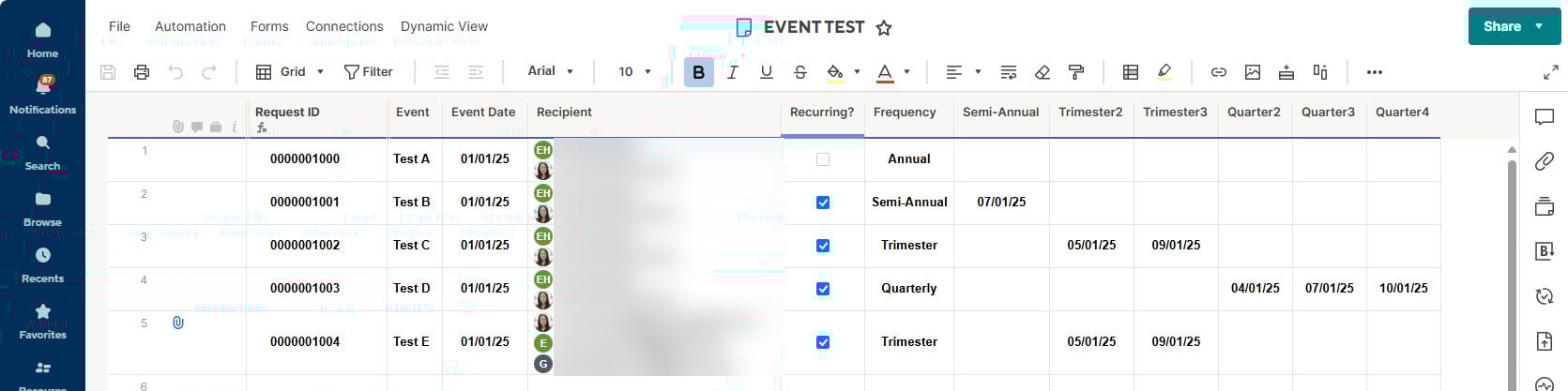
There are 2 hidden system columns "Created By" and Created Date".
There is a hidden Auto# column that the "Request ID" column is referencing via a column formula.
Form Logic
1) If Recurring is checked, then make Frequency drop-down column appear.
2) If Frequency drop-down has Semi-Annual selected, then make "Semi-Annual" appear.
3) If Frequency drop-down has Trimester selected, then make "Trimester2" and "Trimester3" appear. Front End User sees the rebranded label as "Select future 2nd Trimester date" and "Select future 3rd Trimester date".
4) and so on…
Recipient and Date columns are required for Alert Automation. Unless you setup permissions to post on a Teams or Slack channel which require the Admin to initialize.
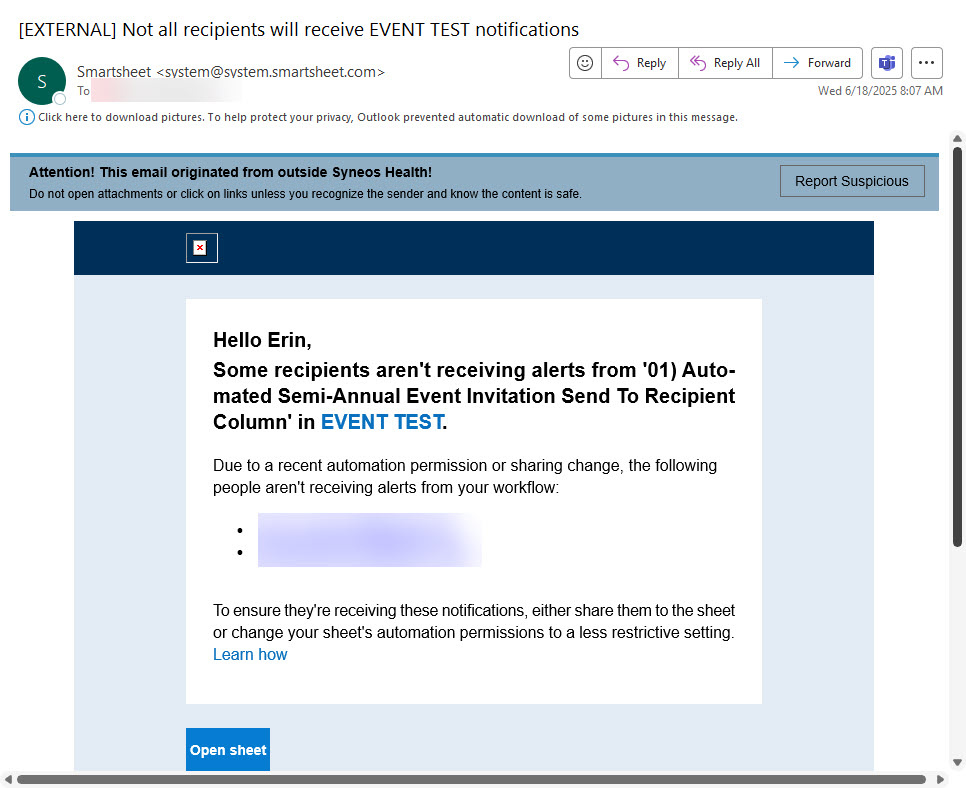
Please note the Alert Automation fails when the Smartsheet is not shared at all in any way to a registered Recipient.
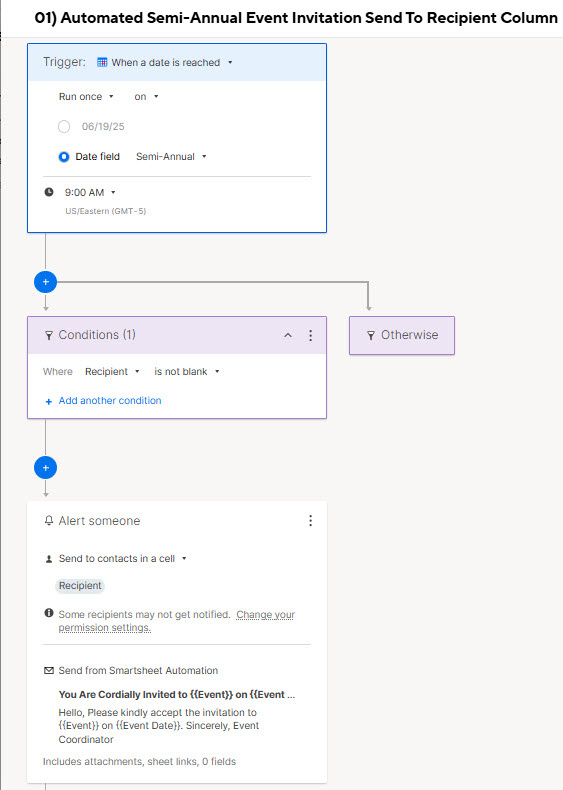
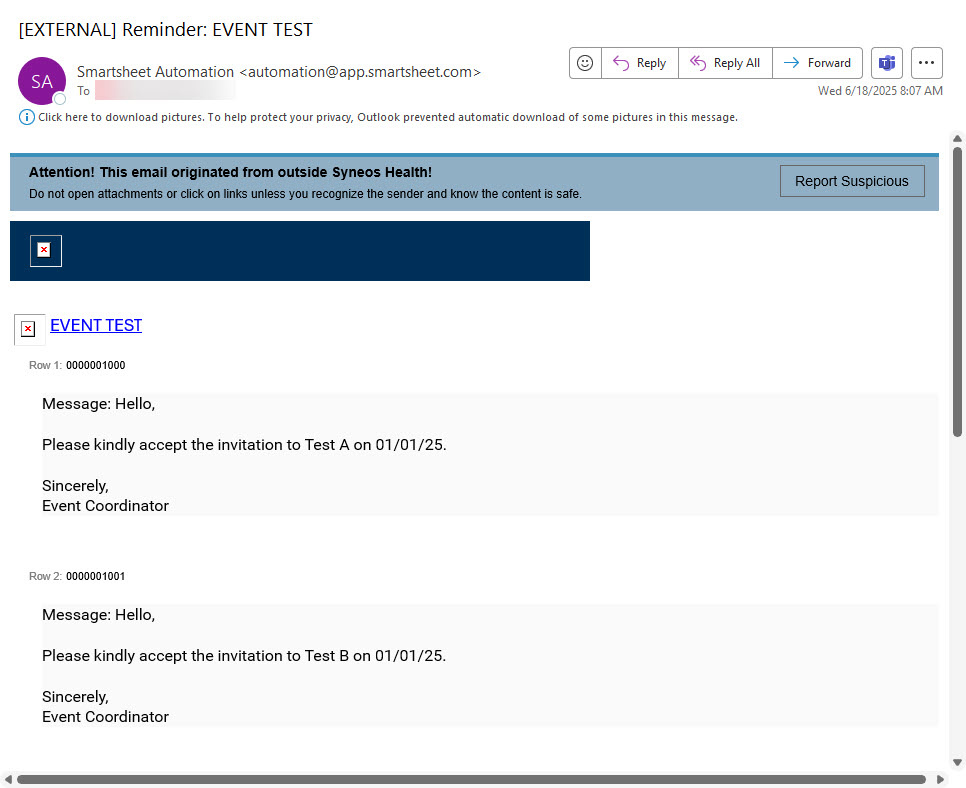
Below is the Alert Automation setup, failure notification to Smartsheet Owner and Successful Recipient notification.
If the Recipient is always singular, then you can embed the Approval Automation capabilities to electronically capture Accepted and Rejected invitations for reporting purposes.