Best Of
Melhoria na integração Smartsheet + DocuSign: localização dos status e rastreabilidade por aprovador
Gostaria de registrar uma sugestão de melhoria para a integração entre Smartsheet e DocuSign.
Atualmente, quando o Smartsheet envia um documento para assinatura via DocuSign, o status retornado para a planilha é exibido em inglês (ex.: Sent, Delivered, Completed), mesmo quando o ambiente e as preferências regionais da conta estão configurados em português (Brasil).
Além disso, quando o documento é enviado para múltiplos aprovadores/assinantes, o acompanhamento fica limitado a uma única coluna de status geral. Isso dificulta a identificação de com qual aprovador o processo está parado em cada etapa, reduzindo a visibilidade e o controle operacional do fluxo.
Pontos de melhoria sugeridos:
- Localização dos status da integração
- Permitir que os status retornados pela integração com o DocuSign sejam exibidos conforme o idioma/região configurados na conta do usuário.
- Exemplo: Sent → Enviado, Delivered → Entregue, Completed → Concluído.
- Rastreabilidade individual por aprovador
- Disponibilizar uma forma de identificar, dentro do Smartsheet, o status de cada aprovador/assinante separadamente.
- Exemplo: mostrar em qual etapa cada aprovador se encontra ou com quem o documento está pendente no momento.
- Maior detalhamento do status do fluxo
- Além do status geral, permitir retorno mais granular da jornada de assinatura, facilitando acompanhamento, follow-up e gestão de SLA.
Impacto da melhoria:
Esses ajustes aumentariam significativamente a clareza operacional, especialmente para empresas que utilizam fluxos com múltiplos aprovadores. Hoje, a limitação de idioma e a ausência de rastreabilidade individual dificultam o acompanhamento interno, geram retrabalho e reduzem a eficiência no monitoramento dos processos de assinatura.
Essa melhoria seria extremamente útil para equipes no Brasil e para operações que dependem de visibilidade rápida e precisa sobre documentos em aprovação.
 Anber Assessoria
Re: Text Wrapping on Report Group Headings
+1 for this as well. When working on lengthy names of projects over time, it is helpful to be able to see the full project name when grouping in reports. Text wrapping would solve this.
 ma_liaison
Re: Membership/ Access question
@MichelleWatkins_GPP Hi Michelle!
I'm a bit confused regarding where external collaborators fall.
We are rolling out a SIS (school information system) and plan to have a "project lead" at each of the schools we are working with (they are external to our organization and do not share email domains).
The idea is that we create the general layout for the project plan (we are owners of each sheet) and the school project lead adapts dates and makes minor adjustments (edits the sheet, may or may not share with other people in the school). Also, the school project lead should be updating progress on tasks (ideally on the sheet itself).
The project is estimated to last 12-18 months.
Would this require us to purchase licenses for each school project lead (external collaborators), or can they edit the sheets for free?
Thanks!
Galastac
Sheet Summary in Table View
How do I view sheet summary fields in Table View? I have a large sheet that only works properly in Table View, but I don't see how to get to the sheet summary page and how to add sheet-level attachments. If I switch back to Grid View to access those, the sheet won't save because it has too many cells. I'm in a Catch-22…
RBro79
Dashboard widget location
Hi Smartsheet, I'd like to be able to click on a specific grid location on Dashboards and be able to plant a widget. When I'm adding widgets I'm not able to tell if it will be adding a widget to the very top of my Dashboard or bottom. This would save me from a large amount of clicking and dragging and reorganizing….
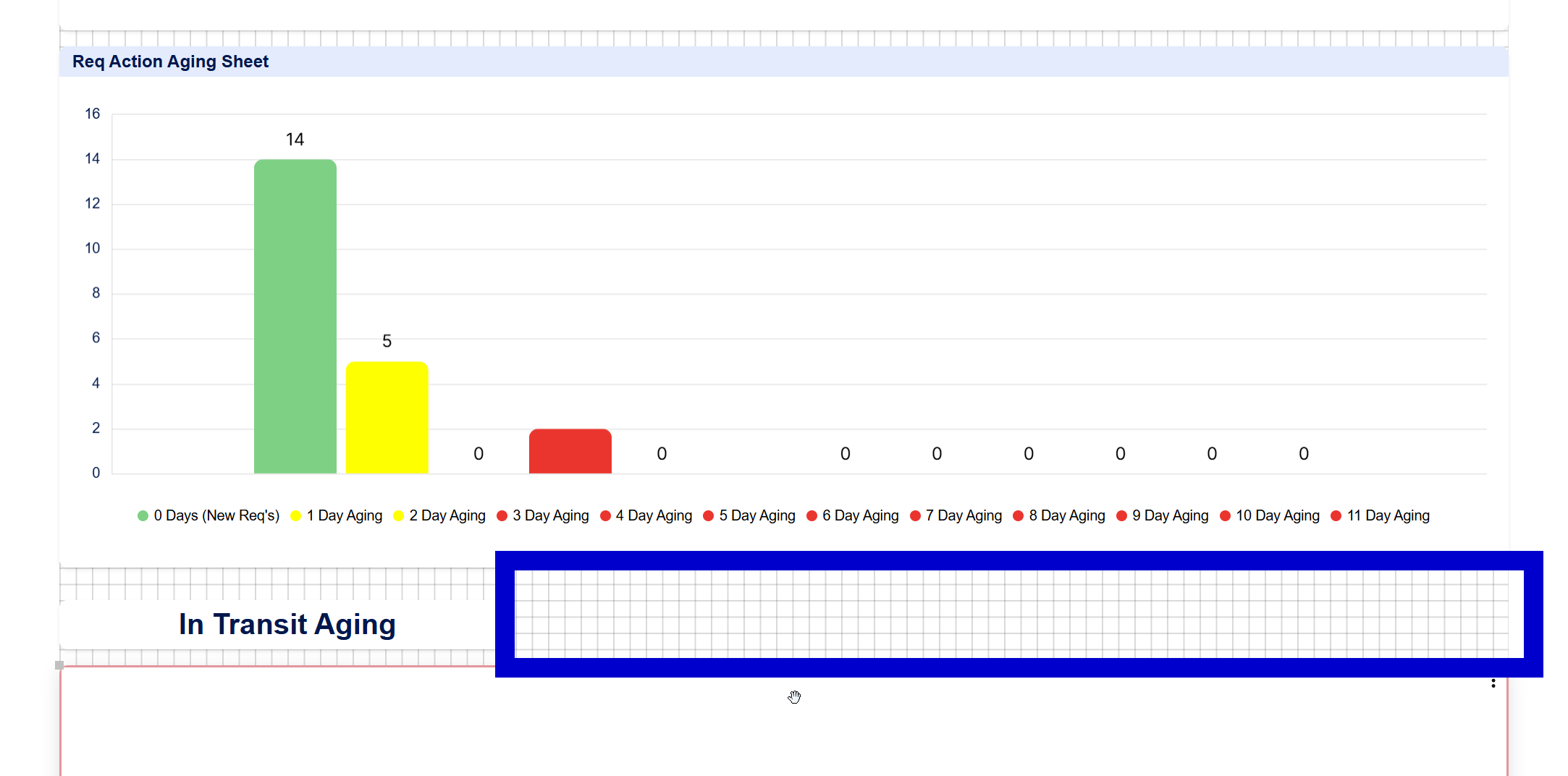
Ample free space for Title widget highlighted in blue above.
Thx!
 Eric B.
Terrible support experience
I've tried to raise a support query, but can only find a route through the AI chat bot. However this has failed to raise a support call on my behalf. The first time it said it logged something but i never got email confirmation nor is anything logged in my cases. I tried again but "something went wrong" so it asked me to try again, which I did, but this time it failed once more and suggested I send an email to support@smartsheet.com. I sent the query as suggested, only to receive an automated email telling me my case is closed and that the email address is no longer in use.
The chat bot couldn't direct me to a support form, nor can I see any way to log a case through the website, and I've just been redirected in circles back to the bot which doesn't work
This is a terrible backward step compared to the support we used to enjoy from Smartsheet. I can't post my sepecifc case on a public board. Please could someone get back to me with a route to resolve my billing query.
 Harvey E
Re: Automation Suddenly Sending Duplicate Update Requests (No Workflow Changes Made)
My company, too is having the same issue. Looking forward to a resolution soon!
Jodi Sorenson
Re: Automation Suddenly Sending Duplicate Update Requests (No Workflow Changes Made)
My company is receiving this error as well. Hopefully this bug will be fixed soon.
MHalvey55
Re: Automation Suddenly Sending Duplicate Update Requests (No Workflow Changes Made)
This started happening to my team yesterday as well!
Mary Clark
Automation Suddenly Sending Duplicate Update Requests (No Workflow Changes Made)
I’m hoping someone can help me understand a strange issue I’ve run into.
I have a workflow that sends a single Update Request when the date in a row matches today’s date. This automation has been working correctly for a long time—each contact would receive one email on the day it triggers.
However, recently the workflow has started sending two identical emails at the exact same time to the same contact, even though:
- Nothing has changed in my workflow
- The contact cell contains only one contact
- The conditions still evaluate the same
- The trigger is still set to run once daily at 5:00 AM
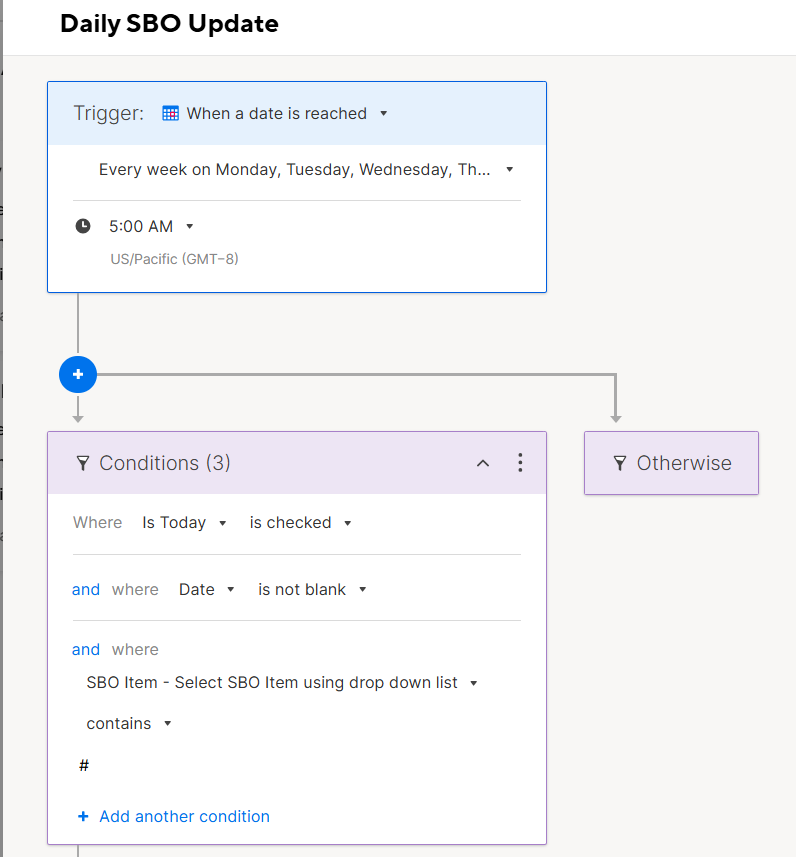
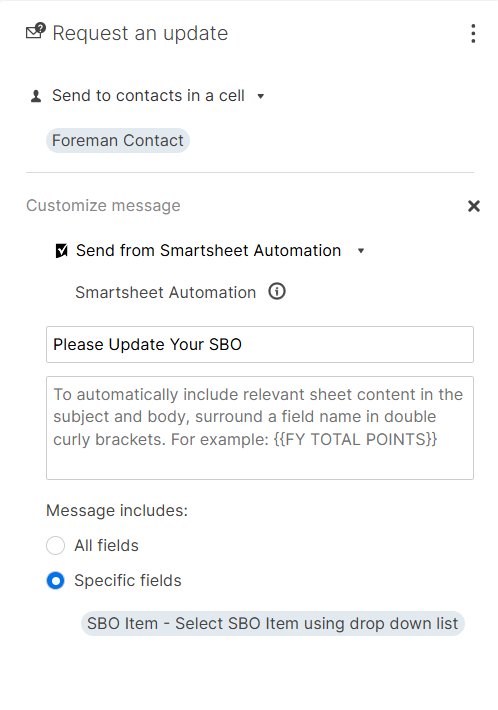
I’m including screenshots of my trigger, conditions, and message settings (images attached in my post).
Here’s what the workflow does:
Trigger:
- When a date is reached
- Runs daily Monday–Thursday at 5:00 AM
Conditions:
- “Is Today” is checked
- “Date” is not blank
- “SBO Item” contains “#”
Action:
- Send Update Request to the contact in the “Foreman Contact” column
- Only one contact is stored in that cell
- Message is customized, using specific fields only
Despite all this, each row that qualifies is now sending two identical Update Requests instead of one.
Has anyone seen this behavior before, or know what might cause a workflow to start sending duplicates?
Is this possibly a bug, or is there something I should double‑check in my sheet or automation settings?
Thanks in advance for any help—really appreciate it!
 Michaelangelo