My team uses a mix of sheets, reports, and WorkApps every day. Having ONE place to see all of my comments across Smartsheet would be extremely helpful to reference and track progress of my work.
Sign in to see the current vote count, add your own vote, or leave a comment.
I agree @Tiffany R! I have seen workarounds that collect and track the latest comments from one sheet to another - but I really like the conversations feature - I would love to be able to set up conversations in one sheet (where there may be multiple instances of the unique identifier) to post to conversations in another (where there is only 1 instance of the unique identifier). Scenario: Sheet A = the master database, each row is a unique clinical trial, conversations used extensively to communicate within team about trial Sheet B = set up to organize protocol amendments for trials on Sheet A - there may be more than one amendment for a trial in any given time interval (right now I've hidden the conversation feature on Sheet B - because I want people to curate all information in conversations on Sheet A)
I would love a way to send conversations from Sheet B to A to make our process more intuitive.
Thank you for considering this!
Hi @Meredith Rhodes
I created a demo solution based on your scenario.
https://app.smartsheet.com/b/publish?EQBCT=c7de18da4d5e4cf395bc2d28ef44202d (The published demo sheet is editable; you can test this solution by adding a new comment)
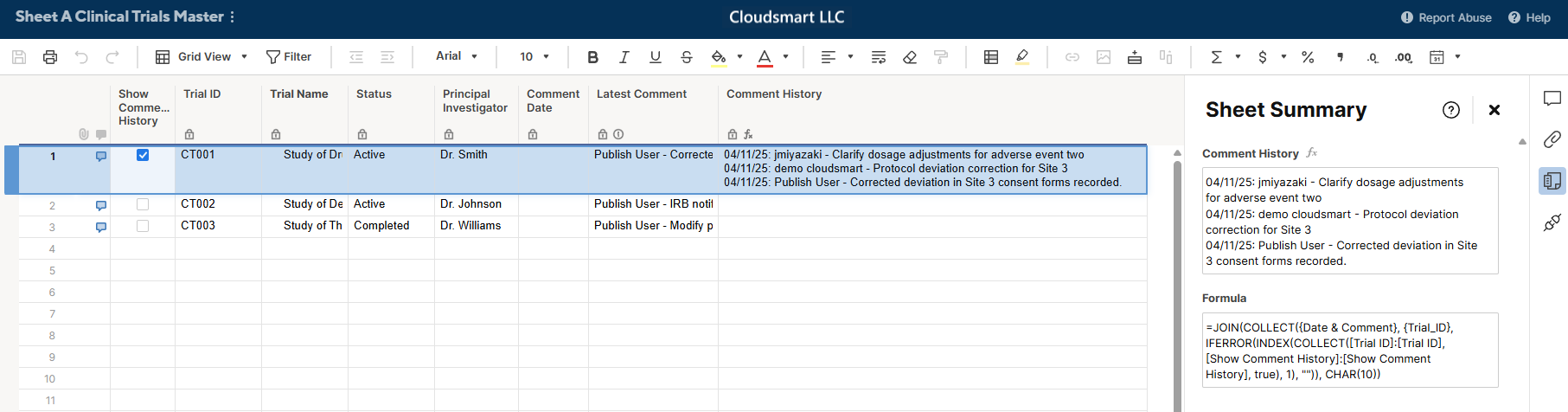
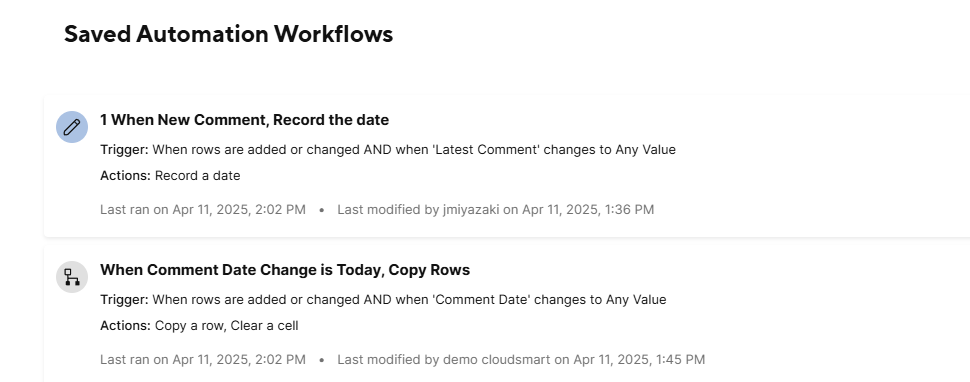
The basic method is: When a new comment is added in Sheet A → "Latest Comment" updates → Record the Comment Date → Copy the row to Sheet B.
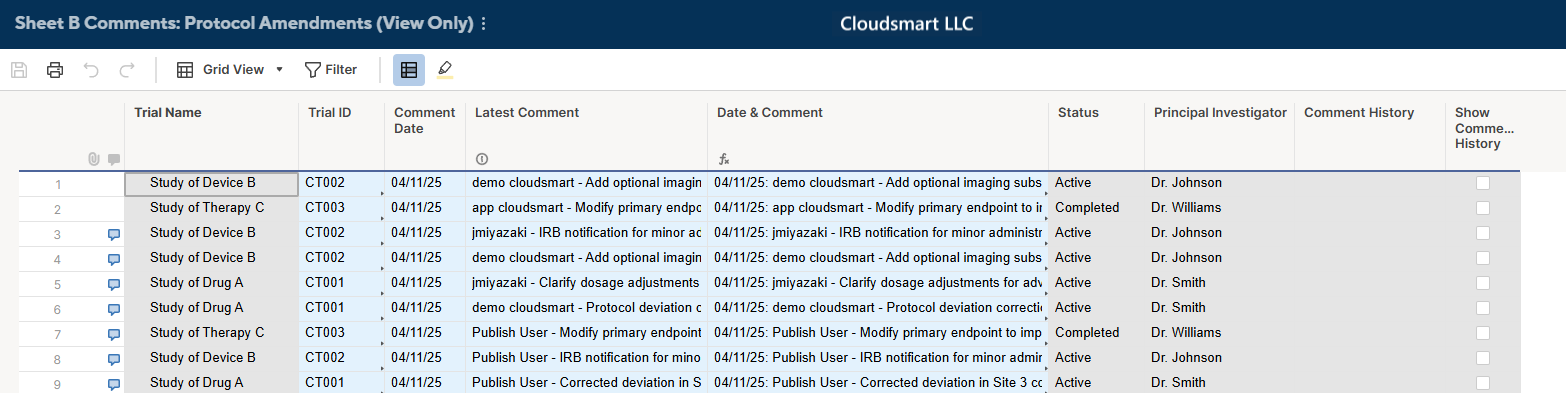
In Sheet B, a formula combines the Comment Date and Latest Comment (Comment Date + ": " + Latest Comment) to easily track when each comment was made.
Comment Date + ": " + Latest Comment
In Sheet A, we use a JOIN(COLLECT()) function to retrieve the comment history based on the Trial ID, combining all related comments with their dates. I used Sheet Summary Fields and a Show Comment History checkbox to keep the sheet clean, so only the selected row displays the history at a time.
Concept
Each clinical trial (Trial ID) has a unique row in Sheet A (the master sheet). Sheet B records amendments or conversation records related to these trials, where multiple rows can share the same Trial ID.
Automation Workflow
Note: We avoid using the system "Created" column because copying rows with system columns can break the automation.Clearing the "Comment Date" after copying ensures multiple comments made on the same day are handled properly.
Displaying Comment History in Sheet A
=JOIN(COLLECT({Date & Comment}, {Trial_ID}, IFERROR(INDEX(COLLECT([Trial ID]:[Trial ID], [Show Comment History]:[Show Comment History], true), 1), "")), CHAR(10))
Only the first selected checkbox will be active, making the sheet easy to navigate without cluttering the view.
Also use:
=IF([Show Comment History]@row, [Comment History]#)
to control visibility so that only the selected row’s comment history is displayed.
https://app.smartsheet.com/b/publish?EQBCT=12157ccce978407ba1e638a3b8fd4945
Until Smartsheet introduces an official feature for a central location for user comments across sheets (as Tiffany suggested here), this approach can serve as a workaround.
The "browse" button was recently changed to go through a recent workspaces menu and requiring a second click on "browse all" before actually bringing up the browse menu sidebar. This change is unintuitive as there is a "recents" button right below the browse button and for anyone who regularly uses more than 6 workspaces…
I need to be able to backup all workspaces at once. Backing up each workspace one by one is tedious and a waste of time. I know someone is going to tell me "even system admins cannot backup workspaces they are not shared to, and can only backup workspaces they own or are shared with." So, let me do that. At least let me…
Smartsheet does not currently send automated error notifications to Pivot workflow owners when workflows fail, unlike the notification behavior for DataTables, Data Shuttle, and Meshes. Also, when column mappings break on a mesh, the mesh will continue to run with an error. We should expect the same functionality from a…